
Unload All llama.cpp Router Models Without Restarting
Free VRAM without killing llama-server.
llama.cpp router mode is one of the most useful changes to llama-server in years. It finally gives local LLM operators something close to the model management experience people expect from Ollama, while keeping the raw performance and low-level control that make llama.cpp worth using in the first place.
But there is one sharp edge: unloading everything is not a single magic button in the HTTP API.
The router can list models. It can load a model. It can unload a model. It can evict the least recently used model when --models-max is reached. What it does not currently document as a first-class endpoint is a universal unload all models now call.
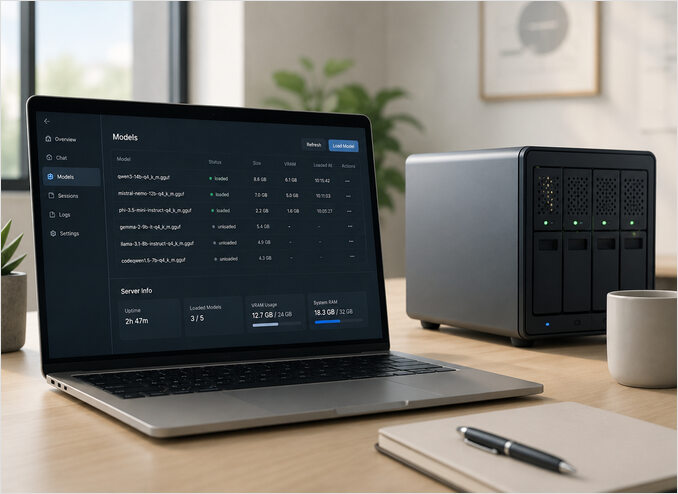
That is not a real blocker. The correct pattern is simple, explicit, and scriptable:
- Ask the router which models exist.
- Filter the models whose status is
loaded. - Call
/models/unloadonce per loaded model.
This is the approach I recommend for serious local LLM workflows. It is boring, visible, and easy to debug. That is exactly what you want when your goal is to free VRAM without restarting the whole inference service.
What llama.cpp router mode actually does
In classic llama-server usage, you start one server with one model:
llama-server \
  --model ./models/qwen3-8b.gguf \
  --port 8080
Router mode changes that model. Instead of binding the server to one GGUF file, the router becomes a coordinator for multiple models. It can discover models from a cache or from a models directory, load them on demand, route requests to the correct model, and unload models when needed.
A typical router-mode startup looks like this:
llama-server \
  --models-dir ./models \
  --models-max 4 \
  --port 8080
The important option here is --models-max. It controls how many models may be loaded at the same time. If the limit is reached, llama.cpp can evict the least recently used model. That is useful, but it is not a substitute for a deliberate unload operation. LRU eviction is reactive. An unload script is operational control.
My opinionated take: if you run local models for real work, you should treat router mode like an inference process manager, not like a toy chat server. Explicit lifecycle operations matter.
The model management endpoints you need
The main endpoint for discovery is:
curl -s http://localhost:8080/models | jq
That endpoint returns the models known to the router and their current lifecycle status. The exact JSON shape can vary slightly between builds, so inspect your own response before writing automation.
A common response shape looks like this:
{
  "data": [
    {
      "id": "qwen3-8b",
      "status": "loaded"
    },
    {
      "id": "llama-3.2-3b",
      "status": "unloaded"
    }
  ]
}
To unload one model, call:
curl -s -X POST http://localhost:8080/models/unload \
  -H "Content-Type: application/json" \
  -d '{"model":"qwen3-8b"}' \
  | jq
That is the primitive operation. Everything else in this article builds on that.
There is no documented unload all endpoint
This is the part that trips people up.
You might expect something like this:
curl -X POST http://localhost:8080/models/unload-all
Do not build around that assumption. The documented operation is per model. You pass a model identifier to /models/unload, and llama.cpp unloads that one model.
This is not necessarily bad API design. A per-model operation is safer. It makes the caller decide what should be unloaded. It also avoids surprising production behavior where one admin request accidentally kills every warm model being used by other clients.
For a workstation, an unload-all shortcut would be convenient. For a multi-user inference box, explicit loops are better.
Unload one model first
Before automating anything, test the exact model identifier your router expects.
First list models:
curl -s http://localhost:8080/models | jq
Pick one loaded model from the output, then unload it:
curl -s -X POST http://localhost:8080/models/unload \
  -H "Content-Type: application/json" \
  -d '{"model":"qwen3-8b"}' \
  | jq
Check the model list again:
curl -s http://localhost:8080/models | jq
If the model status changes to unloaded, your endpoint, port, and model identifier are correct.
If it does not work, do not guess. Inspect the JSON. Router aliases, GGUF filenames, and model IDs are often not the same string.
Unload all loaded models with curl and jq
Once the single-model unload works, the unload-all pattern is just a shell loop.
Use this when your /models response has .data[].id and .data[].status:
curl -s http://localhost:8080/models \
| jq -r '.data[] | select(.status == "loaded") | .id' \
| while IFS= read -r model; do
    echo "Unloading: $model"
    curl -s -X POST http://localhost:8080/models/unload \
      -H "Content-Type: application/json" \
      -d "{\"model\":\"$model\"}" \
      | jq
  done
This is the whole trick. It is not glamorous, but it is the right shape for an admin operation:
- It only unloads models that are actually loaded.
- It prints what it is doing.
- It fails model by model instead of hiding everything behind one opaque action.
- It works from cron, systemd hooks, SSH, or CI jobs.
A reusable script for production use
For anything you run more than twice, stop pasting one-liners. Save a script.
Create llama-router-unload-all.sh:
#!/usr/bin/env bash
set -euo pipefail

LLAMA_SERVER_URL="${LLAMA_SERVER_URL:-http://localhost:8080}"

models_json="$(curl -fsS "$LLAMA_SERVER_URL/models")"

loaded_models="$(printf '%s' "$models_json" \
  | jq -r '.data[] | select(.status == "loaded") | .id')"

if [ -z "$loaded_models" ]; then
  echo "No loaded models found."
  exit 0
fi

printf '%s\n' "$loaded_models" | while IFS= read -r model; do
  [ -z "$model" ] && continue

  echo "Unloading: $model"

  curl -fsS -X POST "$LLAMA_SERVER_URL/models/unload" \
    -H "Content-Type: application/json" \
    -d "{\"model\":\"$model\"}" \
    | jq

done

echo "Done. Current model state:"
curl -fsS "$LLAMA_SERVER_URL/models" | jq
Make it executable:
chmod +x llama-router-unload-all.sh
Run it against the default local server:
./llama-router-unload-all.sh
Run it against another host:
LLAMA_SERVER_URL=http://192.168.1.50:8080 ./llama-router-unload-all.sh
This is the version I would actually keep in a tools directory. It uses curl -f so HTTP errors fail the script, and it lets you override the server URL without editing the file.
Adapting the script to your JSON shape
Do not blindly assume every llama.cpp build returns the exact same fields forever. Router mode is still evolving, and your build may expose a slightly different JSON shape.
Start by inspecting the response:
curl -s http://localhost:8080/models | jq
The script uses this filter:
jq -r '.data[] | select(.status == "loaded") | .id'
If your model identifier is in .name, change it to:
jq -r '.data[] | select(.status == "loaded") | .name'
If your status field uses another value, adjust the filter accordingly. The principle is what matters: select loaded models, extract the identifier accepted by /models/unload, then call unload for each one.
Why models may load again after you unload them
This is the most common source of confusion.
Router mode supports on-demand loading. If a client sends a chat completion request for a model that is currently unloaded, the router may load it again automatically.
That means this sequence is possible:
- You unload every model.
- Open WebUI, a test script, or an agent sends a request.
- llama.cpp loads the requested model again.
- You think unload failed, but it did not.
The fix is operational, not technical. Stop client traffic first if your goal is to keep VRAM free.
For example:
- Stop benchmark scripts.
- Pause agents and cron jobs.
- Close or disconnect Open WebUI sessions.
- Disable health checks that accidentally perform real model requests.
Unloading is not a firewall. If clients keep asking for models, router mode is doing its job by serving them.
Open WebUI and the Eject button
Open WebUI can integrate with llama.cpp model unload support. When the provider is configured as llama.cpp, Open WebUI can show loaded-model state and expose an Eject action for admins.
Under the hood, that action calls Open WebUI’s own unload API, which then calls llama.cpp’s /models/unload endpoint on the configured connection.
That is nice for manual operation, but I would still keep the shell script. A UI button is convenient. A script is auditable, repeatable, and usable on a headless box at 2 AM.
When to use unload all
Unloading every loaded model is useful when you want to:
- Free GPU memory before starting a larger model.
- Reset a development box without restarting
llama-server. - Prepare for a benchmark run with a clean memory state.
- Drain local inference workloads before maintenance.
- Recover from a messy session where too many models were warmed.
It is not the right tool when active users are depending on warm models. In that case, tune --models-max, use deliberate routing, and let LRU eviction do part of the work. If you need smarter timeout-based unloading with per-model lifecycle control, llama-swap is a purpose-built proxy that layers exactly that on top of any llama-server setup.
My rule is simple: use LRU for normal pressure, use explicit unload for operator intent.
Troubleshooting
The models endpoint returns 404
You may not be running a router-capable build, or you may be calling the wrong port.
Check the server process and available options:
llama-server --help | grep -i models
Then test both endpoints:
curl -s http://localhost:8080/models | jq
curl -s http://localhost:8080/v1/models | jq
The /v1/models endpoint is the OpenAI-compatible model list. The /models endpoint is the router model-management endpoint. They are related, but they are not the same thing.
jq is not installed
Install it before scripting JSON parsing.
On Ubuntu or Debian:
sudo apt-get update
sudo apt-get install jq
On macOS with Homebrew:
brew install jq
The unload call returns an error
Most failures come from passing the wrong model identifier. Use the exact identifier returned by /models, not the filename you think should work.
Also check whether your model name contains quotes, slashes, or spaces. The script above handles normal strings well, but unusual names may require more careful JSON construction.
For maximum safety, you can build the POST body with jq:
jq -n --arg model "$model" '{model: $model}'
A more defensive unload loop would use that body instead of hand-escaped JSON.
VRAM is not freed immediately
First confirm the model status changed. Then check whether another request reloaded it. Also remember that GPU memory tools can lag or report allocator behavior rather than instant application-level intent.
The practical test is simple: stop traffic, unload models, list model status, then inspect GPU memory. For measured VRAM usage across model sizes and context windows on llama.cpp, the 16 GB VRAM llama.cpp benchmarks give concrete figures to sanity-check against.
A safer JSON body version
If your model identifiers contain unusual characters, use jq to generate the JSON request body:
curl -s http://localhost:8080/models \
| jq -r '.data[] | select(.status == "loaded") | .id' \
| while IFS= read -r model; do
    echo "Unloading: $model"
    body="$(jq -n --arg model "$model" '{model: $model}')"
    curl -s -X POST http://localhost:8080/models/unload \
      -H "Content-Type: application/json" \
      -d "$body" \
      | jq
  done
This is the version to use if your models are named with repository-style identifiers, custom aliases, or paths.
Final take
llama.cpp router mode is a big step forward for local LLM operations. It gives you dynamic loading, model switching, and memory-aware eviction without giving up the directness of llama-server.
But do not wait for a perfect unload-all endpoint. The clean solution already exists: list loaded models and unload them one by one.
That pattern is explicit. It is scriptable. It works over SSH. It plays nicely with Open WebUI. And most importantly, it frees VRAM without restarting the router.
For local AI infrastructure, that is exactly the kind of boring control surface you want.
