Mermaid Diagrams Quickstart and Cheatsheet for Developers
Diagrams as code, without the drama.
Mermaid is a text-based diagramming tool for people who would rather write diagrams than drag boxes around a canvas.
Diagrams as code, without the drama.
Mermaid is a text-based diagramming tool for people who would rather write diagrams than drag boxes around a canvas.
Publish knowledge that grows, not just posts.
The dominant model for publishing knowledge online has not changed much since the early 2000s: write something, polish it, publish it, move on.
Git-based deploys, CDN, credits, and trade-offs.
Netlify is one of the most developer-friendly ways to ship Hugo sites and modern web apps with a production-grade workflow: preview URLs for every pull request, atomic deploys, a global CDN, and optional serverless and edge capabilities.
Push URL updates to search engines after deploy.
Static sites and blogs change whenever you deploy. Search engines that support IndexNow can learn about those changes without waiting for the next blind crawl.
Publish, deploy, index, and run mail on your domain.
Web infrastructure here means the systems that make publishing work on the open web. Static builds, object storage, CDN behavior, DNS for mail and verification, and indexing signals (sitemaps plus push protocols like IndexNow) sit in one cluster so you can ship fast, stay correct, and avoid reinventing SMTP or search engine plumbing.
Create CloudFront pay-as-you-go via AWS CLI.
The AWS Free plan is not working for me and Pay-as-you-go is hidden for new CloudFront Distributions on AWS Console .
Boost SEO with breadcrumb schema and structured data
Breadcrumb navigation combined with proper schema markup is one of the most effective yet underutilized SEO techniques that can significantly improve your website’s search visibility and user experience.
Automate Hugo deployment to AWS S3
Deploying a Hugo static site to AWS S3 using the AWS CLI provides a robust, scalable solution for hosting your website. This guide covers the complete deployment process, from initial setup to advanced automation and cache management strategies.
For broader context on web infrastructure topics, see the web-infrastructure cluster.
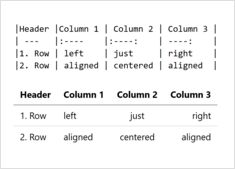
Complete guide to creating tables in Markdown
Tables are one of the most powerful features in Markdown for organizing and presenting structured data. Whether you’re creating technical documentation, README files, or blog posts, understanding how to properly format tables can significantly improve your content’s readability and professionalism.
Transform LaTeX documents to Markdown efficiently
Converting LaTeX documents to Markdown has become essential for modern publishing workflows, integrating static site generators, documentation platforms, and version control systems while maintaining readability and simplicity.
Optimize developing and running Hugo sites
Hugo caching strategies are essential for maximizing the performance of your static site generator. While Hugo generates static files that are inherently fast, implementing proper caching at multiple layers can dramatically improve build times, reduce server load, and enhance user experience.
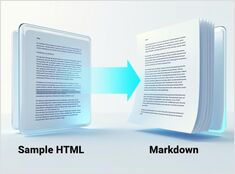
Python for converting HTML to clean, LLM-ready Markdown
Converting HTML to Markdown is a fundamental task in modern development workflows, particularly when preparing web content for Large Language Models (LLMs), documentation systems, or static site generators like Hugo.
Own your content and control your identity
The web was originally designed as a decentralized network where anyone could publish and connect. Over time, corporate platforms consolidated control, creating walled gardens where users are products and content is locked in. The Indie Web movement aims to restore the original promise of the web: personal ownership, creative freedom, and genuine connection.
What to do with `canonical`, `lang` and `hreflang`
Translating your Hugo website can improve your Google and Bing ranking - but only if the translated content is high quality, localized, and properly structured for multilingual SEO.
Using pandoc, python, or online tools for convertion to MD
Converting Word documents to Markdown format is a very common task for technical writers, developers, and content creators who want to move their content to platforms with Markdown (like GitHub, GitLab, static site generators like Hugo).
Some search engines don't like when website has pages with the same titles...
To add the Page number to the blog post List page title in Hugo, you need to modify your list template