
Discord Integration Pattern for Alerts and Control Loops
Turn Discord into a safe, interactive alert bus.
Discord becomes a serious integration surface when you treat it like one: a place where systems publish events, humans make decisions, and automation continues the workflow.
This deep dive frames Discord in three modes:
- Notification sink for one way alerts via incoming webhooks.
- Command surface for explicit actions via application commands and components.
- Event subscription layer where reactions and interactions become triggers via Gateway events.

This page is about shaping the boundary between your systems and a chat UI. It is not a guide to alert philosophy or paging thresholds. For alert strategy and routing, see Modern Alerting Systems Design for Observability Teams.
Discord in app architecture - integration patterns
Discord is not an observability product and it is not a developer tool. It is an integration endpoint with a distinctive property: the user interface is a shared conversation that can also act as an event source.
In Discord, a system can post an event and a human can respond with an approval signal. Your system can then subscribe to that signal via Gateway events. That boundary is an integration-patterns problem.
Incoming webhooks make Discord a low effort way to post messages to channels without running a bot session or managing a persistent connection. This is why webhooks are a pragmatic default for one way alerts. When you need bidirectional control, the shape changes to a bot over the Gateway or an interactions endpoint. See Discord webhooks and the Webhook resource reference.
For the broader framing across Slack and Discord, see Chat Platforms as System Interfaces in Modern Systems.
Discord as a system interface
Discord as a notification sink
A notification sink is a one way integration: your service emits a message and the channel displays it.
Incoming webhooks are designed for this. They are HTTP endpoints tied to a channel, and a POST creates a message without requiring a bot user or a persistent gateway connection. See Incoming webhooks.
This mode fits status updates, build notifications, and operational signals where the desired action is simply “be aware”.
Discord as a command surface
A command surface is where humans explicitly ask the system to do something.
In Discord, this is most cleanly implemented with application commands, message components, and interaction responses. See Application commands and Components reference.
This mode also supports ephemeral messages (visible only to the invoking user) for acknowledgements and low value confirmations, because interactions support an ephemeral flag. See Receiving and responding to interactions.
Discord as an event subscription layer
An event subscription layer is where humans do not issue a command. They react to a message and the system treats it as a signal. The classic example is “react with a thumbs up to approve”.
Technically, you receive these via Gateway events such as Message Reaction Add, which requires selecting the right gateway intents during identify. See Gateway docs and the Gateway Events reference.
Opinionated take: reactions are best when the decision is simple and the action is low friction. Once a workflow needs parameters, state, or multiple outcomes, reactions start to feel like a hack. Buttons and commands age better.
Architecture patterns
Pattern one simple webhook flow
This is the simplest production shape: your system routes an alert to a Discord webhook and stops there.
[service] -> [alert router] -> [discord webhook] -> [channel]
A practical detail that matters: Discord has message and embed limits. The Message Create docs list content up to 2000 characters, and embeds have their own limits including up to 10 embeds and an overall embed size limit. See Message resource.
Pattern two brokered flow with a message queue
Once chat delivery becomes critical, many teams avoid having production services talk to Discord directly. A broker absorbs spikes and gives you a place to retry and deduplicate.
[service] -> [queue topic] -> [alert dispatcher] -> [discord]
                                 |
                                 +-> [dead letter queue]
Discord documents per route and global rate limits and returns rate limit headers plus HTTP 429. See Discord rate limits.
This pattern is why “fastest way to send alerts to Discord” is often webhooks, but “most robust way” is usually a dispatcher sitting behind a queue.
Pattern three control loop pattern
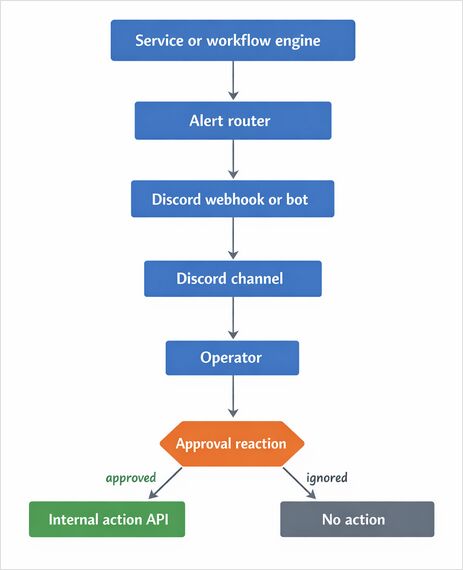
This is the human in the loop control loop: an alert is posted, a small set of users approve, and the system executes an action.
[alert] -> [discord message] -> [human reaction] -> [bot] -> [internal action API]
This pattern is the reason Discord belongs under integration patterns: the integration is not only notification, it is decision and control.
Alert and approval workflow diagram
Webhook versus bot
Webhooks are strong for one way delivery. Bots are required when you need to read events (reactions, commands, and components) in near real time.
A pragmatic comparison:
| Capability | Webhook | Bot over Gateway |
|---|---|---|
| Post messages | Yes | Yes |
| Receive reactions | No | Yes |
| Receive commands or buttons | No | Yes |
| Persistent connection | No | Yes |
| Secret management | Webhook URL | Bot token plus permissions |
| Best fit | Alerts and notifications | Approvals, control loops, workflows |
Webhooks do not require a bot user or authentication beyond the unguessable webhook URL, while Gateway event reception depends on identify plus intents. See Webhook resource and Gateway receiving events and intents.
Recommended libraries for Go and Python
Go
- discordgo is the long running Go binding for Discord, with event handlers and REST methods. See the discordgo repo and its API docs on pkg.go.dev.
Python
- discord.py is the canonical async wrapper. See the Rapptz discord.py repo.
- nextcord is a maintained fork with its own docs. See the nextcord repo and nextcord docs.
Opinionated take: for operational integrations, a Go service built on discordgo is often easy to package and deploy as a single binary. Python shines for quick iteration and glue logic.
Message design for alerts in Discord
A compact alert template
To keep alerts actionable, a stable message schema helps.
| Field | Meaning |
|---|---|
| title | The issue in one line |
| severity | info, warn, critical |
| context | Identifiers and links needed to decide |
| action_hint | The next action, including the approval signal |
Example values:
- title: “checkout error rate elevated”
- severity: “warn”
- context: “service=checkout env=prod region=us-east”
- action_hint: “react with custom emoji thumbsup to trigger restart”
Webhook payload example
Incoming webhooks accept JSON and can post content, embeds, or both. See Incoming webhooks docs.
This example uses embeds for structure and disables automatic mention parsing.
{
  "username": "alert-router",
  "content": "",
  "embeds": [
    {
      "title": "checkout error rate elevated",
      "description": "single message, structured fields",
      "fields": [
        { "name": "severity", "value": "warn", "inline": true },
        { "name": "context", "value": "service=checkout env=prod region=us-east", "inline": false },
        { "name": "action_hint", "value": "react with custom emoji thumbsup to trigger restart", "inline": false }
      ]
    }
  ],
  "allowed_mentions": { "parse": [] }
}
Discord documents allowed_mentions and why it matters for avoiding “phantom pings”. See Allowed mentions in Message resource.
Implementation deep dive for reaction driven approvals
The FAQ questions about capturing reactions, avoiding missed approvals, and triggering actions safely reduce to four areas: intents, matching, idempotency, and security.
Gateway intents and privileged intents
Reaction events are delivered over the Gateway and depend on specifying intents during identify. See Gateway receiving events and intents.
If an integration also needs role based allowlists, it may drift toward member state and member caching, which can involve enabling the privileged Server Members intent in the Developer Portal. Discord documents privileged intents and access requirements for larger scale apps. See What are privileged intents.
Reaction matching and custom emoji
If you use the standard thumbs up emoji, the emoji name is a unicode glyph. To keep matching stable and ASCII friendly, some teams add a custom guild emoji named thumbsup and match on that.
Discord documents custom emoji encoding as name:id for reaction endpoints. See the Create Reaction section in Message resource. discordgo also states that reactions use either a unicode emoji or a guild emoji identifier in name:id format. See discordgo Session.MessageReactionAdd docs.
Idempotency and deduplication
Treat reaction approvals as at least once events. Duplicate deliveries can happen after reconnects, retries, or library internal behavior.
A practical idempotency key for a reaction driven approve is:
message_id + user_id + emoji + action
Brokered flows often store this key in Redis with a TTL that matches the workflow window.
Discord also supports a nonce on message creation, and can enforce nonce uniqueness for a short window. See nonce and enforce_nonce in the Message Create params.
Rate limits and backoff
Discord rate limits apply to both bots and webhooks. In HTTP 429 responses, Discord returns rate limit related headers and a Retry After value. See Rate limits.
In practice, heavy alerting pushes teams toward:
- grouping and batching
- per channel throttling
- exponential backoff with jitter
- a dead letter queue for poison payloads
Go example send alert and approve with reaction
Prereqs:
- Create a bot in the Discord Developer Portal and invite it to your server using OAuth2. See OAuth2 and permissions.
- Give the bot permissions to read the channel, send messages, and read message history.
- Configure gateway intents to receive guild message reactions.
Note: this example matches a custom guild emoji named thumbsup. That represents the “thumbs up” approval signal without embedding a unicode emoji in code.
package main

import (
  "bytes"
  "encoding/json"
  "log"
  "net/http"
  "os"
  "strings"
  "sync"
  "time"

  "github.com/bwmarrin/discordgo"
)

type ActionRequest struct {
  AlertID   string `json:"alert_id"`
  MessageID string `json:"message_id"`
  UserID    string `json:"user_id"`
  Action    string `json:"action"`
}

var (
  targetMessageID string

  seenMu sync.Mutex
  seen   = map[string]time.Time{}
  ttl    = 10 * time.Minute
)

func main() {
  token := os.Getenv("DISCORD_BOT_TOKEN")
  channelID := os.Getenv("DISCORD_CHANNEL_ID")
  internalURL := os.Getenv("INTERNAL_API_URL")
  thumbsEmoji := os.Getenv("THUMBSUP_EMOJI") // custom guild emoji name:id, e.g. thumbsup:123456789012345678
  approverUsers := splitCSV(os.Getenv("APPROVER_USER_IDS")) // comma separated snowflake IDs

  if token == "" || channelID == "" || internalURL == "" {
    log.Fatal("Missing env vars DISCORD_BOT_TOKEN DISCORD_CHANNEL_ID INTERNAL_API_URL")
  }

  dg, err := discordgo.New("Bot " + token)
  if err != nil {
    log.Fatalf("discordgo.New failed: %v", err)
  }

  // Receive reaction events. Keep intents tight.
  dg.Identify.Intents = discordgo.IntentsGuildMessages | discordgo.IntentsGuildMessageReactions

  dg.AddHandlerOnce(func(s *discordgo.Session, r *discordgo.Ready) {
    msg, err := s.ChannelMessageSend(channelID, alertText())
    if err != nil {
      log.Printf("send alert failed: %v", err)
      return
    }
    targetMessageID = msg.ID
    log.Printf("posted alert message_id=%s", targetMessageID)

    // Optional convenience: pre-add the approval reaction so users can click it.
    // For custom emojis, Discord expects name:id. For unicode emojis, it is the glyph.
    // See Message Create and Create Reaction in Discord Message resource.
    if thumbsEmoji != "" {
      _ = s.MessageReactionAdd(channelID, targetMessageID, thumbsEmoji)
    }
  })

  dg.AddHandler(func(s *discordgo.Session, ev *discordgo.MessageReactionAdd) {
    if ev == nil || ev.MessageReaction == nil {
      return
    }

    // Only handle reactions for the message we just posted.
    if targetMessageID == "" || ev.MessageID != targetMessageID {
      return
    }

    // Ignore bot's own reactions.
    if s.State != nil && s.State.User != nil && ev.UserID == s.State.User.ID {
      return
    }

    // Match custom emoji name. If you use the standard emoji, Emoji.Name will be a unicode glyph.
    if ev.Emoji.Name != "thumbsup" {
      return
    }

    // Allowlist. Role based checks often pull in member state and sometimes privileged intents.
    if !isAllowlisted(ev.UserID, approverUsers) {
      log.Printf("deny approval user_id=%s", ev.UserID)
      return
    }

    // Dedupe approvals. In production, store this in Redis.
    key := ev.MessageID + ":" + ev.UserID + ":" + ev.Emoji.Name + ":approve"
    if !tryOnce(key) {
      return
    }

    req := ActionRequest{
      AlertID:   os.Getenv("ALERT_ID"),
      MessageID: ev.MessageID,
      UserID:    ev.UserID,
      Action:    "approve_restart",
    }

    if err := postJSON(internalURL, req); err != nil {
      log.Printf("action POST failed: %v", err)
      return
    }

    _, _ = s.ChannelMessageSend(channelID, "approval received, action triggered")
  })

  if err := dg.Open(); err != nil {
    log.Fatalf("dg.Open failed: %v", err)
  }
  defer dg.Close()

  log.Println("discord bot running")
  select {}
}

func alertText() string {
  return "[warn] checkout error rate elevated\n" +
    "context service=checkout env=prod\n" +
    "action_hint react with custom emoji thumbsup to trigger restart"
}

func splitCSV(s string) []string {
  if strings.TrimSpace(s) == "" {
    return nil
  }
  parts := strings.Split(s, ",")
  out := make([]string, 0, len(parts))
  for _, p := range parts {
    p = strings.TrimSpace(p)
    if p != "" {
      out = append(out, p)
    }
  }
  return out
}

func isAllowlisted(userID string, allow []string) bool {
  if len(allow) == 0 {
    return false
  }
  for _, a := range allow {
    if userID == a {
      return true
    }
  }
  return false
}

func tryOnce(key string) bool {
  now := time.Now()

  seenMu.Lock()
  defer seenMu.Unlock()

  // Lazy cleanup.
  for k, t := range seen {
    if now.Sub(t) > ttl {
      delete(seen, k)
    }
  }
  if _, ok := seen[key]; ok {
    return false
  }
  seen[key] = now
  return true
}

func postJSON(url string, body any) error {
  b, err := json.Marshal(body)
  if err != nil {
    return err
  }

  req, err := http.NewRequest(http.MethodPost, url, bytes.NewReader(b))
  if err != nil {
    return err
  }
  req.Header.Set("Content-Type", "application/json")

  c := &http.Client{Timeout: 5 * time.Second}
  res, err := c.Do(req)
  if err != nil {
    return err
  }
  defer res.Body.Close()

  if res.StatusCode < 200 || res.StatusCode >= 300 {
    return &httpError{code: res.StatusCode}
  }
  return nil
}

type httpError struct{ code int }

func (e *httpError) Error() string { return "http status " + http.StatusText(e.code) }
Python example send alert and approve with reaction
This example uses discord.py style events. A key reliability detail is that cache dependent reaction events can silently fail if the message is not in cache. The discord.py community commonly points to raw reaction events for this reason. See discord.py discussions on raw reaction events and raw event models.
Note: this example matches a custom guild emoji named thumbsup, representing the “thumbs up” approval signal without embedding a unicode emoji literal in code.
import os
import asyncio
import aiohttp
import discord
from typing import Set, Dict

DISCORD_BOT_TOKEN = os.environ["DISCORD_BOT_TOKEN"]
DISCORD_CHANNEL_ID = int(os.environ["DISCORD_CHANNEL_ID"])
INTERNAL_API_URL = os.environ["INTERNAL_API_URL"]

# Comma separated snowflake IDs of approvers
APPROVER_USER_IDS: Set[int] = set(
    int(x.strip()) for x in os.getenv("APPROVER_USER_IDS", "").split(",") if x.strip()
)

# In production, persist this in Redis or a database
_seen: Dict[str, float] = {}
_TTL_SECONDS = 600.0

intents = discord.Intents.default()
intents.guilds = True
intents.messages = True
intents.reactions = True

client = discord.Client(intents=intents)

target_message_id: int | None = None

def _try_once(key: str) -> bool:
    now = asyncio.get_event_loop().time()
    expired = [k for k, t in _seen.items() if (now - t) > _TTL_SECONDS]
    for k in expired:
        _seen.pop(k, None)

    if key in _seen:
        return False
    _seen[key] = now
    return True

async def _post_action(alert_id: str, message_id: int, user_id: int) -> None:
    payload = {
        "alert_id": alert_id,
        "message_id": str(message_id),
        "user_id": str(user_id),
        "action": "approve_restart",
    }
    async with aiohttp.ClientSession(timeout=aiohttp.ClientTimeout(total=5)) as session:
        async with session.post(INTERNAL_API_URL, json=payload) as resp:
            if resp.status < 200 or resp.status >= 300:
                body = await resp.text()
                raise RuntimeError(f"internal api http {resp.status} {body}")

@client.event
async def on_ready() -> None:
    global target_message_id

    ch = client.get_channel(DISCORD_CHANNEL_ID)
    if ch is None:
        raise RuntimeError("channel not found or missing permissions")

    msg = await ch.send(
        "[warn] checkout error rate elevated\\n"
        "context service=checkout env=prod\\n"
        "action_hint react with custom emoji thumbsup to trigger restart"
    )
    target_message_id = msg.id

    # Optional convenience: pre-add a custom emoji named thumbsup (server emoji).
    for e in client.emojis:
        if e.name == "thumbsup":
            try:
                await msg.add_reaction(e)
            except discord.HTTPException:
                pass
            break

    print(f"ready posted message_id={target_message_id}")

@client.event
async def on_raw_reaction_add(payload: discord.RawReactionActionEvent) -> None:
    global target_message_id

    if target_message_id is None:
        return
    if payload.message_id != target_message_id:
        return

    # Ignore the bot account itself
    if client.user and payload.user_id == client.user.id:
        return

    # Allowlist
    if payload.user_id not in APPROVER_USER_IDS:
        return

    # Match custom emoji name
    if payload.emoji.name != "thumbsup":
        return

    key = f"{payload.message_id}:{payload.user_id}:{payload.emoji.name}:approve"
    if not _try_once(key):
        return

    alert_id = os.getenv("ALERT_ID", "")
    try:
        await _post_action(alert_id, payload.message_id, payload.user_id)
    except Exception as exc:
        print(f"action failed {exc}")
        return

    ch = client.get_channel(payload.channel_id)
    if ch is not None:
        await ch.send("approval received, action triggered")

client.run(DISCORD_BOT_TOKEN)
Interaction patterns that scale beyond demos
Reaction driven workflows
Reaction approvals are cheap. They also hide complexity:
- reactions are ambiguous without context
- duplicates happen
- you need an allowlist
If reactions remain the UI, a few patterns tend to help:
- store the target message ID (and optionally a related alert ID)
- store an idempotency key
- log who approved and when
Role based actions
Role checks match how teams think, but they tend to pull in member state. Operationally, this can push you toward privileged intents and member caching.
A compromise that often ages well:
- start with an explicit allowlist of approver user IDs
- later, add role checks once the role model and permissions are stable
Multi step flows
Multi step flows are where reactions start to crack. If the bot needs to ask a question or present options, components and commands are usually a better fit.
Discord supports components for richer interactive messages. See the Components reference.
Safety strategies
A control loop that can restart production needs guardrails. Common guardrails include:
- require two approvals
- require approvals within a time window
- require the alert to still be active
- require the internal action endpoint to be idempotent
Observability routing Discord versus PagerDuty versus Slack
The FAQ question about when Discord should be used instead of a paging tool is fundamentally a routing strategy question.
The SRE view is that paging should interrupt a human only for issues that need immediate action, and alerts should be actionable and based on symptoms. See Google SRE Monitoring Distributed Systems and the Google SRE Incident Management Guide PDF.
A practical split that tends to reduce noise:
- PagerDuty or equivalent for urgent user impact where someone must wake up
- Slack for coordinated incident operations and structured workflows in many organizations
- Discord for teams that live in Discord, and for lightweight approvals and control signals
This page focuses on integration mechanics. If you are deciding how Discord approvals should sit alongside service design and data boundaries, this app architecture overview gives the wider context for those trade-offs. For strategy, severity models, and channel selection, see Modern Alerting Systems Design for Observability Teams. For a Slack alternative, see Slack Integration Patterns for Alerts and Workflows.
Reliability notes that matter in production
Cache behavior and raw reaction events
Cache dependent reaction events are a common source of flakiness in chat ops bots. Raw reaction events exist specifically to avoid dependency on message cache state. See discord.py discussions and raw event models.
Retries and at least once delivery
Assume at least once delivery. If your bot retries an internal API call, duplicates can be created unless the internal API is idempotent.
A pragmatic design is to accept an idempotency key on the internal API and enforce uniqueness there, not only in the bot.
For a full design walkthrough of idempotency keys, atomic persistence, outbox and inbox boundaries, read Idempotency in Distributed Systems That Actually Works.
Backpressure
If Discord is rate limited, queues help. Discord describes rate limit buckets, global limits, and headers. See Rate limits.
Security deep dive
Tokens, scopes, and permissions
For bots, a bot token authenticates the session. For installation, Discord uses OAuth2 scopes and permission bitfields. See OAuth2 and permissions and OAuth2 topics.
A bot that can manage messages or manage roles is a production risk. Least privilege is less about ideology and more about reducing the blast radius of a leaked token.
Verifying signed requests for interactions
If you build an interactions endpoint (slash commands and components delivered over HTTP), Discord requires validating request headers including X-Signature-Ed25519 and X-Signature-Timestamp. See Interactions overview.
Snowflake IDs and auditability
Discord IDs are snowflakes and are returned as strings in the HTTP API due to size. Storing user IDs, message IDs, and channel IDs as strings in logs is normal. See Discord API Reference Snowflakes.
Security checklist
- Store bot tokens and webhook URLs in a secret manager, never in git.
- Use least privilege permissions for the bot role.
- In the internal action API, require authentication and validate the caller identity.
- Allowlist approvers by user ID and optionally role.
- Make internal actions idempotent and deduplicate reaction events.
- Log approvals with message ID, user ID, action, and timestamp.
- If using interactions over HTTP, verify Discord signatures.
Accessibility and UX notes
Discord is a UI. Treat it like one.
- Use threads for each alert to keep channels readable.
- Use channel naming and separation by severity so high signal alerts do not drown in chatter.
- Prefer short messages with structured embeds rather than walls of text.
- When using commands and components, ephemeral responses can reduce channel noise. Ephemeral behavior is documented for interactions. See Receiving and responding to interactions.
Conclusion
Discord is unusually useful when you stop thinking of it as chat and start treating it as a system interface. Webhooks cover the notification sink. Bots and gateway events cover approvals and control loops. The hard parts are not syntax. They are routing, idempotency, and security.
For the broader framing, jump to Chat Platforms as System Interfaces in Modern Systems. For alert strategy, see Modern Alerting Systems Design for Observability Teams. For a Slack based alternative, compare approaches at Slack Integration Patterns for Alerts and Workflows.
