
What Is the A2A Protocol? Agent Cards and Tasks Explained
A2A turns agents into network peers.
The A2A Protocol, short for Agent2Agent Protocol, is an open standard for communication between independent AI agent systems.
That sentence sounds simple, but it implies something most AI agent demos skip entirely. Most demos still assume one assistant, one runtime, one tool loop, and one owner — the agent can search, call tools, write code, query APIs, maybe use MCP servers, and return an answer.
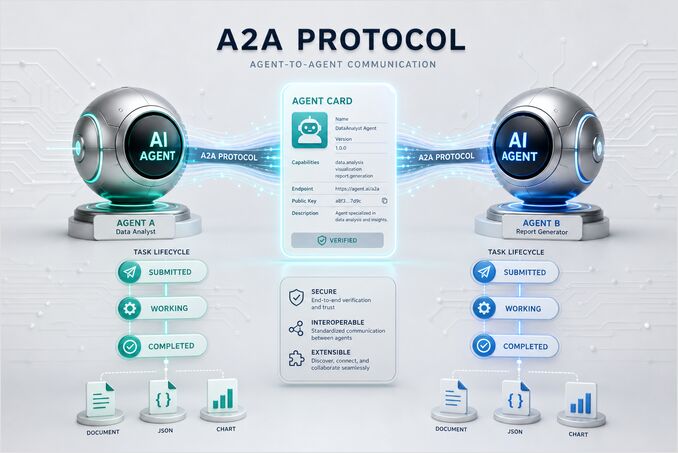
A2A is designed for a different world, one where agents may be built by different teams, frameworks, vendors, languages, or organizations. It assumes one agent may need to discover another agent, understand what it can do, send it work, exchange messages, receive files or structured outputs, and track a task until completion — making it not just another tool calling format, but a genuine attempt to make AI agents interoperable as peers.
The core concepts are:
- Agent Cards
- Agents and clients
- Tasks
- Messages
- Parts
- Artifacts
- Task states
- Streaming and asynchronous updates
This article explains those concepts in plain engineering terms, with enough detail to understand where A2A fits in real multi-agent systems.
The Short Definition
A2A is a protocol for agent-to-agent communication.
It lets one agent or client communicate with another agent through a common model. The receiving agent can describe its capabilities, accept work, manage the lifecycle of that work, ask for more input, stream progress, and return concrete outputs.
The point is not to standardize how an agent thinks internally — it is to standardize how agents talk at their boundaries.
An A2A agent might internally use:
- Python
- Go
- JavaScript
- LangGraph
- CrewAI
- Semantic Kernel
- custom code
- MCP servers
- private APIs
- vector databases
- workflow engines
The caller does not need to know any of that. What the caller does need to know is:
- What can this agent do?
- How do I talk to it?
- What input does it accept?
- What output can it produce?
- How do I track the work?
- How do I receive the result?
Those six questions define the protocol boundary A2A is trying to establish between independently operating agents.
Why A2A Exists
AI systems are moving from single assistants to networks of specialist agents.
A company might have:
- A support agent
- A billing agent
- A legal review agent
- A DevOps agent
- A data analysis agent
- A research agent
- A documentation agent
- A code review agent
Each agent may have its own tools, permissions, domain knowledge, prompts, memory, retrieval system, and audit rules.
Without a shared protocol, every integration becomes custom — the support agent needs bespoke wiring to the billing agent, the billing agent needs its own to the legal agent, and the research agent needs yet another to the documentation agent. That combinatorial overhead does not scale well as the agent network grows.
A2A gives these agents a common way to interact, reducing the N×M integration problem to a single shared contract. The promise is not magic autonomy; the promise is interoperability.
A2A Is Not MCP
A2A is often compared with MCP, but they solve different problems.
MCP, or Model Context Protocol, is mainly about connecting an AI app or agent to tools, resources, and prompts, while A2A is mainly about connecting agents to other agents.
A useful mental model is:
MCP: agent to tool
A2A: agent to agent
For example, an agent may use MCP to access:
- GitHub
- a filesystem
- a database
- Slack
- a documentation search system
- a cloud API
Practical guides for building those MCP servers are available for Go and Python.
The same agent may use A2A to delegate work to:
- a security review agent
- a research agent
- a planning agent
- a compliance agent
- a coding agent
The two protocols can and often do work together. A clean architecture is often:
A2A outside the agent boundary.
MCP inside the agent boundary.
That means other agents communicate with your agent using A2A, while your agent internally uses MCP to access tools — a clean separation of concerns that keeps the external interface stable regardless of what changes inside. For a detailed comparison of how the two protocols divide architectural responsibility and when you actually need both, see A2A vs MCP: Do AI Agents Really Need Both Protocols?
Core Roles In A2A
A2A uses a simple role model built around two parties: an agent that exposes capabilities, and a client that wants to use them.
The client might be:
- another agent
- an orchestrator
- an assistant application
- a workflow system
- a gateway
- a test harness
- a human-facing app
The agent might be:
- a specialist AI service
- a domain assistant
- a workflow-owning agent
- a remote vendor agent
- an internal enterprise agent
The important thing is that the agent is not just a function. It owns some capability and exposes it through an agent interface.
Agent Cards
The Agent Card is one of the most important concepts in A2A.
An Agent Card describes an agent — it is the discovery document that tells clients what the agent is, what it can do, how to communicate with it, and what constraints apply.
Think of an Agent Card as a mix of:
- service metadata
- capability declaration
- API discovery document
- agent profile
- contract surface
A typical Agent Card can describe things such as:
- agent name
- description
- service endpoint
- supported protocol features
- supported input and output modes
- available skills
- authentication requirements
- provider information
- version information
- documentation links
- optional metadata
The Agent Card is important because agents should not need hardcoded knowledge of every other agent.
A client can inspect the card and decide:
- Is this the right agent for the job?
- Does it support the content type I need?
- Does it support streaming?
- Does it require authentication?
- What skills does it advertise?
- Can it return the kind of artifact I need?
In practical systems, Agent Cards become the foundation for agent registries, developer portals, and internal agent catalogs — the machine-readable equivalent of a service directory where clients can look up what is available before committing to an integration.
Agent Cards Are Capability Boundaries
An Agent Card should not be treated as marketing text — it is a capability boundary that other systems will rely on at runtime.
If your agent card says your agent can perform financial analysis, clients may start delegating financial analysis work to it. If it says the agent accepts files, clients may send files. If it says the agent supports streaming, clients may expect progress events.
Bad Agent Cards create bad systems because routing decisions and capability assumptions cascade through the whole agent network. A useful Agent Card should be:
- specific
- accurate
- stable
- versioned
- security-aware
- honest about limitations
A vague skill such as “does business tasks” is not helpful.
A better skill is:
Analyze SaaS invoice data and produce a monthly spend summary.
Even better, include expected input and output modes.
Input: CSV or JSON invoice records.
Output: Markdown summary and structured JSON totals.
The more precise the Agent Card, the easier it is for other agents to route tasks correctly.
Agent Discovery
Agent discovery is the process of finding an Agent Card.
In simple deployments, discovery may be static. A client already knows the URL of a specific agent.
In larger deployments, discovery may involve:
- a registry
- a developer portal
- an internal catalog
- DNS-based discovery
- configuration management
- environment-specific routing
- tenant-aware gateways
The important design choice is whether discovery is public, private, or permissioned.
Not every agent should be discoverable by everyone — an internal payroll agent should not expose the same Agent Card to every caller, and a partner agent may see only partner-safe skills. Agent discovery is not just a convenience feature; it is part of your security and governance model, and scoping visibility is a first-class design decision.
Tasks
A Task represents work being performed by an agent.
This is where A2A becomes more interesting than simple request and response APIs.
Some agent interactions are quick. A client sends a message, and the agent returns a direct response.
But many real agent workflows are not instant.
A task might involve:
- searching multiple sources
- asking for clarification
- calling tools
- delegating work
- waiting for approval
- generating a report
- producing files
- streaming progress
- handling retries
- returning multiple artifacts
A2A models this kind of work as a Task — giving the work an identity and a lifecycle, which matters because long-running agent work needs to be tracked, inspected, and potentially canceled or retried.
Task Lifecycle
A task can move through different states.
The exact state model depends on the protocol version and implementation, but the basic idea is straightforward:
- submitted
- working
- input required
- completed
- failed
- canceled
- rejected
The important point is that a task is not just a response payload — it is an ongoing unit of work with its own state that a client can query at any time. A client can use the task state to understand what is happening:
- Has the agent accepted the task?
- Is it still working?
- Does it need more input?
- Did it finish successfully?
- Did it fail?
- Was it canceled?
- Are there artifacts available?
This is especially useful for workflows that take seconds, minutes, or longer.
For example, a research agent may return a task immediately, then continue working in the background while streaming progress events or making the result available later.
Stateless Message Or Stateful Task
A2A supports both simple and complex interactions.
For a simple interaction, an agent may return a direct Message; for a complex interaction, it may return a Task. This distinction matters because not everything needs task tracking, and over-engineering short interactions into full task workflows adds unnecessary overhead.
If a client asks:
Summarize this one paragraph.
A direct response may be enough.
If a client asks:
Research the top five open source vector databases, compare them, and produce a migration recommendation.
A task is more appropriate.
The practical rule is straightforward: use a direct Message for simple, immediate interactions, and use a Task for long-running, stateful, auditable, or artifact-producing work.
Messages
Messages are the communication units exchanged between client and agent.
A message can contain one or more parts.
A message may represent:
- a user request
- an agent response
- a clarification question
- additional input
- task-related communication
- progress context
- structured instructions
Messages are not just strings — agent communication often needs to carry far more than plain text, and the message structure is designed to accommodate that.
A message might include:
- text
- files
- structured JSON
- images
- references
- metadata
The message is the envelope; the parts are the actual typed content inside it.
Parts
A Part is a piece of content inside a message or artifact.
This is how A2A supports multimodal and structured communication.
A part may contain different content types, such as:
- text
- file data
- structured data
- binary content by reference
- JSON-like data
A part can also include metadata such as:
- media type
- filename
- additional context
The media type matters because it tells the receiving agent how to interpret the content.
For example:
text/plain
application/json
text/markdown
image/png
application/pdf
text/csv
This is one of the underrated parts of A2A. Agent communication should not collapse everything into plain text — if a downstream agent needs a spreadsheet, image, JSON payload, log file, or PDF, the protocol should preserve that content as content rather than mangle it into a paragraph. Good agent systems avoid these unnecessary text bottlenecks by letting each part carry its natural media type all the way to the consumer.
Artifacts
Artifacts are concrete outputs produced by an agent during task processing.
This is different from a general message: a message is communication between agents, whereas an artifact is a concrete deliverable the task has produced.
Examples of artifacts include:
- a markdown report
- a JSON analysis result
- a CSV export
- a generated image
- a PDF document
- a code patch
- a test result file
- a deployment plan
- a diagram
- a data extract
This distinction is useful in practice. When a research agent says “I found the answer”, that is a message. When it returns market-analysis.md, sources.json, and risk-summary.csv, those are artifacts — concrete outputs that make the task’s work inspectable, reusable, and composable. One agent’s artifact becomes another agent’s input without any loss of structure.
Messages vs Artifacts
A simple way to think about it:
Messages are conversation.
Artifacts are output.
Messages help agents coordinate; artifacts are what the task actually produced.
For example, in a software development workflow:
- The client sends a message asking for a bug fix.
- The coding agent sends messages with clarification questions.
- The coding agent works on the task.
- The agent returns artifacts such as a patch file, test output, and explanation.
This separation is helpful because it avoids mixing task coordination with deliverables, making it much easier to log, audit, and pass outputs to downstream consumers.
A Practical Example
Imagine a primary assistant needs help from a documentation agent.
The user asks:
Create developer documentation for our new billing webhook API.
The primary assistant checks an agent registry and finds a documentation agent.
The documentation agent has an Agent Card that says it can:
- write API documentation
- accept OpenAPI specs
- accept Markdown style guides
- produce Markdown docs
- produce examples in Python and JavaScript
- support long-running tasks
- return artifacts
The primary assistant sends a message with:
- a short instruction
- an OpenAPI file
- a style guide
- metadata about the target audience
The documentation agent creates a Task.
The task enters a working state.
The documentation agent may send messages such as:
I am extracting endpoint descriptions.
Then:
I need clarification on authentication examples.
The primary assistant provides the missing input.
The task continues.
Finally, the documentation agent returns artifacts:
billing-webhooks.md
billing-webhook-examples-python.md
billing-webhook-examples-javascript.md
That is the A2A model in action: not just “call this function” but “delegate this task to another agent, communicate as needed, and track the result through to completion.”
Why Tasks Matter For Real Systems
Tasks are what make A2A suitable for serious workflows.
A normal HTTP API call is often too thin for agent work. Agent tasks may involve uncertainty, multiple steps, intermediate results, and follow-up questions.
A Task gives you a place to attach:
- status
- history
- messages
- artifacts
- errors
- metadata
- progress
- cancellation
- audit information
This is useful for:
- research workflows
- code generation
- data analysis
- compliance review
- document production
- incident investigation
- multi-step planning
- human approval workflows
Without a task model, developers usually rebuild this logic themselves with custom job IDs, queues, status endpoints, and webhook callbacks — A2A tries to standardize the agent-specific version of that pattern so you do not have to reinvent it for every new agent integration.
Streaming And Async Work
A2A supports the idea that agent work may be streaming or asynchronous.
Streaming is useful when the client wants live updates.
For example:
- progress events
- partial results
- intermediate status
- generated text
- step updates
Async workflows are useful when the task may take a long time or the client cannot hold an open connection.
For example:
- background research
- large document generation
- multi-agent review
- data processing
- human approval
- batch analysis
In practice, a robust A2A system should be designed around three modes: immediate response for simple work, streaming for interactive long-running work, and async for durable background work that may outlive any single connection. For SSE, push webhooks, resubscription, HITL via input_required, failure handling, and production checklists, see A2A Streaming and Async Tasks for Long-Running Agent Workflows.
Agent Cards And Streaming Support
An Agent Card can advertise whether an agent supports streaming.
This matters because clients cannot assume every agent supports streaming — some agents may only support simple request and response, some may support task polling, and others may support push notifications or server-sent events. A good client inspects the Agent Card before choosing an interaction pattern, which is why Agent Cards are not just documentation: they directly shape runtime behavior.
A2A And Multimodal Agents
A2A is designed to support more than plain text.
That matters because real agent systems increasingly process mixed inputs and outputs:
- text
- images
- audio
- video
- PDFs
- spreadsheets
- structured JSON
- logs
- code
- diagrams
If every agent boundary converts everything into text, important information can be lost.
For example, a visual troubleshooting agent should receive an image as an image, not as a weak text description. A finance agent should receive structured spreadsheet data, not a copied paragraph. A code review agent should receive source files or diffs, not a vague summary.
Parts and media types are how A2A preserves richer content across agent boundaries — and this is one of the places where the protocol is more important than it first appears, because information loss at the boundary compounds across every hop in a multi-agent chain.
A2A Is Not An Agent Framework
A2A does not tell you how to build an agent.
It does not define:
- reasoning strategy
- planning algorithm
- memory system
- vector database
- prompt template
- model provider
- tool framework
- orchestration runtime
- evaluation method
That is a feature, not a bug. A2A is a boundary protocol that lets different agent implementations communicate without requiring them to share the same internal architecture — much like HTTP does not tell you how to build a web application, it only defines how systems communicate. A2A should be understood the same way.
A2A Is Not A Replacement For APIs
A2A also does not replace every API.
If you have a deterministic service with a stable request and response contract, a normal API may be better.
For example:
- currency conversion
- address validation
- invoice lookup
- image resizing
- search endpoint
- feature flag lookup
- internal CRUD service
These do not automatically become agents just because they are called by an AI system. A2A makes sense when the remote system genuinely behaves like an agent:
- it owns a task
- it may ask for more input
- it may use tools internally
- it may take time
- it may produce artifacts
- it has capabilities worth discovering
- it can operate as a peer in a larger workflow
Do not use A2A just because it is fashionable — use it when the abstraction genuinely fits the problem.
Where A2A Fits In AI System Architecture
A2A fits best at the boundary between independently deployable agents.
A useful architecture might look like this:
User
  |
  v
Primary assistant
  |
  |-- A2A --> Research agent
  |-- A2A --> Coding agent
  |-- A2A --> Compliance agent
  |-- A2A --> Documentation agent
Each specialist agent may internally use tools:
Research agent
  |
  |-- MCP --> web search
  |-- MCP --> document store
  |-- MCP --> vector database
This gives you separate layers:
User interface layer
Agent coordination layer
Tool integration layer
Data and execution layer
A2A lives in the agent coordination layer, MCP often lives in the tool integration layer, and normal APIs, queues, databases, and storage systems live below that — each layer with its own abstraction and its own failure modes. For a cross-cutting map of how LLM inference, memory, routing, tooling, and observability fit together inside production assistants, see AI Assistant Architecture: LLM, Memory, Tools, Routing, Observability.
Architecture Pattern: Orchestrator And Specialists
The most common A2A pattern is probably orchestrator plus specialists.
In this pattern, one primary agent receives the user request and delegates pieces of work to specialist agents.
Example:
Primary assistant
  |
  |-- A2A --> Legal agent
  |-- A2A --> Finance agent
  |-- A2A --> Research agent
  |-- A2A --> Writing agent
This pattern is easy to understand: the orchestrator owns the overall workflow, and specialist agents own domain-specific work. The downside is that the orchestrator can become a bottleneck, and it needs a solid routing strategy to delegate effectively — the underlying model selection and orchestration trade-offs are covered in Multi-Model System Design: When One Model Isn’t Enough. Still, for most teams this is the best first multi-agent architecture to reach for before exploring more complex topologies.
Architecture Pattern: Peer Agents
In a peer-to-peer pattern, agents can communicate with each other more directly.
For example:
Research agent --> Data agent --> Charting agent --> Writing agent
This can be powerful, but it is harder to control.
You need strong rules for:
- who can call whom
- what context can be shared
- how loops are prevented
- who owns final output
- how cost is controlled
- how delegation is audited
Peer agent networks sound elegant, but they can become chaotic quickly — use them only when you have strong governance rules and clear ownership over every edge in the graph.
Architecture Pattern: A2A Gateway
A more production-friendly pattern is an A2A gateway.
Instead of every agent directly calling every other agent, traffic flows through a gateway.
The gateway can handle:
- authentication
- authorization
- routing
- tenant mapping
- logging
- rate limits
- policy checks
- protocol version handling
- observability
- audit trails
This is especially useful in enterprise environments, where the gateway becomes the control plane for agent communication — enforcing policy in one place rather than re-implementing it across every agent. In smaller systems this may be overkill, but in larger systems with multiple teams and vendors it often becomes necessary sooner than expected.
Security Considerations
A2A security deserves serious attention.
Agent-to-agent communication can move sensitive context across boundaries. It can also delegate work to systems that may have their own tools and permissions.
The core security questions are:
- Which agents are allowed to discover this agent?
- Which agents are allowed to send it tasks?
- What authentication is required?
- What permissions are attached to the caller?
- Can one agent delegate user authority to another?
- What data can be included in messages?
- What artifacts can be returned?
- How is the task audited?
- Can the receiving agent call tools or other agents?
- How are secrets protected?
Agent Cards should not contain static secrets, and sensitive Agent Cards should be protected behind authentication rather than published openly. Different clients often need different views of the same agent — an internal caller may see more skills than an external partner, while a public client may see only a limited set of safe capabilities.
Security should not be added after the agent network is built; it should shape the network from the start, because retrofitting auth and permission boundaries across a live agent topology is significantly harder than designing them in. For the full treatment — threat model, identity layers, gateway control plane, delegation scope, and audit trails — see A2A and MCP Agent Security: Identity, Delegation, and Audit Trails.
Observability Considerations
A2A systems need strong observability.
When a task crosses agent boundaries, debugging becomes substantially harder because no single system holds the full picture. You need to know:
- which agent created the task
- which agent accepted it
- what messages were exchanged
- what state changes occurred
- what artifacts were produced
- what errors happened
- how long each step took
- what tools were used internally
- whether another agent was called
- who approved risky actions
A useful trace should follow the work across the full chain.
For example:
user request
  -> primary assistant task
  -> research agent task
  -> document search tool call
  -> summarization artifact
  -> final response
Without that end-to-end trace, multi-agent systems become very hard to trust in production — you cannot confidently answer why the system produced a given output, let alone identify where it went wrong. Observability for LLM Systems: Metrics, Traces, Logs, and Testing in Production covers the instrumentation and tooling side of this problem in depth.
Common Mistakes
Mistake 1: Calling Every Tool An Agent
Not every tool is an agent.
A calculator is a tool. A file reader is a tool. A database query endpoint is a tool.
If it does not own a task, ask for input, produce artifacts, or behave as an independent peer, it probably does not need A2A.
Mistake 2: Making Agent Cards Too Vague
An Agent Card should not say:
This agent helps with business tasks.
That is useless to any agent trying to route work intelligently. A good card should say what the agent actually does, what it accepts, what it returns, and what constraints apply.
Mistake 3: Ignoring Task State
If you use A2A but treat every interaction as request and response, you are missing much of the value.
The task model is one of the primary reasons to use A2A over a plain API — skipping it means rebuilding the same lifecycle tracking logic in every integration.
Mistake 4: Returning Everything As Text
A2A supports structured and multimodal content. Use it.
If the output is a report, return a report artifact.
If the output is JSON, return structured data.
If the output is a file, return a file.
Do not flatten everything into plain text unless plain text is the right output.
Mistake 5: No Permission Model
Agent networks without permission boundaries are risky.
Every agent should not be allowed to call every other agent with every kind of data — use authentication, authorization, and audit trails to enforce the principle of least privilege across the agent network.
When Should You Use A2A?
Use A2A when you have real agent boundaries.
Good reasons include:
- agents are owned by different teams
- agents are deployed as separate services
- agents are built with different frameworks
- agents need to discover each other
- agents need to delegate tasks
- tasks may be long-running
- results may include artifacts
- clients should not know internal tools
- agent capability metadata matters
Weak reasons include:
- it sounds modern
- you want to call one function
- you have a single-agent app
- a normal API would work
- MCP already solves your tool integration problem
A2A is powerful when the system is actually multi-agent; it is unnecessary ceremony when the system is not, and the cost of that ceremony — added concepts, infrastructure, debugging surface, and security requirements — is real.
A Minimal Mental Model
If you remember only one thing, remember this:
Agent Card: what the agent can do.
Message: what agents say to each other.
Part: typed content inside a message or artifact.
Task: work the agent owns.
Artifact: output the task produced.
That is the core of A2A — the rest is mostly about making those five concepts reliable, observable, and secure enough to use in real production systems.
Final Thoughts
A2A is not just another AI acronym — it is part of a larger shift from isolated assistants to interoperable agent systems. That shift will not happen everywhere at once, and many applications will remain single-agent systems with good tool access where MCP and normal APIs are entirely sufficient.
But once agents become separately deployed peers, you need stronger boundaries: discovery, task ownership, messages that carry more than text, artifacts as first-class outputs, and security, state, and observability that span agent boundaries. That is the space A2A is trying to occupy, and it is a genuinely different problem from the tool-integration problem MCP solves.
For a practical take on where A2A actually has production traction in 2026 — including adoption tiers, security concerns, the enterprise use case, and a decision framework — see Google A2A Protocol in 2026: Adoption, Hype, and Reality.
My opinion: do not start with A2A for small projects. Start with a useful agent, good tools, and clear architecture — the AI Systems cluster covers self-hosted assistants, MCP servers, and agent memory as a connected set if you want the broader context. But when your “tool” starts looking like another autonomous specialist with its own task lifecycle, it is probably not just a tool anymore — and that is when A2A becomes interesting.
Sources
- A2A Protocol Specification: https://a2a-protocol.org/latest/specification/
- A2A Key Concepts: https://a2a-protocol.org/latest/topics/key-concepts/
- A2A Life of a Task: https://a2a-protocol.org/latest/topics/life-of-a-task/
- A2A Agent Discovery: https://a2a-protocol.org/latest/topics/agent-discovery/
- A2A Streaming and Async Operations: https://a2a-protocol.org/latest/topics/streaming-and-async/
- A2A and MCP: https://a2a-protocol.org/latest/topics/a2a-and-mcp/
