Tables in Markdown: GFM Syntax, Alignment, and Limits
GFM pipe tables, alignment, and cell limits.
A Markdown table is a header row, a delimiter row of hyphens, and the data rows under it. The delimiter row is what turns the pipes into a table in GFM and in Hugo.
This guide is part of Documentation Tools in 2026: Markdown, LaTeX, PDF & Printing Workflows. The other block types are in the Markdown Cheatsheet.
Tables are not in the original Markdown syntax or in CommonMark. They are the tables extension in the GitHub Flavored Markdown spec. Hugo 0.164 uses Goldmark with that extension on by default (markup.goldmark.extensions.table). The samples below are fenced so the pipes stay literal, which is the pattern in Markdown code blocks.
Pipe-table syntax
A table is three parts: one header row, one delimiter row, and zero or more data rows. Cells are separated by |. A pipe at the start and end of a row is optional. Spaces next to a pipe are trimmed.
| Header 1 | Header 2 |
| --- | --- |
| Cell A1  | Cell B1  |
| Cell A2  | Cell B2  |
GitHub’s writing docs say each delimiter cell needs at least three hyphens, and that a blank line before the table is required for GitHub to render it. The GFM spec describes the delimiter cell as hyphens, with an optional colon on either side, and its examples include a one-hyphen cell. Hugo 0.164 rendered this as a table:
| A | B |
| - | - |
| 1 | 2 |
The same Hugo render also turned a table into a <table> when the previous line was a paragraph and there was no blank line. On GitHub, follow the three-hyphen delimiter and the blank line. On this site, one hyphen is enough and the blank line is not required.
|Too|Tight| with a |---|---| delimiter also rendered. Spaces beside the pipes are trimmed. The spaces in the first example keep a source diff readable.
The header row and the delimiter row must have the same number of cells. If they differ, Hugo does not recognize a table. This stays ordinary text, and the hyphens are then eligible for Hugo’s typographer:
| abc | def |
| --- |
| bar |
A data row may be shorter or longer than the header. A short row is filled with empty cells. Cells past the header count are dropped.
| A | B | C |
| --- | --- | --- |
| 1 | 2 |
| A | B |
| --- | --- |
| 1 | 2 | 3 |
The first of those renders a blank third cell. The second renders only 1 and 2.
A line with no pipes is still inside the table until a blank line. Hugo 0.164 put a following bar into the table as a row with an empty second cell, matching GFM example 202. The next paragraph starts after the blank line.
| abc | def |
| --- | --- |
| bar | baz |
bar

next
Column alignment
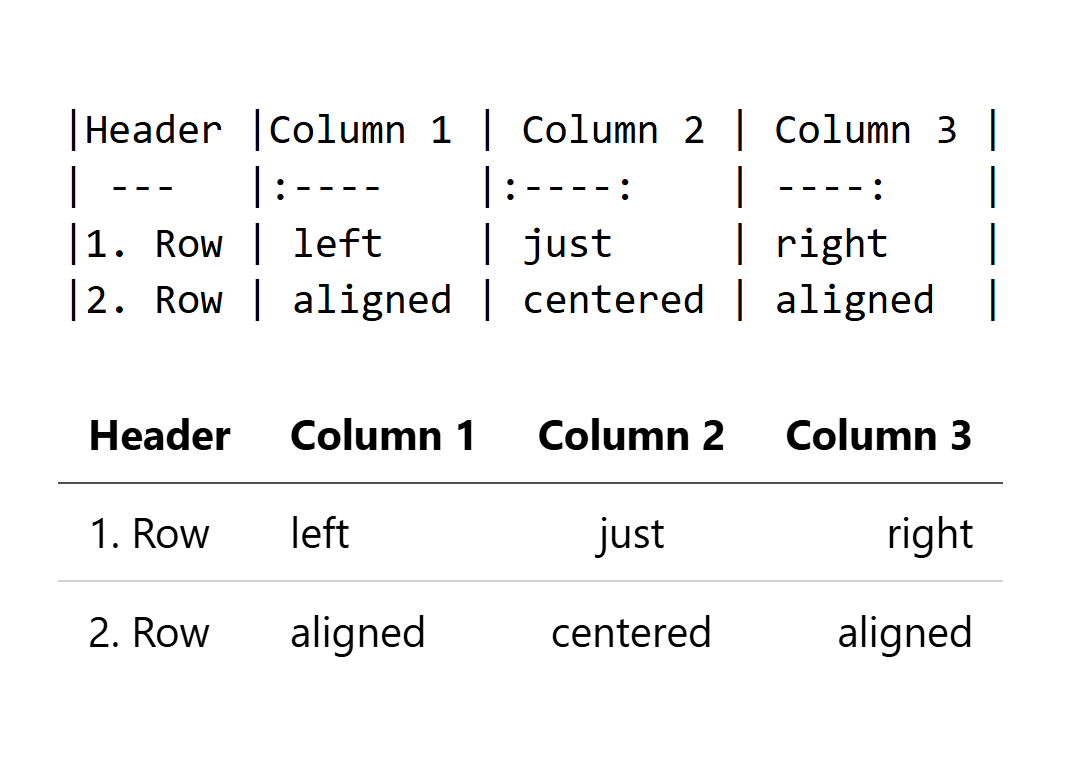
Alignment is a colon on the delimiter row. --- with no colon is left alignment, the same as :---.
| Left | Right | Center |
| :--- | ----: | :----: |
| text | 12.50 | yes    |
| Left | Right | Center |
|---|---|---|
| text | 12.50 | yes |
Colons in the header row are characters in that cell. They do not set alignment. The delimiter row below is what Hugo used:
| :--- Left | Right ---: |
| :-------- | ---------- |
| Correct   | Alignment  |
Cell content
Inlines work inside a cell: emphasis, code spans, and links. Block constructs do not. The GFM spec says block-level elements cannot be inserted in a table, so a list or a fenced block inside a cell is not a list or a fence.
| Feature    | Status     | Documentation |
| ---------- | ---------- | ------------- |
| **API v2** | *Released* | [Docs](/api)  |
| `Auth`     | Beta       | Coming soon   |
A literal pipe is \| or |. Hugo 0.164 rendered both as |.
| Expression | Result |
| ---------- | ------ |
| a | b | true   |
| x \| y     | false  |
A line break inside a cell is an HTML <br>. This site sets markup.goldmark.renderer.unsafe to true, so that tag is kept. A processor that strips raw HTML concatenates the two halves.
Three hyphens written as cell text are a separate trap on Hugo. The typographer rewrites --- in a cell to an em dash (—). A code span keeps the hyphens. \--- rendered as -–.
| As text | As code |
| ------- | ------- |
| ---     | `---`   |
Merged cells
GFM has no rowspan or colspan. When a cell must cover two rows, the table is HTML. This site’s unsafe renderer leaves that HTML in the page:
<table>
  <tr>
    <td rowspan="2">Merged</td>
    <td>Cell 1</td>
  </tr>
  <tr>
    <td>Cell 2</td>
  </tr>
</table>
Pandoc’s markdown+pipe_tables writer emits the pipe syntax on this page. That is the writer used when converting Word documents to Markdown. Grid tables and other Pandoc-only layouts are dialect features, covered in GFM vs CommonMark vs Pandoc Markdown.
A wide pipe table scrolls or overflows. The portable reductions are a transposed layout, several smaller tables, or an HTML table with its own CSS. Pipe syntax has no caption. Hugo’s table of contents is built from headings.
Checks when a table stays text
Count the cells in the header row and the delimiter row. If those two counts differ, the block is a paragraph. A short data row is still a table, with an empty cell at the end. markdownlint rule MD056 asks every row to match that count anyway, because a short row looks like a missing cell and an extra cell is discarded.
Look at the delimiter row for the colons. A colon sitting in the header is text, and the column stays at the delimiter’s alignment.
If --- inside a cell appears as a single dash glyph on this site, the typographer rewrote it. Put the hyphens in a code span.
If GitHub shows the pipes as text, add the blank line GitHub’s docs require and use at least three hyphens in each delimiter cell. Hugo 0.164 already accepted the shorter form.
A missing delimiter row is the other way a pipe block stays text. Hugo 0.164 left this as a paragraph:
| Header 1 | Header 2 |
| Cell A   | Cell B   |
A parameter table
The same delimiter row carries alignment and leaves room for inline code:
| Parameter | Type    | Default | Required |
| :-------- | :------ | :-----: | :------: |
| `apiKey`  | string  | —       | Yes      |
| `timeout` | number  | 30000   | No       |
| `retries` | number  | 3       | No       |
