
Oh My Opencode Review: Honest Results, Billing Risks, and When It's Worth It
What actually happens when you run Ultrawork.
Oh My Opencode promises a “virtual AI dev team” — Sisyphus orchestrating specialists, tasks running in parallel, and the magic ultrawork keyword activating all of it.
That promise holds up for the right workload. For the wrong one, it adds cost and complexity without improving results. This article covers what actually happened in hands-on testing, and what the broader community has found after months of real usage.

If you are new to the stack,
- start with the OpenCode quickstart to get the base agent running,
- then the Oh My Opencode quickstart
- and then the specialised agents deep dive
This article assumes you are already familiar with the system and want to know whether it actually performs. For the wider picture of how OMO fits into the AI coding toolchain, see the AI developer tools overview.
Oh My Opencode Performance: Hands-on Testing Results
I ran the same tests I use for bare OpenCode — the same LLM benchmark tasks I ran against OpenCode with local Ollama and llama.cpp models. This time on the Big Pickle model (GLM 4.6 via OpenCode Zen — the free tier).
The short version: mixed results, and the failure mode was instructive.
Why Sisyphus Skips Delegation Without an Explicit Ultrawork Prompt
The first thing I hit was that Sisyphus did not behave like an orchestrator without explicit prompting. Even with the ulw prefix, he started doing all the work himself — reading files directly, writing code, skipping the research and planning phases entirely. No delegation to Oracle, no parallel Explore runs, no Prometheus interview.
To actually trigger orchestration I had to be explicit in the prompt:
ulw research the codebase first,
create a detailed plan,
delegate implementation tasks,
and only do direct work yourself when delegation is unreasonable
Once I did that, the system behaved as advertised. But the default behaviour without that framing was vanilla OpenCode with a heavier context window. The ultrawork keyword alone is not a guarantee of delegation — it is a prerequisite for it.
Test 1: IndexNow CLI Tool — Where Oh My Opencode Orchestration Pays Off
The task was to build a command-line tool that submits URLs to the IndexNow API for search engine indexing. This is a reasonably scoped multi-step task: read the API spec, design the CLI, implement, test.
With Oh My Opencode and explicit orchestration prompting, the result was noticeably better than bare OpenCode. The final tool correctly extracted URLs from sitemap.xml and sent them in batches, in addition to supporting standard CLI options. The Librarian agent pulling the IndexNow documentation contributed context that the bare-model run missed.
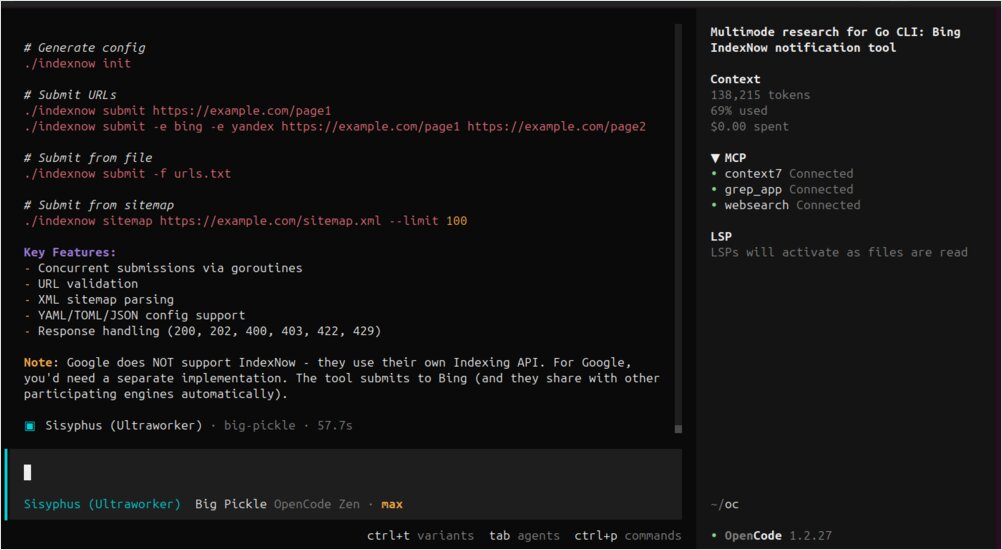
This is the kind of task OMO is built for: research + implementation + some design decisions. The overhead paid off here.
Test 2: Page Migration Mapping — Same Result, Triple the Tokens
The second test was a document analysis task: sort out where website pages should be migrated based on their slugs and a migration policy document.
The result was identical to the bare OpenCode run — same accuracy, same structure, same decisions. But the OMO run consumed approximately three times the tokens.
This is a single-context-window reasoning task. There is no parallelism to exploit, no specialist knowledge to pull in from a subagent. The orchestration layer added overhead without adding value. For this class of task, vanilla OpenCode is the better choice.
Model Selection: Why Weaker Models Struggle with Orchestration Overhead
Running on Big Pickle (a free-tier model) exposed something the community has also noticed: weaker models are more sensitive to harness quality than strong models. Claude Opus is resilient enough to produce good output even with a heavy orchestration layer around it. A smaller model like Big Pickle benefits more from a clean, focused prompt than from a complex multi-agent setup that adds noise to the context.
If you are running OMO on budget models, start simpler. Use orchestration for research-heavy tasks where Librarian and Explore genuinely add information. Avoid it for pure reasoning tasks where the model just needs clear input and space to think.
Oh My Opencode Community Findings: Benchmarks, Billing, and Real-World Caveats
Before going all-in, it is worth knowing what the community has found through real usage — both the wins and the failure modes.
Oh My Opencode Benchmark: 69% vs 73% Pass Rate, 3× More Requests Than Vanilla OpenCode
One community member ran a systematic benchmark across 120+ agent/model combinations and published the results. With OMO Ultrawork enabled, the pass rate on their coding eval was 69.2% — against 73.1% for plain OpenCode without OMO. The OMO run took 10 minutes longer (55 vs 45 minutes) and made 96 requests instead of 27.
Their conclusion: “it’s literally just Opus with more steps.” Opus is particularly resilient to harness differences — it delivers strong results regardless of what is around it. Weaker models showed more sensitivity to the harness, but not necessarily in OMO’s favour.
This does not mean OMO is useless. For large multi-file tasks, parallel background agents, and complex engineering workflows, the overhead pays off. But for coding tasks that fit in a single context window, vanilla OpenCode with a good model will often match or beat a full orchestration stack.
Startup Token Overhead: 15,000–25,000 Tokens Before Any Work Begins
A recurring community complaint is that OMO injects many tools and MCPs at startup. A simple “Hello world” message can consume 15,000–25,000 tokens just from the context window setup before any actual work happens. The maintainer is aware of this and working on deferred tool loading, but as of early 2026 it is a real cost to factor into pricing estimates.
The $350 Gemini infinite loop — and what to do about it
In March 2026, a confirmed bug (issue #2571, labelled will-fix) caused a user to be billed ~$438 in a single afternoon. Three separate problems compounded:
-
No circuit breaker: OMO had no max-step limit per subagent. A Gemini model got stuck in a
git diff/readverification loop and ran 809 consecutive turns over 3.5 hours without stopping. -
Silent model routing: The user’s parent session was on GPT-5.4. But a delegated Compose UI task was routed to Gemini 3.1 Pro via category routing (
visual-engineering) — a model the user never intentionally selected and had no visibility into until digging through the SQLite database after the fact. -
Incorrect cost display: OpenCode’s pricing snapshot for
gemini-3.1-pro-previewwas missing the>200K contextpricing tier. Google charges 2× for contexts over 200K tokens, but OpenCode calculated everything at the base rate. The displayed cost was less than half the actual Google bill.
A community comment summed it up: “Gemini constantly spins into loops for me, hence I rarely use it as a non-read-only model.”
A fix (PR #2590) is in progress — adding a configurable max step limit and loop detection. Until it ships, protect yourself:
- Audit your category config. If any category maps to Gemini (including
visual-engineeringby default), every background task in that category uses Gemini — silently — even when your foreground session is on a different model. - Set explicit
providerConcurrencylimits for Gemini inbackground_task. Keeping it at 1 limits the blast radius. - Check your actual provider billing dashboards, not just OpenCode’s displayed cost, especially for Gemini.
{
  "background_task": {
    "providerConcurrency": {
      "google": 1   // hard cap until the circuit breaker ships
    }
  }
}
Ultrawork Delegation Requires the Keyword — It Is Not Automatic
Early users found that without ultrawork, the main agent often does not delegate to specialist subagents at all — it just starts calling read and grep directly. The maintainer acknowledged this early on: “it seems difficult to achieve calling the appropriate agent solely through system prompt instructions without explicit prompts.”
The ultrawork keyword is what reliably triggers orchestration. Without it, you are often running vanilla OpenCode with a heavier context window. This matches what I found in my own testing.
Lighter Alternatives to OMO: OMO Slim and Oh-My-Pi
If you want the background execution hooks and key OMO improvements without the full agent orchestration overhead, oh-my-opencode-slim is a community fork that trims the feature set. Some users have also moved to oh-my-pi, which focuses on background task execution and hooks while keeping the prompt surface minimal.
One user put it well: “I like OMO for its hooks and background task execution. I think OMO slim is trying to optimise the wrong things. The base OpenCode prompts plus background workers and hooks that auto-prompt the model to continue when it decides to stop would be enough for me.”
The right choice depends on your task profile. Large, multi-step engineering work justifies full OMO. For daily shorter tasks, a leaner harness often produces better results with less cost.
When Oh My Opencode Genuinely Outperforms: Real User Results
To balance the caveats, here is what users report as OMO’s clearest wins:
- 8,000 ESLint warnings cleared in a day — parallel Explore agents scanning the codebase while worker agents execute fixes simultaneously
- 45k-line Tauri app converted to a SaaS web app overnight — Prometheus interview mode produced a detailed plan, Ralph Loop executed it start to finish
- Full-stack features implemented end-to-end without the user touching the keyboard beyond the initial prompt
- Architecture reviews on inherited codebases — Oracle’s read-only advisory role surfaces problems without accidentally making changes
The common thread: tasks that benefit from parallelism and have clear acceptance criteria that Prometheus can verify. Tasks where a single focused model would do fine get little benefit from the orchestration overhead.
Oh My Opencode vs Vanilla OpenCode: When to Use Each
Oh My Opencode is not universally better than vanilla OpenCode. It is a power multiplier for a specific class of work — and overhead for everything else.
Use the full OMO stack (with ultrawork) when:
- The task spans multiple files and layers
- You need research, planning, implementation, and verification as distinct phases
- You benefit from parallel background agents (Explore, Librarian) gathering context while workers run
- The scope is large enough that you would otherwise babysit the agent through multiple sequential prompts
Use vanilla OpenCode (or a leaner harness) when:
- The task fits in a single context window
- The problem is pure reasoning without external research
- You are running budget models — they benefit more from a clean focused prompt than from orchestration complexity
- You want predictable billing without category-routing surprises
The billing risk is real and underreported. Until the circuit breaker lands, treat OMO with Gemini as requiring active monitoring — not as a “fire and forget” system. For everything else, the system is genuinely impressive when pointed at the right problem.
Sources
Community discussions and issues referenced in this article:
- r/opencodeCLI — Oh my opencode vs GSD vs others vs Claude CLI vs Kilo — user comparison of orchestration tools and OMO’s real-world feel vs alternatives
- r/opencodeCLI — I tested Opencode on 9 MCP tools, Firecrawl Skills + CLI and Oh My Opencode — systematic benchmark of 120+ agent/model combinations, including the 69.2% vs 73.1% pass rate data
- GitHub issue #2571 — Subagent burned $350 in 3.5 hours with ZERO safeguard — detailed incident report: silent model routing, infinite Gemini loop, cost display showing half the real bill
- GitHub issue #37 — Share your opinion — maintainer-opened feedback thread, early delegation problems, community use cases
- GitHub issue #74 — Memory system opinions — token overhead discussion, AGENTS.md workflow patterns, community memory system proposals
- oh-my-opencode-slim — community fork with trimmed feature set for lighter use cases
- oh-my-pi — alternative harness focused on background execution and hooks with minimal prompt surface
