
GitHub Spec Kit vs Kiro vs Claude Code SDD Workflows
Process depth vs portability, not best tool.
Developers comparing Spec-Driven Development setups in 2026 are usually not asking which model is smartest. They are asking which workflow will keep an AI agent aligned without burying them in ceremony.
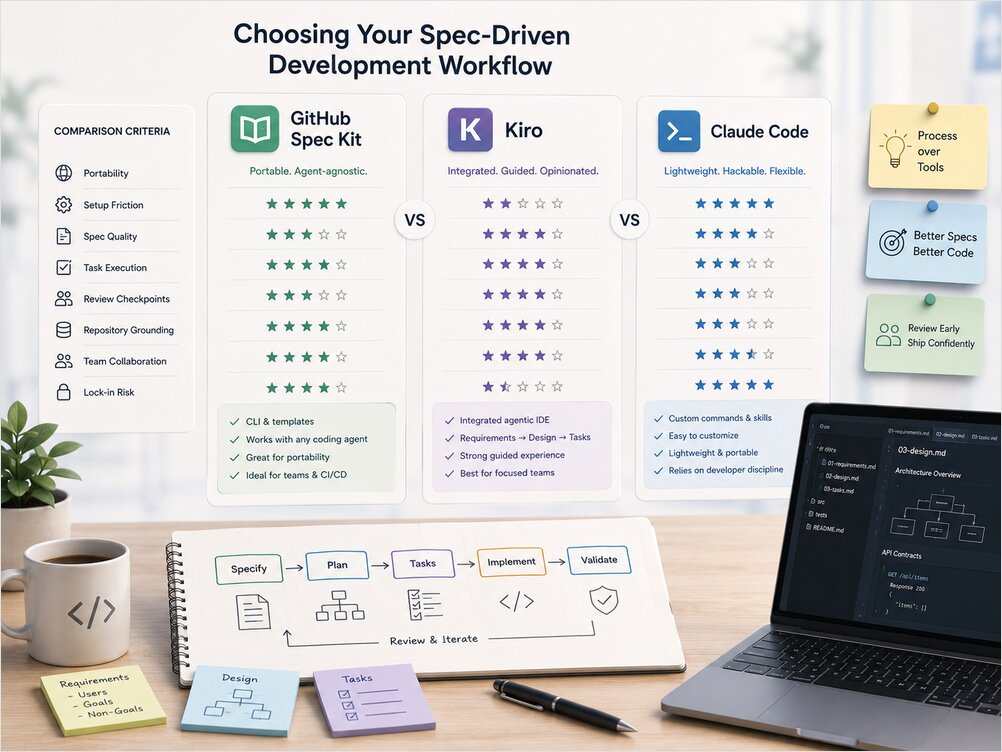
GitHub Spec Kit, AWS Kiro, and Claude Code custom workflows all implement the same broad idea – requirements, design, tasks, implementation, validation – but they trade off portability, integration depth, and how much process they enforce.
If you need the concepts first, read What Is Spec-Driven Development? and the tool-neutral Spec-Driven Development Workflow guide in the App Architecture documentation cluster. This comparison sits in the AI Developer Tools hub alongside assistant reviews and workflow guides.
SDD Is Becoming a Tool Category
Spec-Driven Development stopped being a paper exercise sometime in late 2025. Every major AI coding vendor now ships some version of specify-plan-implement, and a growing list of standalone tools competes on how much structure they add around that loop.
| Tool / approach | Maintainer | Shape | Typical strength |
|---|---|---|---|
| GitHub Spec Kit | GitHub (open source) | CLI scaffolding, multi-file artifacts, 30+ agents | Portability across editors and agents |
| Kiro | AWS | Spec-native IDE (VS Code fork) plus CLI | Guided workflow inside one environment |
| Claude Code skills/commands | Anthropic ecosystem | Lightweight repo-local workflows | Fast to customize, easy to hack |
| OpenSpec | Fission AI (community) | Change-centric, fewer artifacts | Brownfield iteration with lower overhead |
| BMAD-METHOD | Community | Multi-agent, role-based ceremony | Large features with explicit role simulation |
| Tessl | Tessl (commercial, beta) | Spec-as-source code generation | Strong traceability, higher lock-in |
| Superpowers | obra (open source) | Skills package enforcing a full methodology | Opinionated brainstorm-to-TDD loop, cross-agent install |
The comparison that matters is not “which tool wins.” It is process depth versus portability. Kiro is integrated. Spec Kit is portable. Claude Code workflows are hackable. Bad specs make every agent worse regardless of which wrapper you choose. Good specs travel across tools.
How to Compare SDD Setups
Before picking a tool, name what you are optimizing for. The same feature can feel effortless in one setup and bureaucratic in another depending on team size, codebase age, and how much review you need.
Portability – Can the specs live as plain markdown in your repository and work with the agent you prefer next quarter? Or are they tied to one IDE, one cloud, or one proprietary format?
Setup friction – How long from “I want to try SDD” to a working specify-plan-tasks loop? CLI scaffolding, IDE install, or rolling your own slash commands all have different activation energy.
Spec quality – Does the tool help you write precise requirements and acceptance criteria, or does it mostly generate long documents? Structure is useful. Volume is not.
Task execution – How does the tool break work into reviewable slices? Can tasks run in parallel? Does it resist fifty-item task explosions?
Review checkpoints – Are there natural human gates between specify, plan, tasks, and implement? SDD without review is just slower vibe coding.
Repository grounding – Does the workflow read project conventions, decision records, ADRs, AGENTS.md, and existing code before planning? Agents without grounding reinvent architecture because they never see the reviewed intent behind prior choices.
Team collaboration – Can multiple people review the same spec artifacts in pull requests? Can you mix agents without rewriting the process?
Lock-in – What do you lose if you switch editors, models, or cloud vendors in six months?
GitHub Spec Kit
GitHub Spec Kit is an open-source CLI toolkit that scaffolds a spec-driven loop into your repository and hands execution to whichever coding agent you already use. The specify CLI drops templates, slash commands, and a conventional folder layout. Typical commands follow a constitution-specify-clarify-plan-tasks-implement sequence, with an explicit clarify step to resolve ambiguity before architecture work begins.
Spec Kit’s defining advantage is agent independence. The official docs position it as tooling that works with Claude Code, GitHub Copilot, Cursor, Gemini CLI, Codex, and dozens of other agents. You write specs once in markdown, commit them like code, and swap the executor without rewriting the process. That makes Spec Kit the default recommendation for teams that want SDD without betting on a single vendor.
The tradeoffs are real. Spec Kit can produce a large artifact tree – constitution, spec, plan, tasks, contracts – which pays off on multi-session features but feels heavy for a small CLI tweak. Hacker News threads regularly compare that overhead to waterfall ceremony. Spec Kit is also weaker if you want a fully integrated IDE where specs, tasks, and implementation live in one guided surface. It layers process on top of your existing editor rather than replacing it.
| Strength | Limitation |
|---|---|
| Free, MIT licensed, repo-portable | No built-in IDE integration |
| Works with 30+ coding agents | Can generate verbose artifact sets |
| Explicit clarify and review phases | You assemble editor + agent + CLI yourself |
| Specs are plain markdown in Git | No automatic bidirectional spec sync |
Spec Kit fits teams that already have a preferred AI coding assistant and want a standardized SDD scaffold on top. It is especially strong for greenfield features, multi-agent shops, and anyone who refuses editor lock-in.
AWS Kiro
Kiro is AWS’s spec-driven IDE, built on a VS Code / Code OSS fork. Where Spec Kit brings SDD to your existing stack, Kiro assumes SDD deserves a purpose-built environment. A prompt generates structured artifacts – typically requirements.md in EARS-style notation, design.md, and a dependency-sequenced tasks.md – before agents write production code.
The guided experience is Kiro’s main selling point. Requirements, design, and tasks are first-class UI objects beside your code, not files you manage through a separate CLI. Kiro also ships Agent Hooks, event-driven automations that can update tests, docs, or related artifacts when implementation changes. That bidirectional loop is something Spec Kit does not provide out of the box – Spec Kit specs stay static until a human updates them.
The costs are integration depth traded for portability. Kiro runs inside its editor, uses AWS Bedrock-backed models, and bills through a credit-based pricing model with tiered plans. Enterprise teams already on AWS infrastructure often find that acceptable. Solo developers and multi-editor teams may not. Kiro also has rough edges typical of a newer IDE – extension compatibility, workflow surprises, and the usual “do I really need another editor?” question.
| Strength | Limitation |
|---|---|
| Tight requirements-design-tasks loop in one IDE | Editor and cloud ecosystem lock-in |
| EARS-style requirements rigor | Credit-metered pricing surface |
| Agent Hooks for spec-code sync | Weaker appeal outside AWS-native shops |
| Strong traceability from requirement to task | Harder to mix arbitrary external agents |
Kiro fits developers who want the most guided SDD experience and are comfortable adopting a spec-native IDE. It is a strong option for enterprise teams, AWS-heavy environments, and anyone migrating from Amazon Q Developer who wants spec discipline without assembling the toolchain manually. If you live in standard VS Code today and love your current setup, Kiro asks for a bigger switch than Spec Kit does.
Claude Code Custom Commands and Skills
Claude Code does not ship a single official SDD product the way Spec Kit or Kiro do. If you are new to the tool itself, start with the Claude Code install and config guide for setup, permissions, and local backends. The SDD pattern itself lives in custom commands, skills, and repo-local markdown templates that developers maintain. Anthropic folded older .claude/commands/*.md files into the Skills mechanism, so the durable pattern is a SKILL.md (or equivalent) that defines your specify-plan-implement checklist, loaded on demand.
This approach is the lightest and most hackable. You can port a Kiro-style three-file layout, mirror Spec Kit phases with slash commands, or invent a minimal workflow that fits one repository. Claude Code reads CLAUDE.md for always-on project context and pulls skills when the task matches. That progressive disclosure keeps sessions focused without loading a full constitution on every prompt.
The downside is discipline. Nothing forces you through clarify or review gates unless you build those gates yourself. Reddit and Hacker News threads about “spec-driven development inside Claude Code” are full of developers who copied someone else’s skill, ran it once, and went back to unstructured prompting when the skill felt slow. Claude Code SDD works when you treat skills like code – versioned, reviewed, and maintained – not like a one-time prompt download.
| Strength | Limitation |
|---|---|
| Fast to customize per repo | No enforced workflow without your own rules |
| Portable markdown specs in Git | Quality depends entirely on author discipline |
| Skills reusable across compatible clients | No built-in multi-agent orchestration |
| Lowest ceremony for solo developers | Easy to drift back to vibe coding |
For a serious implementation, read Claude Skills and SKILL.md for Developers and encode your phases as skills with explicit review checkpoints. Claude Code SDD is the right pick when you already live in Claude Code, want maximum flexibility, and will maintain the workflow yourself. For the review-gate step specifically, Claude Code subagents can run an independent, isolated-context review pass on generated code before you merge a task – a lightweight stand-in for the verification role Kiro’s Agent Hooks provide natively.
Superpowers: A Packaged Version of the DIY Skill Stack
If hand-rolling that skill stack sounds like exactly the discipline problem the table above warns about, Superpowers is worth a look. It is an open-source skills package – brainstorming, writing-plans, subagent-driven-development, test-driven-development, requesting-code-review, and a handful of supporting skills – distributed as an installable plugin rather than something you write from scratch. It targets the “quality depends entirely on author discipline” limitation directly: the skills trigger automatically and are meant to be mandatory workflow, not optional suggestions the agent can skip.
The workflow it enforces maps closely onto the five-phase loop covered in Spec-Driven Development Workflow From Requirements to Code: brainstorming refines a rough idea into a reviewed design document, writing-plans breaks it into small verifiable tasks, subagent-driven-development dispatches a fresh subagent per task with a two-stage review, and test-driven-development enforces strict red-green-refactor before anything is considered done. That last part is stricter than most Claude Code SDD skills bother to be – Superpowers explicitly deletes code written before a failing test existed for it.
Unlike a repo-local skill you write yourself, Superpowers is not Claude Code-only. It ships plugin manifests for Claude Code, Cursor, Codex, Gemini CLI, GitHub Copilot CLI, Devin, Factory Droid, and several other agents, so the same methodology follows you across harnesses instead of living in one .claude/skills/ folder. That makes it a middle ground between rolling your own Claude Code skill and adopting a heavier, IDE-specific tool like Kiro: you get an opinionated, enforced loop without giving up your editor or committing to a single vendor’s spec format.
| Strength | Limitation |
|---|---|
| Enforced, mandatory-feeling workflow instead of ad-hoc skills | Opinionated process; less room to deviate than a custom skill |
| Cross-agent plugin install (Claude Code, Cursor, Codex, and more) | Newer project; smaller track record than Spec Kit |
| Strict TDD and two-stage subagent review baked in | Still bound by whatever discipline the underlying agent has |
| Free and open source | Commercial support is a paid add-on, not the default |
Superpowers fits developers who like the Claude Code skills approach in principle but keep sliding back to unstructured prompting because nothing forces the review gates. It is a weaker fit if you already have a project-specific SDD skill tuned to your stack – in that case you are trading a small amount of customization for a larger amount of enforced ceremony.
BMAD, OpenSpec, and Other Workflows
Not every team wants the Spec Kit artifact tree or the Kiro IDE. Two alternatives show up constantly in 2026 comparisons.
OpenSpec (Fission AI) takes a change-centric approach with fewer generated files than Spec Kit. Community benchmarks report materially lower token usage for comparable tasks, at the cost of less upfront structure. OpenSpec tends to win when you are modifying an existing codebase and want reviewable specs without an 800-line planning phase. It competes with Spec Kit on portability more than with Kiro on IDE integration. See the OpenSpec quickstart for the install steps, the explore-propose-apply-archive loop, and the pitfalls that show up most on Reddit.
BMAD-METHOD (community) pushes in the opposite direction – multi-agent, role-based workflows that simulate product owner, architect, developer, and reviewer personas. BMAD can be powerful on large greenfield efforts where explicit role separation helps. It is also heavy. Teams frequently report that the ceremony only pays off when coordination pain is already acute.
Tessl treats the spec as the literal source of generated code, marking output as derived and discouraging hand-edits. That is the strongest “spec-as-source” stance among mainstream tools, but Tessl remains beta and carries the highest product lock-in of the group.
Spec Kitty and other community scaffolds sit between OpenSpec and Spec Kit on weight. They are worth watching if you want templates without adopting the full GitHub toolchain.
gstack goes a step beyond the spec layer: it wraps the coding agent in a full virtual engineering team – product review, architecture and design review, browser QA, security audits, and the ship-deploy release chain – so the specification is one of several enforced stages instead of the backbone. It runs on Claude Code and nine other agents, and the guide covers how to let Spec Kit (or OpenSpec) own the planning backbone while gstack supplies the layers a spec tool does not enforce.
The pattern across all of them is the same. More process helps when ambiguity is expensive. More process hurts when feedback speed matters more than alignment. Match tool weight to task size, not to hype.
Which SDD Setup Should You Use?
There is no universal winner. The right setup depends on who you are, what you are building, and how much structure you will actually maintain.
Solo developer, existing codebase, small features. Start with Claude Code skills or OpenSpec. Write a short requirements block, a minimal task list, and one review checkpoint. Do not install a full Spec Kit tree for a fifty-line change.
Want the Claude Code skills approach but keep skipping your own review gates. Install Superpowers instead of writing a custom skill from scratch. You give up some project-specific tuning in exchange for an enforced brainstorm-plan-implement-review loop that does not depend on your discipline that day.
Solo developer, greenfield feature, multiple sessions. Spec Kit or a well-maintained Claude Code SDD skill. You need durable artifacts more than IDE hand-holding.
Small team, mixed editors. Spec Kit. Plain markdown specs in Git, reviewed in pull requests, executed by whichever agent each developer prefers.
Enterprise team, AWS-native, compliance pressure. Kiro. Guided artifacts, requirement traceability, and hooks that keep docs and tests closer to implementation.
Regulated environment. Kiro or Spec Kit plus your own validation checklist – not Claude Code skills alone unless you encode compliance gates explicitly. Tooling does not replace audit trails. It only makes them easier to produce.
Existing codebase, brownfield change. OpenSpec or a lightweight Claude Code workflow. Full Spec Kit ceremony on every bugfix will feel like waterfall. Reserve heavier structure for cross-cutting features.
Greenfield product, many agents. Spec Kit. Portability matters more than IDE polish when Copilot, Claude Code, and Cursor may all touch the same repo.
Teams experimenting with multi-agent orchestration should also look at Oh My OpenCode Agents for patterns on splitting roles across agents – complementary to SDD artifacts, not a replacement for them. If your team runs a terminal-first agent instead of an IDE-integrated one, the OpenCode CLI practice guide shows the lighter, prompt-level version of the same plan-before-implement discipline – useful when a full Spec Kit tree is more ceremony than the task warrants.
Practical Decision Table
| If you want… | Start here | Why |
|---|---|---|
| Least lock-in | Spec Kit or plain markdown + Claude skills | Specs in Git, swap agents freely |
| Best guided IDE experience | Kiro | Requirements, design, tasks built into the editor |
| Claude Code only, minimal setup | Custom SDD skill in .claude/skills/ |
Fast, hackable, repo-local |
| Enforced skill workflow, cross-agent | Superpowers plugin | Mandatory brainstorm/plan/TDD/review loop, installs across agents |
| Team review in pull requests | Spec Kit or OpenSpec | Markdown artifacts diff cleanly in PRs |
| Security / compliance traceability | Kiro + explicit validation checklist | Requirement-to-task mapping plus hooks |
| Lowest token overhead | OpenSpec or lightweight Claude workflow | Fewer generated artifacts per change |
| Maximum process for large builds | BMAD-METHOD | Role-based multi-agent ceremony |
| Spec literally drives generated code | Tessl (evaluate beta risk) | Strongest spec-as-source model |
What Actually Determines Success
Tool choice matters less than artifact quality. A Kiro requirements file with vague acceptance criteria will produce the same drift as a sloppy Claude Code prompt. A Spec Kit plan that lists fifty redundant tasks will feel like waterfall regardless of which agent implements it.
The practices that travel across every setup are boring and effective. Keep specs small enough to review in one sitting. Write non-goals explicitly. Break tasks into diffs a human can read. Validate against acceptance criteria before merge. Update the spec when implementation discovers a better path.
If you are still choosing between SDD and unstructured prompting for a given feature, read Spec-Driven Development vs Vibe Coding. The tool comparison in this article only matters once you have decided the feature deserves a spec at all.
Bad specs make every agent worse. Good specs travel across tools.
Conclusion
GitHub Spec Kit, Kiro, and Claude Code workflows are three answers to the same question – how do you keep AI agents aligned across sessions – with different bets on portability versus integration. Spec Kit optimizes for agent-agnostic markdown in your repository. Kiro optimizes for a guided spec-native IDE with AWS-backed agents. Claude Code skills optimize for hackable, lightweight workflows that succeed only when you maintain them.
Pick the shallowest setup that still removes ambiguity for the feature at hand. Add structure when coordination pain appears, not when a blog post tells you to. The developers who get value from SDD in 2026 are not the ones with the most elaborate toolchain. They are the ones who write specs worth implementing – then let whichever tool they chose execute against them.
Useful Links
- GitHub Spec Kit documentation – official Spec Kit workflow reference
- Superpowers Quickstart: Install, Workflow, and Tryout – open-source skills package enforcing a brainstorm-to-TDD methodology across Claude Code, Cursor, Codex, and other agents
- gstack: An Opinionated AI Software Engineering Stack – the full virtual-engineering-team option, and how it combines with Spec Kit, OpenSpec, and Superpowers
- Martin Fowler on SDD tools – analysis of Kiro, Spec Kit, and Tessl
