
Move Ollama Models to different location
Ollama LLM model files take a lot of space
After installing ollama better to reconfigure ollama to store them in new place right away. So after we pull a new model, it doesn’t get downloaded to the old location.

About Ollama
Ollama is a text-based frontend to LLM AI Models and an API that can host those too. For a broader comparison of Ollama with vLLM, Docker Model Runner, LocalAI and cloud providers—including cost and infrastructure trade-offs—see LLM Hosting: Local, Self-Hosted & Cloud Infrastructure Compared.
Install Ollama
Goto https://ollama.com/download
To install Ollama on linux:
curl -fsSL https://ollama.com/install.sh | sh
Ollama on Windows is on page: https://ollama.com/download/windows Ollama for Mac is there too: https://ollama.com/download/macOllamaSetup.exe
Download, List and Remove Ollama models
To download some Ollama models: Go to Ollama Library (https://ollama.com/library) and find the model you need, there you can also find model tags and sizes.
Then run:
ollama pull gemma2:latest

# Or get slightly smarter one still nicely fitting into 16GB VRAM:
ollama pull gemma2:27b-instruct-q3_K_S

# Or:
ollama pull llama3.1:latest
ollama pull llama3.1:8b-instruct-q8_0
ollama pull mistral-nemo:12b-instruct-2407-q6_K
ollama pull mistral-small:22b-instruct-2409-q4_0
ollama pull phi3:14b-medium-128k-instruct-q6_K
ollama pull qwen2.5:14b-instruct-q5_0
To check the models Ollama has in local repository:
ollama list
To remove some unneeded model:
ollama rm qwen2:7b-instruct-q8_0 # for example
Ollama Model location
By default the model files are stored:
- Windows: C:\Users%username%.ollama\models
- Linux: /usr/share/ollama/.ollama/models
- macOS: ~/.ollama/models
The same storage concern shows up when Ollama runs in containers: you want models and server state on a named volume or bind mount (and optionally OLLAMA_MODELS when the layout should differ from the default /root/.ollama path in the official image). For a full Compose layout with GPU reservation, OLLAMA_HOST, upgrades, and rollback patterns, see Ollama in Docker Compose with GPU and Persistent Model Storage.
Configuring Ollama models path on Windows
To create an environment variable on Windows you can follow these instructions:
- Open Windows Settings.
- Go to System.
- Select About
- Select Advanced System Settings.
- Go to the Advanced tab.
- Select Environment Variables….
- Click on New…
- And create a variable called OLLAMA_MODELS pointing to where you want to store the models
Move Ollama models on Linux
Edit the ollama systemd service parameters
sudo systemctl edit ollama.service
or
sudo xed /etc/systemd/system/ollama.service
This will open an editor.
For each environment variable, add a line Environment under section [Service]:
[Service]
Environment="OLLAMA_MODELS=/specialplace/ollama/models"
Save and exit.
There is also a User and Group params, those must have access to this folder.
Reload systemd and restart Ollama:
sudo systemctl daemon-reload
sudo systemctl restart ollama
if something went wrong
systemctl status ollama.service
sudo journalctl -u ollama.service
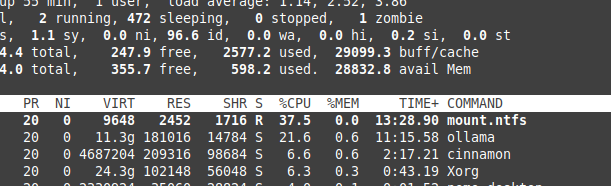
Storing files on NTFS overhead
Please be aware that if you are running linux and keeping your models on NTFS formatted partition, your models would be loading much - more then 20% slower.
Install Ollama on Windows to specific folder
Together with the models
.\OllamaSetup.exe /DIR=D:\OllamaDir
Expose Ollama API to internal network
Internal here means local network.
Add to service config:
[Service]
Environment="OLLAMA_HOST=0.0.0.0"
That exposes the plain HTTP API on your network. For automated HTTPS, correct streaming and WebSocket proxying through Caddy or Nginx, and edge hardening (timeouts, buffering, optional auth in front of the API), use Ollama behind a reverse proxy with Caddy or Nginx for HTTPS streaming.
To reach Ollama from remote devices without opening public ports, use a private overlay (Tailscale) or WireGuard; see Remote Ollama access via Tailscale or WireGuard, no public ports.
To see how Ollama fits with other local and cloud LLM options, check our LLM Hosting: Local, Self-Hosted & Cloud Infrastructure Compared guide.
Useful links
- Test: How Ollama is using Intel CPU Performance and Efficient Cores
- How Ollama Handles Parallel Requests
- LLM Performance and PCIe Lanes: Key Considerations
- LLM speed performance comparison
- Comparing LLM Summarising Abilities
- Writing effective prompts for LLMs
- Self-hosting Perplexica - with Ollama
- Ollama in Docker Compose with GPU and Persistent Model Storage
- Ollama behind a reverse proxy with Caddy or Nginx for HTTPS streaming
- Remote Ollama access via Tailscale or WireGuard, no public ports
- Cloud LLM Providers
