구조화된 출력을 활용한 LLM 제재: Ollama, Qwen3, Python 또는 Go
Ollama에서 구조화된 출력을 받는 몇 가지 방법
대규모 언어 모델(LLM) 은 강력하지만, 프로덕션 환경에서는 자유형식(paragraph) 응답을 원하는 경우가 드뭅니다. 대신, 애플리케이션에 직접 입력할 수 있는 예측 가능한 데이터, 즉 속성, 사실 또는 구조화되어 객체를 원합니다. 이것이 바로 LLM 구조화 출력입니다.
Schema 강제 적용은 잘못된 logits가 유효하지 않은 JSON으로 변환되는 빈도를 줄여주지만, 재시도 폭풍(retry storms)을 피하려면 temperature와 penalty 설정이 여전히 중요합니다. 에이전트와 format 제약을 함께 사용할 때는 Qwen 및 Gemma를 위한 에이전틱 추론 파라미터를 참고하십시오.
서비스 계층은 여전히 파싱-정규화-검증(parse-normalize-validate) 로직이 필요합니다. format이 설정되어 있어도 Ollama와 클라이언트가 정확한 문자열에 대해 의견이 다를 수 있기 때문입니다. 자세한 내용은 견고한 Python LLM 구조화 출력 검증을 참고하세요.
얼마 전 Ollama에서 구조화 출력 지원 기능이 도입되었습니다(공지). 이를 통해 모델의 응답을 JSON 스키마에 맞게 제약할 수 있게 되었습니다. 이로써 LLM 기능 카탈로그 관리, 모델 벤치마킹, 시스템 통합 자동화 등 다양한 작업에 일관된 데이터 추출 파이프라인을 구성할 수 있습니다.

이 글에서는 다음 내용을 다루겠습니다:
- 구조화 출력이 무엇이고 왜 중요한지
- LLM에서 구조화 출력을 얻는 간단한 방법
- Ollama의 새로운 기능이 작동하는 원리
- LLM 기능 추출 예제:
구조화 출력이란?
보통 LLM은 자유 텍스트를 생성합니다:
“Model X는 체인 오브 스코스(chain-of-thought) 추론을 지원하고, 200K 컨텍스트 윈도우를 가지며, 영어, 중국어, 스페인어를 지원합니다.”
읽기에는 쉽지만, 파싱하기는 어렵습니다.
대신 구조화 출력을 사용하면 엄격한 스키마를 요청할 수 있습니다:
{
  "name": "Model X",
  "supports_thinking": true,
  "max_context_tokens": 200000,
  "languages": ["English", "Chinese", "Spanish"]
}
이 JSON은 검증하기 쉽고, 데이터베이스에 저장하거나 UI에 전달하기 용이합니다.
LLM에서 구조화 출력을 얻는 간단한 방법
LLM은 스키마를 이해하는 경우가 있으며, 특정 스키마에 맞춰 JSON 형식으로 출력을 반환하도록 LLM에 요청할 수 있습니다. Alibaba의 Qwen3 모델은 추론 및 구조화된 응답에 최적화되어 있습니다. JSON으로 응답하도록 명시적으로 지시할 수 있습니다.
예제 1: ollama을 사용하여 Python에서 Qwen3와 함께 스키마가 포함된 JSON 요청하기
import json
import ollama

prompt = """
You are a structured data extractor.
Return JSON only.
Text: "Elon Musk is 53 and lives in Austin."
Schema: { "name": string, "age": int, "city": string }
"""

response = ollama.chat(model="qwen3", messages=[{"role": "user", "content": prompt}])
output = response['message']['content']

# Parse JSON
try:
    data = json.loads(output)
    print(data)
except Exception as e:
    print("Error parsing JSON:", e)
출력:
{"name": "Elon Musk", "age": 53, "city": "Austin"}
Pydantic을 활용한 스키마 검증 강제 적용
잘못된 형식의 출력을 방지하려면 Python에서 Pydantic 스키마에 대해 검증을 수행할 수 있습니다.
from pydantic import BaseModel

class Person(BaseModel):
    name: str
    age: int
    city: str

# 'output'이 Qwen3에서 반환된 JSON 문자열이라고 가정합니다
data = Person.model_validate_json(output)
print(data.name, data.age, data.city)
이것은 출력이 예상된 구조를 따르는지 보장합니다.
Ollama의 구조화 출력
이제 Ollama는 format 파라미터에 스키마를 전달할 수 있습니다. 모델은 해당 스키마를 준수하는 JSON 형식으로만 응답하도록 제약됩니다(문서).
Python에서는 보통 Pydantic으로 스키마를 정의하고, Ollama가 이를 JSON 스키마로 사용하도록 합니다.
예제 2: LLM 기능 메타데이터 추출
LLM의 기능을 설명하는 텍스트 조각이 있다고 가정해 봅시다:
“Qwen3는 강력한 다국어 지원(영어, 중국어, 프랑스어, 스페인어, 아랍어)을 제공합니다. 추론 단계(chain-of-thought)를 허용합니다. 컨텍스트 윈도우는 128K 토큰입니다.”
구조화된 데이터가 필요합니다:
from pydantic import BaseModel
from typing import List
from ollama import chat

class LLMFeatures(BaseModel):
    name: str
    supports_thinking: bool
    max_context_tokens: int
    languages: List[str]

prompt = """
Analyze the following description and return the model’s features in JSON only.
Model description:
'Qwen3 has strong multilingual support (English, Chinese, French, Spanish, Arabic).
It allows reasoning steps (chain-of-thought).
The context window is 128K tokens.'
"""

resp = chat(
    model="qwen3",
    messages=[{"role": "user", "content": prompt}],
    format=LLMFeatures.model_json_schema(),
    options={"temperature": 0},
)

print(resp.message.content)
가능한 출력:
{
  "name": "Qwen3",
  "supports_thinking": true,
  "max_context_tokens": 128000,
  "languages": ["English", "Chinese", "French", "Spanish", "Arabic"]
}
예제 3: 여러 모델 비교
여러 모델의 설명을 입력하여 구조화된 형태로 추출합니다:
from typing import List

class ModelComparison(BaseModel):
    models: List[LLMFeatures]

prompt = """
Extract features of each model into JSON.

1. Llama 3.1 supports reasoning. Context window is 128K. Languages: English only.
2. GPT-4 Turbo supports reasoning. Context window is 128K. Languages: English, Japanese.
3. Qwen3 supports reasoning. Context window is 128K. Languages: English, Chinese, French, Spanish, Arabic.
"""

resp = chat(
    model="qwen3",
    messages=[{"role": "user", "content": prompt}],
    format=ModelComparison.model_json_schema(),
    options={"temperature": 0},
)

print(resp.message.content)
출력:
{
  "models": [
    {
      "name": "Llama 3.1",
      "supports_thinking": true,
      "max_context_tokens": 128000,
      "languages": ["English"]
    },
    {
      "name": "GPT-4 Turbo",
      "supports_thinking": true,
      "max_context_tokens": 128000,
      "languages": ["English", "Japanese"]
    },
    {
      "name": "Qwen3",
      "supports_thinking": true,
      "max_context_tokens": 128000,
      "languages": ["English", "Chinese", "French", "Spanish", "Arabic"]
    }
  ]
}
이렇게 하면 기능을 기준으로 모델을 벤치마크, 시각화하거나 필터링하는 것이 매우 쉬워집니다.
예제 4: 누락된 값 자동 감지
필드가 누락된 경우에도 null 값을 허용할 수 있습니다:
from typing import Optional

class FlexibleLLMFeatures(BaseModel):
    name: str
    supports_thinking: Optional[bool]
    max_context_tokens: Optional[int]
    languages: Optional[List[str]]
이것은 일부 정보가 알려지지 않은 경우에도 스키마가 유효하게 유지되도록 보장합니다.
이점, 주의사항 및 모범 사례
Ollama(또는 이를 지원하는 어떤 시스템이든)를 통해 구조화 출력을 사용하면 많은 이점이 있습니다. 그러나 몇 가지 주의사항도 있습니다.
이점
- 더 강한 보장: 모델은 자유형식 텍스트가 아니라 JSON 스키마에 따르도록 요청됩니다.
- 더 쉬운 파싱: 정규식이나 휴리스틱 대신 Pydantic / Zod로 직접
json.loads또는 검증을 수행할 수 있습니다. - 스키마 기반 진화: 스키마의 버전을 관리하고, 필드를(기본값과 함께) 추가하며, 하위 호환성을 유지할 수 있습니다.
- 상호 운용성: 다운스트림 시스템은 구조화된 데이터를 기대합니다.
- 결정론(저온도일 때 더 좋음): 온도가 낮을 때(예: 0), 모델은 스키마를 더 엄격하게 따를 가능성이 높아집니다. Ollama 문서에서도 이를 권장합니다.
주의사항 및 함정
- 스키마 불일치: 모델은 여전히 이탈할 수 있습니다. 예를 들어, 필수 프로퍼티를 놓치거나, 키 순서를 바꾸거나, 추가 필드를 포함할 수 있습니다. 검증이 필요합니다.
- 복잡한 스키마: 매우 깊거나 재귀적인 JSON 스키마는 혼란을 주거나 실패를 초래할 수 있습니다.
- 프롬프트의 모호함: 프롬프트가 모호하면 모델이 필드나 단위를 잘못 추측할 수 있습니다.
- 모델 간 일관성 부족: 일부 모델은 구조화 제약을 준수하는 데 더 잘하거나 더 못할 수 있습니다.
- 토큰 한계: 스키마 자체도 프롬프트나 API 호출에 토큰 비용을 추가합니다.
모범 사례 및 팁 (Ollama 블로그 및 경험 기반)
- Pydantic (Python) 또는 **Zod (JavaScript)**를 사용하여 스키마를 정의하고 JSON 스키마를 자동으로 생성하세요. 이를 통해 수동 오류를 방지할 수 있습니다.
- 프롬프트에 “JSON으로만 응답하세요” 또는 **“설명이나 추가 텍스트를 포함하지 마세요”**와 같은 지침을 항상 포함하세요.
- 랜덤성을 최소화하고 스키마 준수율을 극대화하기 위해 temperature = 0(또는 매우 낮은 값)을 사용하세요. Ollama는 결정론을 권장합니다.
- JSON 파싱이 실패하거나 스키마 검증이 실패할 경우 검증하고 잠재적으로 폴백(예: 재시도 또는 정리) 처리하세요.
- 더 간단한 스키마로 시작하여 점차 확장하세요. 처음부터 너무 복잡하게 만들지 마세요.
- 유용하지만 제약을 가진 오류 지시사항을 포함하세요. 예: 모델이 필수 필드를 채울 수 없다면, (스키마가 허용하는 경우) 생략하기보다
null로 응답하도록 하세요.
Go 예제 1: LLM 기능 추출
이것은 LLM의 기능에 대해 Qwen3에게 구조화 출력을 요청하는 간단한 Go 프로그램입니다.
package main

import (
	"context"
	"encoding/json"
	"fmt"
	"log"

	"github.com/ollama/ollama/api"
)

type LLMFeatures struct {
	Name             string   `json:"name"`
	SupportsThinking bool     `json:"supports_thinking"`
	MaxContextTokens int      `json:"max_context_tokens"`
	Languages        []string `json:"languages"`
}

func main() {
	client, err := api.ClientFromEnvironment()
	if err != nil {
		log.Fatal(err)
	}

	prompt := `
  Analyze the following description and return the model’s features in JSON only.
  Description:
  "Qwen3 has strong multilingual support (English, Chinese, French, Spanish, Arabic).
  It allows reasoning steps (chain-of-thought).
  The context window is 128K tokens."
  `

	// Define the JSON schema for structured output
	formatSchema := map[string]any{
		"type": "object",
		"properties": map[string]any{
			"name": map[string]string{
				"type": "string",
			},
			"supports_thinking": map[string]string{
				"type": "boolean",
			},
			"max_context_tokens": map[string]string{
				"type": "integer",
			},
			"languages": map[string]any{
				"type": "array",
				"items": map[string]string{
					"type": "string",
				},
			},
		},
		"required": []string{"name", "supports_thinking", "max_context_tokens", "languages"},
	}

	// Convert schema to JSON
	formatJSON, err := json.Marshal(formatSchema)
	if err != nil {
		log.Fatal("Failed to marshal format schema:", err)
	}

	req := &api.GenerateRequest{
		Model:   "qwen3:8b",
		Prompt:  prompt,
		Format:  formatJSON,
		Options: map[string]any{"temperature": 0},
	}

	var features LLMFeatures
	var rawResponse string
	err = client.Generate(context.Background(), req, func(response api.GenerateResponse) error {
		// Accumulate content as it streams
		rawResponse += response.Response

		// Only parse when the response is complete
		if response.Done {
			if err := json.Unmarshal([]byte(rawResponse), &features); err != nil {
				return fmt.Errorf("JSON parse error: %v", err)
			}
		}
		return nil
	})
	if err != nil {
		log.Fatal(err)
	}

	fmt.Printf("Parsed struct: %+v\n", features)
}
이 예제 Go 프로그램을 컴파일하고 실행하려면, ollama-struct 폴더에 main.go 파일이 있다고 가정해 봅시다.
이 폴더 안에서 다음을 실행해야 합니다:
# initialise module
go mod init ollama-struct
# pull all the dependencise
go mod tidy
# build & execute
go build -o ollama-struct main.go
./ollama-struct
예제 출력
Parsed struct: {Name:Qwen3 SupportsThinking:true MaxContextTokens:128000 Languages:[English Chinese French Spanish Arabic]}
Go 예제 2: 여러 모델 비교
모델 목록을 추출하여 비교하도록 확장할 수 있습니다.
  type ModelComparison struct {
		Models []LLMFeatures `json:"models"`
	}

	prompt = `
	Extract features from the following model descriptions and return as JSON:

	1. PaLM 2: This model has limited reasoning capabilities and focuses on basic language understanding. It supports a context window of 8,000 tokens. It primarily supports English language only.
	2. LLaMA 2: This model has moderate reasoning abilities and can handle some logical tasks. It can process up to 4,000 tokens in its context. It supports English, Spanish, and Italian languages.
	3. Codex: This model has strong reasoning capabilities specifically for programming and code analysis. It has a context window of 16,000 tokens. It supports English, Python, JavaScript, and Java languages.

	Return a JSON object with a "models" array containing all models.
	`

	// Define the JSON schema for model comparison
	comparisonSchema := map[string]any{
		"type": "object",
		"properties": map[string]any{
			"models": map[string]any{
				"type": "array",
				"items": map[string]any{
					"type": "object",
					"properties": map[string]any{
						"name": map[string]string{
							"type": "string",
						},
						"supports_thinking": map[string]string{
							"type": "boolean",
						},
						"max_context_tokens": map[string]string{
							"type": "integer",
						},
						"languages": map[string]any{
							"type": "array",
							"items": map[string]string{
								"type": "string",
							},
						},
					},
					"required": []string{"name", "supports_thinking", "max_context_tokens", "languages"},
				},
			},
		},
		"required": []string{"models"},
	}

	// Convert schema to JSON
	comparisonFormatJSON, err := json.Marshal(comparisonSchema)
	if err != nil {
		log.Fatal("Failed to marshal comparison schema:", err)
	}

	req = &api.GenerateRequest{
		Model:   "qwen3:8b",
		Prompt:  prompt,
		Format:  comparisonFormatJSON,
		Options: map[string]any{"temperature": 0},
	}

	var comp ModelComparison
	var comparisonResponse string
	err = client.Generate(context.Background(), req, func(response api.GenerateResponse) error {
		// Accumulate content as it streams
		comparisonResponse += response.Response

		// Only parse when the response is complete
		if response.Done {
			if err := json.Unmarshal([]byte(comparisonResponse), &comp); err != nil {
				return fmt.Errorf("JSON parse error: %v", err)
			}
		}
		return nil
	})
	if err != nil {
		log.Fatal(err)
	}

	for _, m := range comp.Models {
		fmt.Printf("%s: Context=%d, Languages=%v\n", m.Name, m.MaxContextTokens, m.Languages)
	}
예제 출력
PaLM 2: Context=8000, Languages=[English]
LLaMA 2: Context=4000, Languages=[English Spanish Italian]
Codex: Context=16000, Languages=[English Python JavaScript Java]
참고로, qwen3:4b는 이 예제들에서 qwen3:8b와 동일하게 잘 작동합니다.
Go 개발자를 위한 모범 사례
- 최대 스키마 준수를 위해 temperature를 0으로 설정하세요.
json.Unmarshal로 검증하고, 파싱이 실패하면 폴백 처리하세요.- 스키마를 단순하게 유지하세요. 깊게 중첩되거나 재귀적인 JSON 구조는 문제를 일으킬 수 있습니다.
- 누락된 데이터가 예상되는 경우 선택 필드 허용 (Go struct 태그에서
omitempty사용). - 모델이 가끔 잘못된 JSON을 출력할 경우를 대비하여 재시도 추가.
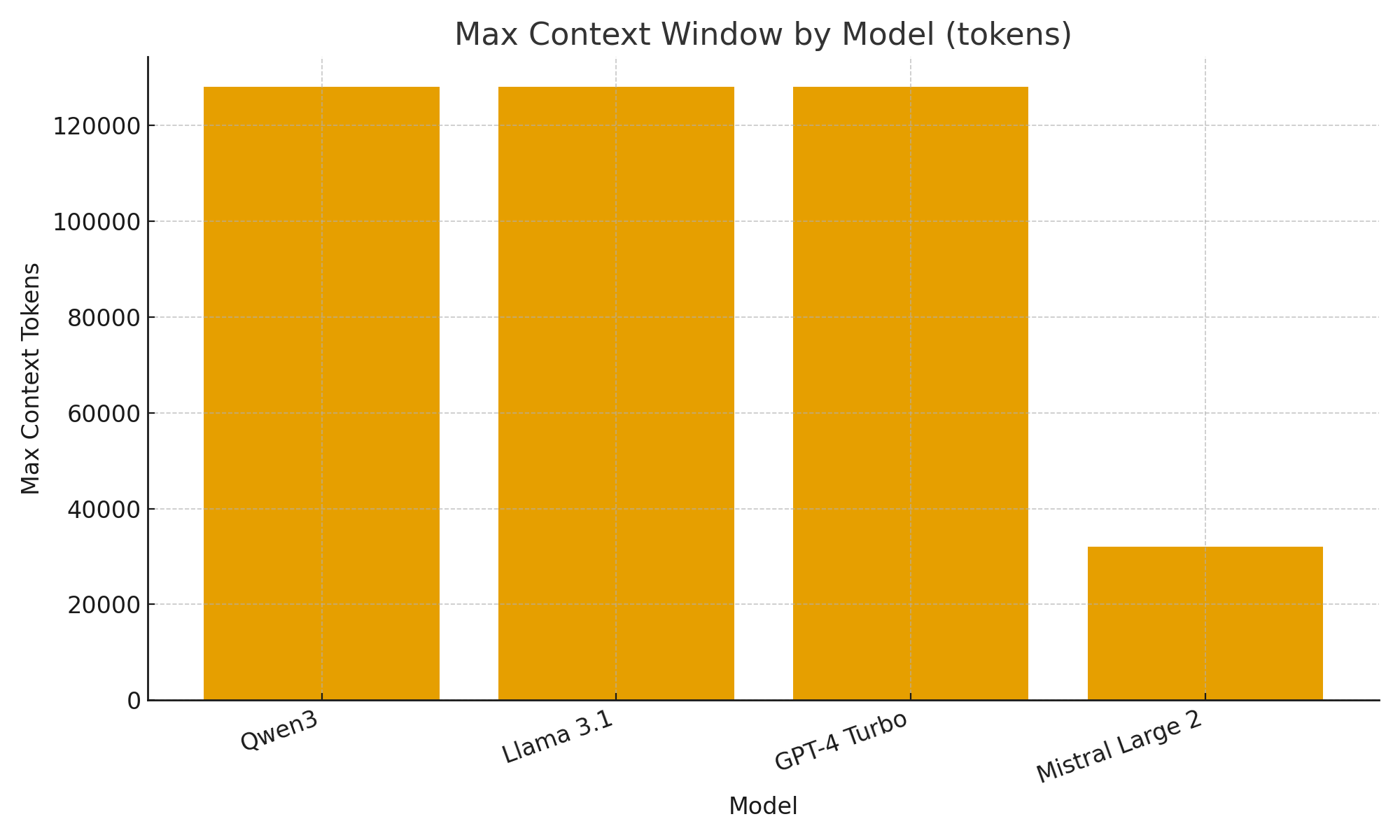
전체 예제 - LLM 스펙으로 차트 그리기 (단계별: 구조화된 JSON부터 비교 테이블까지)
- 원하는 데이터에 대한 스키마 정의
Pydantic을 사용하면 (a) Ollama를 위한 JSON 스키마를 생성하고 (b) 모델의 응답을 검증할 수 있습니다.
from pydantic import BaseModel
from typing import List, Optional

class LLMFeatures(BaseModel):
    name: str
    supports_thinking: bool
    max_context_tokens: int
    languages: List[str]
- Ollama에 해당 형태에 대한 JSON만 반환하도록 요청
format=에 스키마를 전달하고 결정론을 위해 temperature를 낮춥니다.
from ollama import chat

prompt = """
Extract features for each model. Return JSON only matching the schema.
1) Qwen3 supports chain-of-thought; 128K context; English, Chinese, French, Spanish, Arabic.
2) Llama 3.1 supports chain-of-thought; 128K context; English.
3) GPT-4 Turbo supports chain-of-thought; 128K context; English, Japanese.
"""

resp = chat(
    model="qwen3",
    messages=[{"role": "user", "content": prompt}],
    format={"type": "array", "items": LLMFeatures.model_json_schema()},
    options={"temperature": 0}
)

raw_json = resp.message.content  # JSON list of LLMFeatures
- 검증 및 정규화
프로덕션에서 사용하기 전에 항상 검증하세요.
from pydantic import TypeAdapter

adapter = TypeAdapter(list[LLMFeatures])
models = adapter.validate_json(raw_json)  # -> list[LLMFeatures]
- 비교 테이블 만들기 (pandas)
검증된 객체를 정렬/필터링 및 내보낼 수 있는 DataFrame으로 변환합니다.
import pandas as pd

df = pd.DataFrame([m.model_dump() for m in models])
df["languages_count"] = df["languages"].apply(len)
df["languages"] = df["languages"].apply(lambda xs: ", ".join(xs))

# Reorder columns for readability
df = df[["name", "supports_thinking", "max_context_tokens", "languages_count", "languages"]]

# Save as CSV for further use
df.to_csv("llm_feature_comparison.csv", index=False)
- (선택) 빠른 시각화
단순한 차트는 모델 간 차이를 빠르게 확인하는 데 도움이 됩니다.
import matplotlib.pyplot as plt

plt.figure()
plt.bar(df["name"], df["max_context_tokens"])
plt.title("Max Context Window by Model (tokens)")
plt.xlabel("Model")
plt.ylabel("Max Context Tokens")
plt.xticks(rotation=20, ha="right")
plt.tight_layout()
plt.savefig("max_context_window.png")
요약 (TL;DR)
Ollama의 새로운 구조화 출력 지원을 통해 LLM을 단순히 챗봇이 아닌 데이터 추출 엔진으로 취급할 수 있습니다.
위 예제들은 추론 지원, 컨텍스트 윈도우 크기, 지원 언어와 같은 LLM 기능에 대한 구조화된 메타데이터를 어떻게 자동 추출하는지 보여주었습니다. 그렇지 않으면 취약한 파싱이 필요했을 작업들이죠.
LLM 모델 카탈로그, 평가 대시보드, 또는 AI 기반 연구 비서를 구축하고 있든, 구조화된 출력은 통합을 매끄럽고, 신뢰할 수 있으며, 프로덕션 대비 가능한 상태로 만들어 줍니다.
