
Airtable for Developers & DevOps - Plans, API, Webhooks, and Go/Python Examples
Airtable - Free plan limits, API, webhooks, Go & Python.
Airtable is best thought of as a low‑code application platform built around a collaborative “database-like” spreadsheet UI - excellent for rapidly creating operational tooling (internal trackers, lightweight CRMs, content pipelines, AI evaluation queues) where non-developers need a friendly interface, but developers also need an API surface for automation and integration.
Airtable’s own materials describe the Web API as RESTful, using JSON, and standard HTTP status codes.
The two constraints that most strongly shape engineering decisions are:
The Free plan’s hard ceilings: 1,000 records per base, 1,000 API calls per workspace per month, 1 GB attachment storage per base, and only two weeks revision/snapshot history.
These numbers are low enough that you should treat “Free Airtable” as a prototype, demo, hobby project, or very small internal workflow, not as a production datastore queried continuously by services.
The public Web API rate limits: Airtable enforces 5 requests/second per base and also 50 requests/second for all traffic using personal access tokens from a given user or service account. If you exceed these, you’ll receive HTTP 429 and (per Airtable guidance) must wait ~30 seconds before retrying.
The consequence is architectural: batch wherever possible, cache reads, prefer webhooks over polling for change detection, and build retry/backoff into every client.
If you want Airtable in a custom-made system, an effective “DevOps + backend” production pattern is:
Airtable as the operational UI + lightweight source of truth for a bounded dataset (routing rules, human review queues, editorial plans, customer onboarding steps).
A separate system (PostgreSQL/warehouse/object storage) as the durable primary store for scale, auditing, backups, analytics, and higher-QPS reads/writes.
A sync layer that pulls pages of records (offset pagination), pushes changes in batches, and optionally uses Airtable Webhooks to reduce polling.
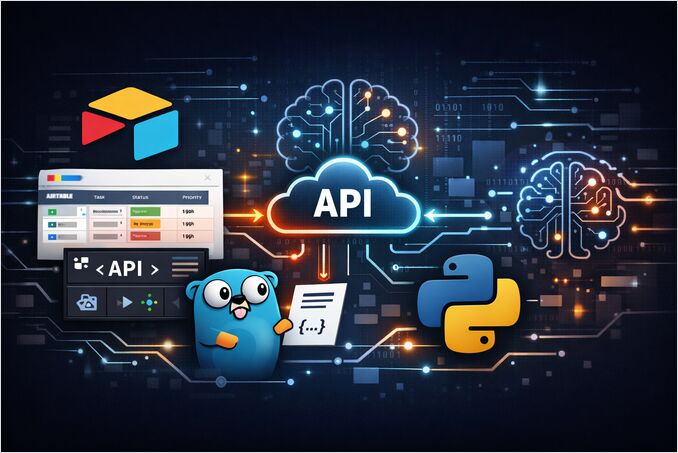
For the broader picture-object storage, PostgreSQL, Elasticsearch, and AI-native data layers-see the Data Infrastructure for AI Systems article.
What is Airtable and why developers use it as a low-code database
Airtable’s core abstraction is the base: a container for related tables and workflow artefacts (views, interfaces, automations). In practice, a base often maps to a business domain boundary - Content Ops, Incident Postmortems, LLM Evaluations, Customer Requests.
Within a base, you model data as:
Tables: analogous to entities/collections.
Records: rows.
Fields: columns with rich types (selects, attachments, links, formulas, etc.).
You then create multiple “lenses” over the same table using views-filtered/sorted/grouped representations optimised for specific tasks. Airtable’s documentation emphasises that views help you “see the records most relevant to you” and can be customised for different consumers.
Developers reach for Airtable when they need:
A human-friendly UI for business users to create/update operational data quickly (without waiting for a custom admin app).
A programmable backend surface via the Airtable Web API for ingestion, syncing, and automation. The API uses REST semantics and JSON, making it straightforward to integrate from Go/Python services.
Gluing together SaaS/workflows via integrations and automations, where some steps can be implemented entirely in Airtable and others are handled in code. Airtable automations are described as trigger-action workflows (e.g., “when record created → send message / update record / run script”).
Airtable is particularly productive for DevOps + AI teams when used as:
A change-controlled configuration table: e.g., feature flag metadata, service ownership, escalation paths, deployment approvals.
A human review queue: e.g., LLM outputs awaiting validation, safety triage, prompt iteration tasks.
A metadata index for assets that live elsewhere: S3 URIs, Git commit SHAs, dataset IDs-minimising attachment storage pressure on Airtable itself (important on Free).
Airtable core features: bases, tables, fields, views, interfaces, extensions, automations and integrations
Airtable’s “power” isn’t just tables; it’s the surrounding workflow surface that makes a base behave like a lightweight app platform.
Bases and tables for structured collaboration
A base is where teams co-own structured data and process state. The practical engineering implication is schema governance: if business users can rename fields or tables, your API clients can break unless you design for change.
Two tactics reduce breakage:
Use stable IDs in code where possible. Airtable explicitly notes for record updates that table names and table IDs can be used interchangeably, and recommends table IDs so you don’t need to change requests when names change.
Document “API-coupled fields” in field descriptions and treat changes as controlled events (PR review / change request).
Views and workflow “lenses”
Views let you filter/sort/group records for specific processes (triage view, “needs review”, “ready to ship”). Airtable highlights views as the mechanism to show only the “most relevant” subsets of records for different users.
From an integration perspective, you can design a view as a stable contract: your sync job reads only records in the “Export” view, for example, instead of trying to replicate all filtering logic in code. (The API also supports selecting records by view and via formula filters; see the API section below.)
Extensions, apps marketplace, and “bring your own tooling”
Airtable supports “Extensions” (previously “Blocks”), which add capabilities inside the base (charts, scripts, imports, etc.). Airtable’s own overview frames Extensions as add-ons built by Airtable and third parties.
Critically, Extensions are not supported on the Free plan, so any workflow that depends on them starts at Team or above.
Automations: triggers, actions, and scripting for integration glue
Automations are trigger-action workflows: Airtable lists triggers including “when a record is created/updated”, “when a record enters a view”, scheduled time triggers, and “when a webhook is received”, among others.
Actions include creating/updating records, sending messages, and (importantly for developers) running code: the “Run a script” action runs scripts “in the background of the base” and is positioned as the right choice for scripts you want executed automatically.
However, “Run a script” is explicitly marked as unavailable on the Free plan, which matters if your architecture assumption is “use Airtable automations to call our internal APIs.”
Web API and integrations as the engineering interface
Airtable’s Web API enables external systems to read/write records using standard HTTP calls. Airtable documentation gives concrete URL patterns such as:
https://api.airtable.com/v0/{your_app_id}/Flavors?filterByFormula=Rating%3D5 (example for formula filtering).
Airtable also provides a metadata layer (useful for DevOps “configuration as code” patterns), including listing bases via GET https://api.airtable.com/v0/meta/bases and creating a base via POST https://api.airtable.com/v0/meta/bases (requires schema scopes).
Authentication-wise, Airtable has moved away from legacy API keys: its official deprecation timeline includes API key deprecation effective February 1, 2024.
Airtable pricing plans and the Free plan limits for developers
Airtable’s plan names and entitlements change over time, but Airtable’s current plans documentation provides explicit, engineering-relevant quotas and constraints.
Airtable plans table: key limits that impact API integrations
| Plan (self-serve unless noted) | Records per base | API calls per workspace / month | Attachment storage per base | Revision/snapshot history | Notable constraints / notes |
|---|---|---|---|---|---|
| Free | 1,000 | 1,000 | 1 GB | 2 weeks | No Extensions; additional UI limitations; collaborator limits; includes AI credits per editor+ |
| Team | 50,000 | 100,000 | 20 GB | 1 year | Includes Automations, Extensions, Forms, Interface Designer, Timeline/Gantt, locked/personal views, and more |
| Business | 125,000 | Unlimited | 100 GB | 1 year | Includes Two-way sync and Admin panel (and requires private email domains) |
| Enterprise Scale (sales-led) | (varies) | (varies) | (varies) | (varies) | Sold/managed by sales; Business/Enterprise require private email domains |
Team and Business plan pricing in Airtable’s plans documentation is listed per collaborator (monthly vs annual billing).
Free plan deep dive: limits and practical implications for DevOps and backend systems
On Free, you get:
1,000 records per base.
This is the first “architecture forcing function”: once you exceed ~1k records for a domain, you either shard into multiple bases (which complicates integrations), archive aggressively, or move the primary dataset elsewhere (Postgres/warehouse) and keep only “active” operational slices in Airtable.
1,000 API calls per workspace per month.
This is low enough that naïve sync strategies (poll every minute) will burn quota quickly. Airtable’s API call limits guide explicitly describes the API as RESTful and calls out that list-record operations return pages of up to 100; if you poll repeatedly, you can exhaust monthly calls rapidly.
A Free plan integration should therefore default to:
event-driven updates via webhooks (when feasible),
or user-driven/manual sync,
or a very low-frequency batch job (daily),
plus caching to avoid repeated reads. Airtable explicitly recommends caching/proxy approaches as a strategy to manage rate limits.
1 GB attachment storage per base.
For AI/LLM workflows, this is a trap if you store PDFs, images, or datasets as attachments. Prefer storing attachments in object storage and keep only URLs and metadata in Airtable.
2 weeks of revision/snapshot history.
From a DevOps risk lens, limited history reduces your ability to recover from accidental bulk changes. If Airtable is operationally critical, you should implement external backups/snapshots (API export jobs) rather than relying on revision history alone.
Free also has collaboration limits and feature removals that matter to delivery:
Unlimited read-only collaborators, but only 5 collaborators with Editor/Creator permissions and 50 Commenters.
No Extensions on Free.
Some automation capabilities are restricted: the “Run a script” action is marked unavailable on Free.
Airtable alternatives and competitors: Notion vs Google Sheets vs Coda vs ClickUp vs PostgreSQL + UI
Airtable isn’t the default answer for every “tables + workflow” use case. The right choice depends on whether your primary need is:
a database-like operational store with UI (Airtable / Coda),
a document-first workspace with databases embedded (Notion),
pure spreadsheet compatibility (Google Sheets),
task/project management (ClickUp),
or a true backend datastore with a purpose-built admin UI (PostgreSQL + Retool/Appsmith/etc.).
Competitor comparison table: engineering tradeoffs (API, UI, scale)
| Tool | Best at | Typical limits/rate limiting model | Key tradeoffs vs Airtable | |—|—|—| | Notion | Doc-centric knowledge + databases embedded in docs | Notion API is rate limited and enforces request size/basic limits. | Excellent for docs/RAG inputs and narrative workflows; databases are powerful but often less “ops-table” focused than Airtable; integration patterns differ (needs explicit sharing to integrations). | | Google Sheets | Spreadsheet interoperability, formulas, broad ecosystem | Sheets API has per-minute quotas; Google documents quota behaviour and recommends ~2 MB payloads. | Great when you need spreadsheet semantics and compatibility; harder to build app-like experiences (permissions, forms, relational linking) without additional tooling. | | Coda | Doc + table hybrid with “packs” and automation | Coda publishes that its API rate limits and returns 429 when limits are reached; recommends backing off and retrying. | Strong doc/table fusion; if you want Airtable-style base-first operational apps, Airtable’s model may feel clearer; rate limits and doc limits vary by plan. | | ClickUp | Task/project management | ClickUp applies per-token rate limits and varies limits by workspace plan (e.g., 100 req/min/token on lower tiers, higher on others). | Best when “tasks” are primary; using it as a general database is awkward; strong for workflow but weaker for arbitrary schema modelling. | | PostgreSQL + UI (Retool/Appsmith/custom) | Durable system of record, strong consistency, scale | Depends on your infra; no SaaS-imposed “5 QPS per base” type ceiling | More engineering work up front; but best for high-QPS, strict correctness, auditing, complex queries, and long-term maintainability-then add an admin UI for non-dev users. |
A useful rule: if you foresee high-frequency reads/writes, complex query needs, or strict change control, you typically want “Postgres-first.” If you foresee heavy non-dev editing and rapid workflow iteration, Airtable is compelling-especially for internal tools-so long as you design around API and plan limits.
Airtable DevOps patterns and end-to-end API integration with Go and Python
This section gives a complete, production-minded path from configuration → secure auth → CRUD clients → pagination → rate-limit handling → batching → webhooks → deployment notes.
SEO integration diagram: Airtable API architecture for DevOps-friendly systems
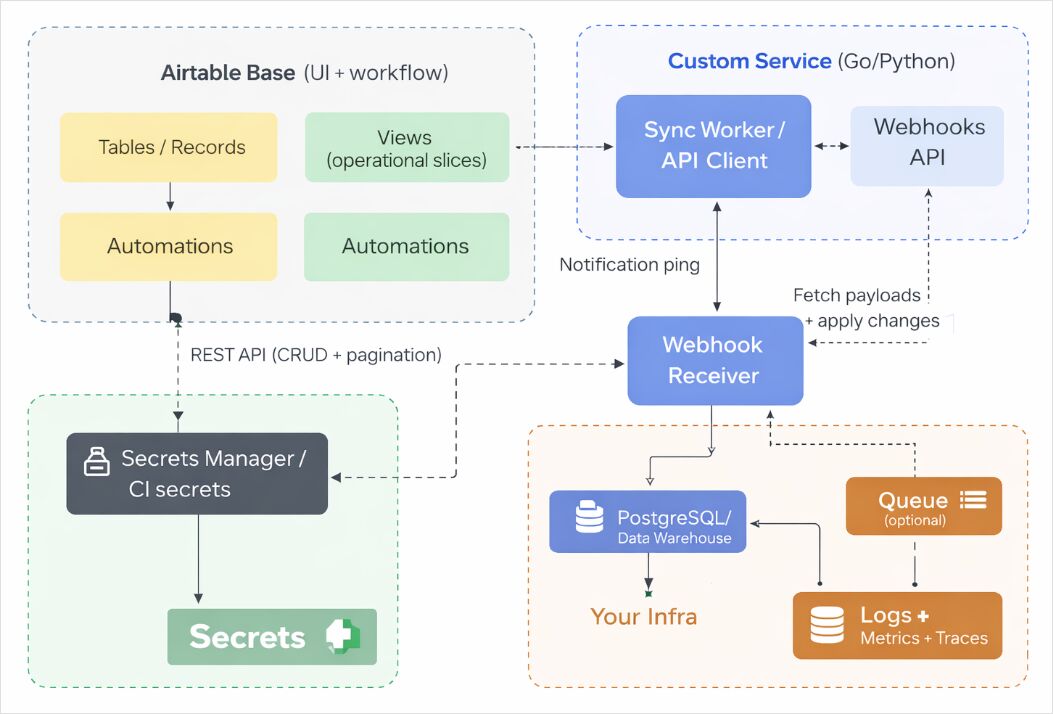
Configuration and authentication: stable IDs, tokens, and least privilege
Prefer table IDs in code to reduce breaking changes
Airtable notes that table names and table IDs can be used interchangeably and recommends table IDs to avoid request changes when names change.
In practice, this is one of the highest leverage “Ops hygiene” decisions you can make for an Airtable-backed integration.
To locate IDs, Airtable provides guidance on finding base and table IDs from URLs (and via API docs).
Use Personal Access Tokens (PATs), not legacy API keys
Airtable’s official deprecation list includes “February 1st, 2024 - API key deprecation.”
PATs are described by Airtable as allowing you to create multiple tokens with different scopes-from narrow (single scope + single base) to broad (all workspaces/bases/scopes permitted by the user).
The operational best practice is: create multiple PATs per integration surface (e.g., one token for read-only sync, another for write paths) and rotate them like any other secret.
For enterprise-style resiliency (integration shouldn’t die when an employee leaves), Airtable describes service accounts designed for API integrations, independent of any specific user.
Minimal environment variables for both Go and Python examples
# Required
export AIRTABLE_TOKEN="pat_xxx..."          # Personal Access Token
export AIRTABLE_BASE_ID="appXXXXXXXXXXXXXX" # Base ID
export AIRTABLE_TABLE="tblYYYYYYYYYYYYYY"   # Prefer table ID; table name also works

# Optional (filters/behaviour)
export AIRTABLE_PAGE_SIZE="100"             # 100 is max for list records
export AIRTABLE_TIMEOUT_SECONDS="30"
API fundamentals that shape client design: pagination, rate limits, batching
Pagination: list records returns up to 100 records per request
Airtable documents that “list records” responses are paged up to 100 records at a time; if the table has more than 100, you must make multiple requests and use the returned offset as the next request’s query parameter.
The pageSize parameter can reduce the page size, but 100 is the maximum.
Filtering and sorting: filterByFormula and sort query parameters
Airtable provides concrete examples of using filterByFormula and sort[...] parameters, including a canonical URL shape like:
https://api.airtable.com/v0/{your_app_id}/Flavors?filterByFormula=Rating%3D5
Rate limits and retry strategy: treat 429 as normal
Airtable’s API call limits documentation states:
5 requests per second per base,
50 requests per second per user/service account using PAT traffic,
and if exceeded you get a 429 and must wait 30 seconds before subsequent requests succeed.
Airtable’s troubleshooting guide reinforces that 429 can mean you exceeded the 5 req/base/sec rate limit and advises waiting before retrying.
Batching: design around “up to 10 records per request”
Airtable explicitly documents batching as a rate-limit strategy: the API “supports batching,” handling “up to 10 records per request.”
And Airtable’s “Update multiple records” endpoint demonstrates the batch request shape (records: [...]) and also supports performUpsert with fieldsToMergeOn.
SEO sequence diagram: Airtable API call sequence for list → paginate → batch update → webhook payload fetch
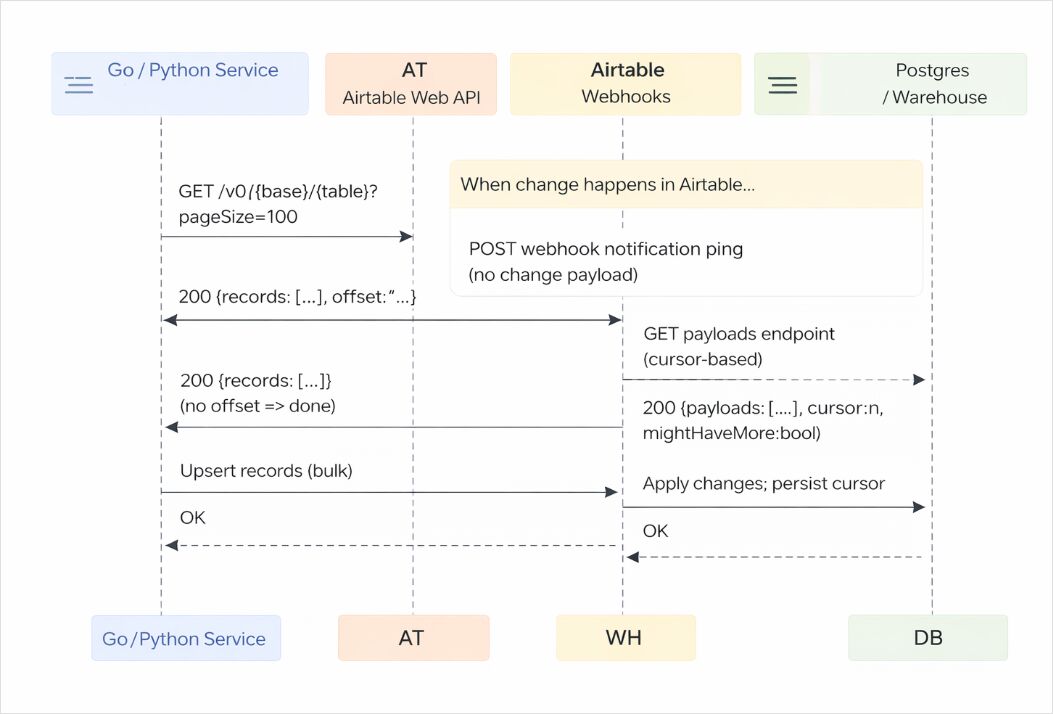
Go example: production-ready Airtable REST client with pagination, retries and batching
This Go program demonstrates:
PAT authentication via Authorization: Bearer ... (Bearer auth is required).
List records pagination using offset and pageSize (100 max).
Rate-limit handling for 429 with Retry-After fallback and Airtable’s “wait 30 seconds” guidance.
Batch update using the official PATCH https://api.airtable.com/v0/{baseId}/{tableIdOrName} shape.
Single-record update endpoint shape (PATCH/PUT semantics).
Filtering example (filterByFormula) URL pattern.
Run requirements: Go 1.21+ recommended; set
AIRTABLE_TOKEN,AIRTABLE_BASE_ID,AIRTABLE_TABLE.
// File: main.go
package main

import (
	"bytes"
	"context"
	"encoding/json"
	"errors"
	"fmt"
	"io"
	"net/http"
	"net/url"
	"os"
	"strconv"
	"time"
)

type AirtableClient struct {
	BaseID     string
	Token      string
	HTTPClient *http.Client
}

type airtableError struct {
	Error interface{} `json:"error"`
}

type Record struct {
	ID          string                 `json:"id"`
	CreatedTime string                 `json:"createdTime,omitempty"`
	Fields      map[string]interface{} `json:"fields"`
}

type listRecordsResponse struct {
	Records []Record `json:"records"`
	Offset  string   `json:"offset,omitempty"`
}

func mustEnv(key string) string {
	v := os.Getenv(key)
	if v == "" {
		fmt.Fprintf(os.Stderr, "missing env var: %s\n", key)
		os.Exit(2)
	}
	return v
}

func (c *AirtableClient) doJSON(ctx context.Context, method, rawURL string, body any, out any) (*http.Response, error) {
	var reqBody io.Reader
	if body != nil {
		b, err := json.Marshal(body)
		if err != nil {
			return nil, fmt.Errorf("marshal body: %w", err)
		}
		reqBody = bytes.NewReader(b)
	}

	req, err := http.NewRequestWithContext(ctx, method, rawURL, reqBody)
	if err != nil {
		return nil, err
	}
	req.Header.Set("Authorization", "Bearer "+c.Token) // Bearer required
	req.Header.Set("Content-Type", "application/json")

	// Basic retry loop that treats 429 as normal. Airtable guidance: wait ~30s.
	var lastResp *http.Response
	for attempt := 0; attempt < 6; attempt++ {
		resp, err := c.HTTPClient.Do(req)
		if err != nil {
			return nil, err
		}
		lastResp = resp

		if resp.StatusCode != http.StatusTooManyRequests {
			if out == nil {
				return resp, nil
			}
			defer resp.Body.Close()
			if resp.StatusCode < 200 || resp.StatusCode >= 300 {
				b, _ := io.ReadAll(resp.Body)
				return resp, fmt.Errorf("http %d: %s", resp.StatusCode, string(b))
			}
			if err := json.NewDecoder(resp.Body).Decode(out); err != nil {
				return resp, fmt.Errorf("decode response: %w", err)
			}
			return resp, nil
		}

		// 429 handling
		resp.Body.Close()
		wait := 30 * time.Second // Airtable says wait 30 seconds before subsequent requests succeed
		if ra := resp.Header.Get("Retry-After"); ra != "" {
			if secs, err := strconv.Atoi(ra); err == nil && secs > 0 {
				wait = time.Duration(secs) * time.Second
			}
		}
		time.Sleep(wait)

		// Rewind body for retry if needed (only safe because we used bytes.NewReader).
		if reqBody != nil {
			if seeker, ok := reqBody.(io.Seeker); ok {
				_, _ = seeker.Seek(0, io.SeekStart)
			}
		}
	}
	return lastResp, errors.New("too many retries after 429")
}

// ListRecords paginates with offset; pageSize max 100
func (c *AirtableClient) ListRecords(ctx context.Context, table string, pageSize int, filterByFormula string) ([]Record, error) {
	if pageSize <= 0 || pageSize > 100 {
		pageSize = 100
	}

	var out []Record
	var offset string

	for {
		u := url.URL{
			Scheme: "https",
			Host:   "api.airtable.com",
			Path:   fmt.Sprintf("/v0/%s/%s", c.BaseID, table),
		}
		q := u.Query()
		q.Set("pageSize", strconv.Itoa(pageSize))
		if offset != "" {
			q.Set("offset", offset)
		}
		if filterByFormula != "" {
			// Example pattern in Airtable docs
			q.Set("filterByFormula", filterByFormula)
		}
		u.RawQuery = q.Encode()

		var page listRecordsResponse
		_, err := c.doJSON(ctx, http.MethodGet, u.String(), nil, &page)
		if err != nil {
			return nil, err
		}
		out = append(out, page.Records...)
		if page.Offset == "" {
			return out, nil
		}
		offset = page.Offset
	}
}

// UpdateMultiple demonstrates the official batch PATCH shape.
func (c *AirtableClient) UpdateMultiple(ctx context.Context, table string, records []Record) ([]Record, error) {
	type reqBody struct {
		Records []Record `json:"records"`
	}

	u := fmt.Sprintf("https://api.airtable.com/v0/%s/%s", c.BaseID, table)
	var resp struct {
		Records []Record `json:"records"`
	}
	_, err := c.doJSON(ctx, http.MethodPatch, u, reqBody{Records: records}, &resp)
	if err != nil {
		return nil, err
	}
	return resp.Records, nil
}

// UpsertMultiple uses performUpsert (fieldsToMergeOn) on the batch update endpoint.
func (c *AirtableClient) UpsertMultiple(ctx context.Context, table string, mergeOn []string, records []Record) error {
	body := map[string]any{
		"performUpsert": map[string]any{
			"fieldsToMergeOn": mergeOn,
		},
		"records": records,
	}
	u := fmt.Sprintf("https://api.airtable.com/v0/%s/%s", c.BaseID, table)
	_, err := c.doJSON(ctx, http.MethodPatch, u, body, nil)
	return err
}

// UpdateRecord demonstrates single-record PATCH/PUT endpoint semantics.
func (c *AirtableClient) UpdateRecord(ctx context.Context, table, recordID string, fields map[string]any) (Record, error) {
	u := fmt.Sprintf("https://api.airtable.com/v0/%s/%s/%s", c.BaseID, table, recordID)
	body := map[string]any{"fields": fields}
	var resp Record
	_, err := c.doJSON(ctx, http.MethodPatch, u, body, &resp)
	return resp, err
}

func chunk[T any](items []T, n int) [][]T {
	if n <= 0 {
		return [][]T{items}
	}
	var out [][]T
	for i := 0; i < len(items); i += n {
		j := i + n
		if j > len(items) {
			j = len(items)
		}
		out = append(out, items[i:j])
	}
	return out
}

func main() {
	ctx, cancel := context.WithTimeout(context.Background(), 60*time.Second)
	defer cancel()

	token := mustEnv("AIRTABLE_TOKEN")
	baseID := mustEnv("AIRTABLE_BASE_ID")
	table := mustEnv("AIRTABLE_TABLE")

	c := &AirtableClient{
		BaseID: baseID,
		Token:  token,
		HTTPClient: &http.Client{
			Timeout: 30 * time.Second,
		},
	}

	// Example: list all records filtered by formula (adapt formula to your schema).
	records, err := c.ListRecords(ctx, table, 100, "")
	if err != nil {
		panic(err)
	}
	fmt.Printf("listed %d records\n", len(records))

	// Example: batch update in chunks (Airtable supports batching as a strategy, up to 10 records per request).
	// Here we update at most 10 at a time.
	var updates []Record
	for i := 0; i < len(records) && i < 3; i++ {
		updates = append(updates, Record{
			ID: records[i].ID,
			Fields: map[string]any{
				"Visited": true,
			},
		})
	}
	for _, part := range chunk(updates, 10) {
		updated, err := c.UpdateMultiple(ctx, table, part)
		if err != nil {
			panic(err)
		}
		fmt.Printf("updated %d records\n", len(updated))
	}
}
Python example: Airtable integration with requests and a webhook receiver
This Python implementation includes:
Direct REST calls with Bearer auth.
Pagination with offset and pageSize (100 max).
429 handling aligned with Airtable guidance (wait ~30 seconds).
Batch update with the official update-multiple endpoint shape and performUpsert.
Webhook receiver behaviour that acknowledges: webhook pings do not include change payload, so you must fetch payloads separately, and payloads are retained for 7 days; webhooks can expire after 7 days unless refreshed.
Note: Airtable’s “List webhook payloads” endpoint details are referenced in Airtable’s webhooks guide, but the most reliably indexed public text is the guide itself and community examples. The guide’s behavioural constraints (no payload in ping, retention, expiration) are the critical operational facts.
# File: airtable_client.py
import os
import time
import json
import typing as t
import requests
from urllib.parse import urlencode

AIRTABLE_TOKEN = os.environ["AIRTABLE_TOKEN"]
AIRTABLE_BASE_ID = os.environ["AIRTABLE_BASE_ID"]
AIRTABLE_TABLE = os.environ["AIRTABLE_TABLE"]

SESSION = requests.Session()
SESSION.headers.update({
    "Authorization": f"Bearer {AIRTABLE_TOKEN}",  # Bearer auth required
    "Content-Type": "application/json",
})

def _airtable_request(method: str, url: str, *, params=None, json_body=None, max_retries: int = 5) -> requests.Response:
    for attempt in range(max_retries + 1):
        resp = SESSION.request(method, url, params=params, json=json_body, timeout=30)
        if resp.status_code != 429:
            return resp

        # Airtable guidance: wait ~30s after 429
        retry_after = resp.headers.get("Retry-After")
        wait = 30
        if retry_after and retry_after.isdigit():
            wait = int(retry_after)
        time.sleep(wait)

    raise RuntimeError(f"Too many retries after 429 for {method} {url}")

def list_records(page_size: int = 100, filter_by_formula: str | None = None) -> list[dict]:
    # pageSize max is 100
    page_size = min(max(page_size, 1), 100)
    base_url = f"https://api.airtable.com/v0/{AIRTABLE_BASE_ID}/{AIRTABLE_TABLE}"

    all_records: list[dict] = []
    offset: str | None = None

    while True:
        params = {"pageSize": page_size}
        if offset:
            params["offset"] = offset
        if filter_by_formula:
            # Example pattern documented by Airtable
            params["filterByFormula"] = filter_by_formula

        resp = _airtable_request("GET", base_url, params=params)
        resp.raise_for_status()
        data = resp.json()
        all_records.extend(data.get("records", []))
        offset = data.get("offset")
        if not offset:
            break

    return all_records

def update_multiple_records(records: list[dict], perform_upsert_fields: list[str] | None = None) -> dict:
    """
    Uses PATCH https://api.airtable.com/v0/{baseId}/{tableIdOrName}
    with body { "records": [ { "id": "...", "fields": {...} }, ... ] }
    and optional performUpsert, per Airtable docs.
    """
    url = f"https://api.airtable.com/v0/{AIRTABLE_BASE_ID}/{AIRTABLE_TABLE}"
    body: dict[str, t.Any] = {"records": records}
    if perform_upsert_fields:
        body["performUpsert"] = {"fieldsToMergeOn": perform_upsert_fields}

    resp = _airtable_request("PATCH", url, json_body=body)
    resp.raise_for_status()
    return resp.json()

def webhook_receiver_example():
    """
    Minimal pattern; in production, use Flask/FastAPI and validate signatures.
    Airtable webhooks guide notes:
      - Notification ping DOES NOT include the change payload
      - Payload must be fetched from the GET payloads endpoint
      - Payloads retained 7 days
      - Webhooks created via PAT/OAuth expire after 7 days unless refreshed/listed
    """
    pass

if __name__ == "__main__":
    rows = list_records(page_size=100)
    print(f"Fetched {len(rows)} records")
    # Example: update first 2 records (chunk in 10s; Airtable supports batching up to 10 records/request as a strategy).
    updates = []
    for r in rows[:2]:
        updates.append({"id": r["id"], "fields": {"Visited": True}})
    if updates:
        result = update_multiple_records(updates)
        print(json.dumps(result, indent=2))
Webhook receiver: cursor persistence and “no payload in ping”
For a production webhook receiver, your key jobs are:
Return a quick success response (e.g., HTTP 204).
Persist the webhook cursor so you don’t re-process old payloads.
Fetch payloads after pings; the webhooks guide warns the ping order is not guaranteed, but payload lists have stable order.
Understand retention and expiry: payloads are retained 7 days; webhooks created with PAT/OAuth expire after 7 days unless refreshed (listing payloads can extend life).
Design your sync worker so it won’t miss events if a ping is dropped: the “fetch payloads by cursor” approach is your durable mechanism.
If you don’t want to manage the Webhooks API complexity, Airtable itself suggests that some use cases may be “more straightforward” using an Automation with “Run a script” to make a POST request to your endpoint.
Deployment notes: CI/CD, infra-as-code, security, and backups
CI/CD and release safety
Treat Airtable integrations like any other production dependency:
Unit-test your mapping layer (Airtable field ↔ domain model).
Add contract tests against a dedicated “sandbox base” so schema changes are detected early.
Monitor 429s and latency; 429 is normal under bursty loads because Airtable enforces 5 req/sec/base.
Infra as code: deploy the integration, not the spreadsheet
Airtable itself is SaaS, but your integration service can be deployed with Terraform (AWS Lambda + API Gateway webhook receiver, GCP Cloud Run, Kubernetes, etc.). The IaC focus is usually:
Networking for inbound webhook receiver
Secrets distribution (PAT in a secrets manager; injected at runtime)
Scheduled jobs (cron) for periodic reconciliation syncs
Observability (logs/metrics)
Security: keep tokens server-side, use least privilege, rotate
Airtable Enterprise API documentation warns that requests exposing tokens shouldn’t be made client-side because tokens would be exposed; the safe norm is server-side requests.
Airtable’s official JS client README also cautions about putting API keys on web pages and suggests using separate accounts/shared access if you must.
Combine that with PAT scoping (only required actions + only required bases) and you get a practical least-privilege posture.
Backups and disaster recovery: don’t rely on short revision history
Free plan revision history is two weeks, Team/Business are one year.
If Airtable is business-critical, implement:
API-based export snapshots to object storage (daily)
Replication into a durable datastore (Postgres/warehouse)
Cursor-based webhook ingestion where applicable, understanding payload retention is 7 days.
URL length and filter complexity: plan for POST fallback
Airtable enforces a 16,000-character URL length limit for Web API requests and recommends workarounds; notably, it states there is a POST version of the GET list table records endpoint to put options in the request body instead of query parameters.
This matters if your DevOps pipeline builds complex filterByFormula expressions or long sorts/field lists.
By designing around Free plan caps, standard rate limits, and cursor-based change capture, Airtable can be a highly effective “ops UI + integration surface” for DevOps and AI-focused teams-especially when paired with a durable store for scale and auditability.
