
OpenCode Quickstart: Install, Configure, and Use the Terminal AI Coding Agent
How to Install, Configure, and Use the OpenCode
OpenCode is an open source AI coding agent you can run in the terminal (TUI + CLI) with optional desktop and IDE surfaces. This is the OpenCode Quickstart: install, verify, connect a model/provider, and run real workflows (CLI + API).
Version note: OpenCode ships quickly. The “latest” commands here are stable, but output and defaults can change—always cross-check the official CLI docs and changelog (linked below).
This article is a part of AI Developer Tools: The Complete Guide to AI-Powered Development.
What OpenCode is (and where it fits)
OpenCode is designed for terminal-first, agentic coding, while staying provider/model-flexible. In practice, it’s a workflow layer that can:
- start a terminal UI when you run
opencode - run non-interactive “one-shot” prompts via
opencode run(scripts/automation) - expose a headless HTTP server via
opencode serve(and a web UI viaopencode web) - be controlled programmatically via the official JS/TS SDK
@opencode-ai/sdk
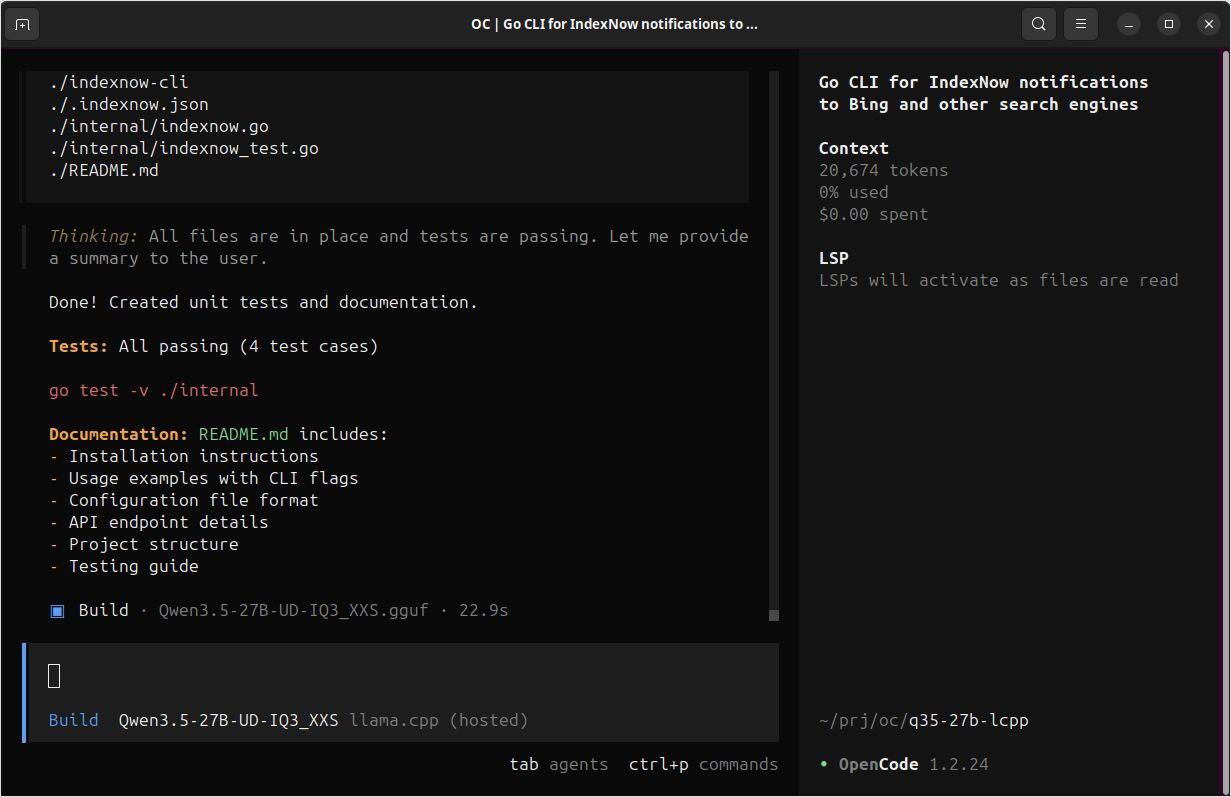
If you’re building an /ai-devtools/ cluster, OpenCode is a strong candidate for a subcluster because it naturally expands into:
- CLI deep dive
- model/provider behavior and costs (LLM comparison inside OpenCode)
- configuration & agents
- integrations (GitHub/GitLab/Copilot)
- cheatsheet
Prerequisites
You’ll want:
- A modern terminal emulator (important for the TUI experience).
- Access to at least one model/provider (API keys or subscription auth, depending on provider).
Install OpenCode (copy-paste)
Official install script (Linux/macOS/WSL):
curl -fsSL https://opencode.ai/install | bash
Package manager options (official examples):
# Node.js global install
npm install -g opencode-ai

# Homebrew (recommended by OpenCode for most up-to-date releases)
brew install anomalyco/tap/opencode

# Arch Linux (stable)
sudo pacman -S opencode

# Arch Linux (latest from AUR)
paru -S opencode-bin
Windows notes (official guidance commonly recommends WSL for best compatibility). Alternatives include Scoop/Chocolatey or npm.
# chocoloatey (Windows)
choco install opencode

# scoop (Windows)
scoop install opencode
Docker (useful for a quick try):
docker run -it --rm ghcr.io/anomalyco/opencode
Verify installation
opencode --version
opencode --help
Expected output shape (will vary by version):
# Example:
# <prints a version number, e.g. vX.Y.Z>
# <prints help with available commands/subcommands>
Connect a provider (two practical paths)
Path A: TUI /connect (interactive)
Start OpenCode:
opencode
Then run:
/connect
Follow the UI steps to select a provider and authenticate (some flows open a browser/device login).
Path B: CLI opencode auth login (provider keys)
OpenCode supports configuring providers via:
opencode auth login
Notes:
- Credentials are stored at
~/.local/share/opencode/auth.json. - OpenCode can also load keys from environment variables or a
.envfile in your project.
Start a project correctly (recommended first run)
From your repo:
cd /path/to/your/repo
opencode
Then initialize:
/init
This analyzes your project and creates an AGENTS.md file in the project root. It’s typically worth committing this file so OpenCode (and teammates) share consistent project context.
Core CLI workflows (copy-paste examples)
OpenCode supports non-interactive runs:
opencode run "Explain how closures work in JavaScript"
Workflow: generate code (CLI)
Goal: generate a small, testable function with minimal context.
opencode run "Write a Go function ParsePort(envVar string, defaultPort int) (int, error). It should read the env var, parse an int, validate 1-65535, and return defaultPort if empty. Include 3 table-driven tests."
Expected output:
- An explanation plus code blocks (function + tests). Exact code varies by model/provider and prompt.
Workflow: refactor a file safely (CLI + Plan agent)
Goal: refactor without accidental edits by using a more restrictive agent.
opencode run --agent plan --file ./src/auth.ts \
  "Refactor this file to reduce complexity. Output: (1) a short plan, (2) a unified diff patch, (3) risks/edge-cases to test. Do not run commands."
Expected output:
- A plan section + a
diff --git ...patch block + a test checklist. - Content varies. If it doesn’t produce a diff, re-prompt: “Return only a unified diff” or “Use
diff --gitformat.”
Workflow: ask repo questions (CLI)
Goal: locate implementation details fast.
opencode run --agent explore \
  "In this repository, where is authentication validated for API requests? List likely files and explain the flow. If uncertain, say what you checked."
Expected output:
- A short map of file paths + flow description.
- Output depends on repo size and model/provider context tools.
Workflow: speed up repeated CLI runs with a persistent server
If you’re scripting or running multiple opencode run calls, you can start a headless server once:
Terminal 1:
opencode serve --port 4096 --hostname 127.0.0.1
Terminal 2:
opencode run --attach http://localhost:4096 "Summarize the repo structure and main entrypoints."
opencode run --attach http://localhost:4096 "Now propose 3 high-impact refactors and why."
Expected output:
- Same as
opencode run, but usually with less repeated startup overhead.
Programmatic usage (official JS/TS SDK)
OpenCode exposes an HTTP server (OpenAPI) and provides a type-safe JS/TS client.
Install:
npm install @opencode-ai/sdk
Example: start server + client, then prompt
Create scripts/opencode-sdk-demo.mjs:
import { createOpencode } from "@opencode-ai/sdk";

const opencode = await createOpencode({
  hostname: "127.0.0.1",
  port: 4096,
  config: {
    // Model string format is provider/model (example only)
    // model: "anthropic/claude-3-5-sonnet-20241022",
  },
});

console.log(`Server running at: ${opencode.server.url}`);

// Basic health/version check
const health = await opencode.client.global.health();
console.log("Healthy:", health.data.healthy, "Version:", health.data.version);

// Create a session and prompt
const session = await opencode.client.session.create({ body: { title: "SDK quickstart demo" } });

const result = await opencode.client.session.prompt({
  path: { id: session.data.id },
  body: {
    parts: [{ type: "text", text: "Generate a small README section describing this repo." }],
  },
});

console.log(result.data);

// Close server when done
opencode.server.close();
Run:
node scripts/opencode-sdk-demo.mjs
Expected output shape:
- “Server running at …”
- A health response including a version string
- A session prompt response object (exact structure depends on
responseStyleand SDK version)
Minimal OpenCode config you can copy
OpenCode supports JSON and JSONC config. This is a reasonable starting point for a project-local config.
Create opencode.jsonc in your repo root:
{
  "$schema": "https://opencode.ai/config.json",

  // Choose a default model (provider/model). Keep this aligned with what `opencode models` shows.
  "model": "provider/model",

  // Optional: a cheaper “small model” for lightweight tasks (titles, etc.)
  "small_model": "provider/small-model",

  // Optional: OpenCode server defaults (used by serve/web)
  "server": {
    "port": 4096,
    "hostname": "127.0.0.1"
  },

  // Optional safety: require confirmation before edits/commands
  "permission": {
    "edit": "ask",
    "bash": "ask"
  }
}
Short cheatsheet (quick reference)
Commands you’ll use daily
opencode                       # start TUI
opencode run "..."             # non-interactive run (automation)
opencode run --file path "..." # attach files to prompt
opencode models --refresh      # refresh models list
opencode auth login            # configure provider credentials
opencode serve                 # headless HTTP server (OpenAPI)
opencode web                   # headless server + web UI
opencode session list          # list sessions
opencode stats                 # token/cost stats
TUI commands worth memorizing
/connect   # connect a provider
/init      # analyze repo, generate AGENTS.md
/share     # share a session (if enabled)
/undo      # undo a change
/redo      # redo a change
/help      # help/shortcuts
Default “leader key” concept (TUI)
OpenCode uses a configurable “leader” key (commonly ctrl+x) to avoid terminal conflicts. Many shortcuts are “Leader + key”.
One-page printable OpenCode cheatsheet table
This version is intentionally dense and “print-friendly.” (You can paste it into a dedicated /ai-devtools/opencode/cheatsheet/ page later.)
| Task | Command / shortcut | Notes |
|---|---|---|
| Start TUI | opencode |
Default behavior is to launch the terminal UI |
| Run one-shot prompt | opencode run "..." |
Non-interactive mode for scripting/automation |
| Attach file(s) to prompt | opencode run --file path/to/file "..." |
Use multiple --file flags for multiple files |
| Choose model for a run | opencode run --model provider/model "..." |
Model strings are provider/model |
| Choose agent | opencode run --agent plan "..." |
Plan is designed for safer “no changes” work (permission-restricted) |
| List models | opencode models [provider] |
Use --refresh to update cached list |
| Configure provider credentials | opencode auth login |
Stores credentials in ~/.local/share/opencode/auth.json |
| List authenticated providers | opencode auth list / opencode auth ls |
Confirms what OpenCode sees |
| Start headless server | opencode serve --port 4096 --hostname 127.0.0.1 |
OpenAPI spec at http://host:port/doc |
| Attach runs to server | opencode run --attach http://localhost:4096 "..." |
Helpful to avoid repeated cold boots |
| Enable basic auth | OPENCODE_SERVER_PASSWORD=... opencode serve |
Username defaults to opencode unless overridden |
| Web UI mode | opencode web |
Starts server + opens browser |
| Export a session | opencode export [sessionID] |
Useful for archiving or sharing context |
| Import a session | opencode import session.json |
Can also import from a share URL |
| View global CLI flags | opencode --help / opencode --version |
--print-logs + --log-level for debugging |
| TUI leader key concept | default leader key often ctrl+x |
Customizable in tui.json |
Sources (official first)
Official:
- OpenCode docs (Intro, CLI, Config, Server, SDK): https://opencode.ai/docs/
- OpenCode changelog: https://opencode.ai/changelog
- Official GitHub repo: https://github.com/anomalyco/opencode
- Releases: https://github.com/anomalyco/opencode/releases
Authoritative integration reference:
- GitHub Changelog (Copilot supports OpenCode): https://github.blog/changelog/2026-01-16-github-copilot-now-supports-opencode/
Reputable comparisons/tutorials:
- DataCamp: OpenCode vs Claude Code (2026): https://www.datacamp.com/blog/opencode-vs-claude-code
- Builder.io: OpenCode vs Claude Code (2026): https://www.builder.io/blog/opencode-vs-claude-code
- freeCodeCamp: Integrate AI into your terminal using OpenCode: https://www.freecodecamp.org/news/integrate-ai-into-your-terminal-using-opencode/
