
Garage - S3 compatible object storage Quickstart
Run Garage in Docker in minutes
Garage is an open-source, self-hosted, S3-compatible object storage system designed for small-to-medium deployments, with a strong emphasis on resilience and geo-distribution.
This quickstart walks you from a copy/paste single-node setup to production-minded patterns: cluster layout, replication, TLS via reverse proxy, multi-disk storage backends, monitoring, repairs, and backup/restore.
For the broader picture—object storage, PostgreSQL, Elasticsearch, and AI-native data layers—see the Data Infrastructure for AI Systems article.
What Garage is
Garage is an S3-compatible distributed object store intended for self-hosting, aiming to stay lightweight and straightforward to operate while supporting multi-site/geo-distributed clusters.
It is released under the AGPL v3 licence.
Key ideas that shape how you run it:
Garage measures node capacity and physical location (“zones”) to place replicas; cluster topology changes (add/remove nodes) are handled through versioned layouts and rebalancing.
Objects are chunked into fixed-size blocks (block_size), which enables deduplication and optional Zstandard compression; block hashes are used for placement and dedupe.
Garage doesn’t terminate TLS on its S3 API/web endpoints: you are expected to deploy a reverse proxy for HTTPS in real-world deployments.
Architecture and data flow
At a high level you interact with Garage through S3-compatible clients; traffic typically enters via a reverse proxy (TLS), reaches one or more Garage API endpoints (often “gateway” nodes), and is then served by storage nodes that hold replicated data blocks.
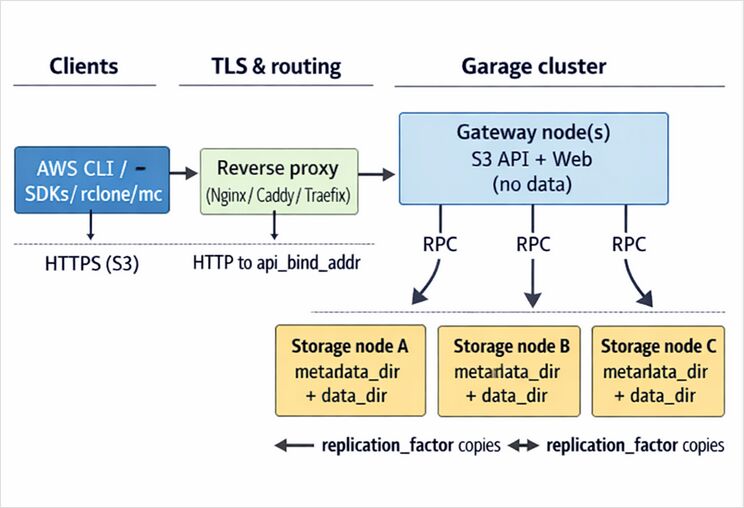
Nodes have roles: storage nodes with capacity vs gateway nodes that expose endpoints without storing data; gateways reduce latency by avoiding extra network hops and by “knowing” which storage nodes to query.
Replication is controlled via replication_factor (e.g., 3-way replication across zones), with clear availability/failure-tolerance trade-offs described in the config reference.
Copy/paste quickstart
This is an intentionally minimal single-node deployment for learning the workflows: config → start server → define layout → create bucket + key → upload an object.
Prereqs
You need docker, openssl, and (optionally) an S3 client like awscli. Garage’s CLI is the same binary used to administer the cluster.
Step by step
# 0) Workspace
mkdir -p ~/garage-quickstart/{config,meta,data}
cd ~/garage-quickstart

# 1) Create a starter config (persistent paths inside the container)
cat > ./config/garage.toml <<EOF
metadata_dir = "/var/lib/garage/meta"
data_dir     = "/var/lib/garage/data"
db_engine = "sqlite"

# Single-node learning deployment (NO redundancy). For production, see later.
replication_factor = 1

rpc_bind_addr   = "[::]:3901"
rpc_public_addr = "127.0.0.1:3901"
rpc_secret      = "$(openssl rand -hex 32)"

[s3_api]
s3_region = "garage"
api_bind_addr = "[::]:3900"
# Optional vhost-style. Path-style is always enabled.
root_domain = ".s3.garage.localhost"

[s3_web]
bind_addr = "[::]:3902"
root_domain = ".web.garage.localhost"
index = "index.html"

[admin]
api_bind_addr = "[::]:3903"
admin_token   = "$(openssl rand -base64 32)"
metrics_token = "$(openssl rand -base64 32)"
EOF

# 2) Pick an image tag (placeholder). Example tags appear in the Garage docs.
GARAGE_IMAGE="dxflrs/garage:TAG_PLACEHOLDER"

# 3) Run Garage (Docker)
docker run -d --name garaged \
  -p 3900:3900 -p 3901:3901 -p 3902:3902 -p 3903:3903 \
  -v "$PWD/config/garage.toml:/etc/garage.toml:ro" \
  -v "$PWD/meta:/var/lib/garage/meta" \
  -v "$PWD/data:/var/lib/garage/data" \
  "$GARAGE_IMAGE"

# 4) Use the garage CLI inside the container
alias garage='docker exec -ti garaged /garage'

# 5) Check node status (you will likely see "NO ROLE ASSIGNED")
garage status

# 6) Assign a layout (single node) and apply it
NODE_ID="$(garage status | awk '/NO ROLE ASSIGNED/{print $1; exit}')"
garage layout assign -z dc1 -c 1G "$NODE_ID"
garage layout apply --version 1

# 7) Create a bucket + key and grant least-privilege-ish permissions
garage bucket create example-bucket
garage key create example-app-key
garage bucket allow --read --write --owner example-bucket --key example-app-key

# 8) Show the key material (save it securely)
garage key info example-app-key
The config pattern (S3 API on 3900, RPC on 3901, web endpoint on 3902, admin API on 3903) and the “layout required” workflow are straight from the upstream quickstart.
Validate with AWS CLI
Garage requires clients to use the configured s3_region (often “garage”); if your client uses us-east-1, you can hit AuthorizationHeaderMalformed redirects.
# Install (one option)
python -m pip install --user awscli

# Configure env (example)
export AWS_ACCESS_KEY_ID="YOUR_GARAGE_KEY_ID"
export AWS_SECRET_ACCESS_KEY="YOUR_GARAGE_SECRET_KEY"
export AWS_DEFAULT_REGION="garage"
export AWS_ENDPOINT_URL="http://localhost:3900"

aws s3 ls
aws s3 cp /etc/hosts s3://example-bucket/hosts.txt
aws s3 ls s3://example-bucket/
aws s3 cp s3://example-bucket/hosts.txt /tmp/hosts.txt
The upstream quickstart recommends using an ~/.awsrc file to switch between endpoints/keys and notes minimum AWS CLI versions for convenient endpoint handling.
Installation and deployment options
Binary installs and packages
The Garage docs explicitly support: downloading binaries from Garage’s download page, using distro packages (e.g., apk add garage on Alpine), or building from source if needed.
Docker and Docker Compose
Garage provides container images and documents a minimal docker run method for quickstart use.
For production you will typically use compose (or an orchestrator) to manage persistent storage, reverse proxy, and upgrades (rolling restarts). The Garage “deployment on a cluster” guide assumes Docker on each node and calls out the common host paths and SSD recommendation for metadata.
systemd
Garage documents a hardened systemd deployment, including caveats around systemd’s DynamicUser= and where persistent state ends up on disk.
A minimal unit example (adapt paths to your environment):
# /etc/systemd/system/garage.service
[Unit]
Description=Garage S3-compatible object storage
After=network.target

[Service]
ExecStart=/usr/local/bin/garage -c /etc/garage.toml server
Restart=on-failure
Environment=RUST_LOG=garage=info

[Install]
WantedBy=multi-user.target
Kubernetes and Helm
Garage ships a Helm chart in-repo and has official documentation pages for Kubernetes deployment.
A common gotcha is that you still must bootstrap/apply a cluster layout after installing (you can automate it with a Kubernetes Job).
Configuration, security, and TLS
Storage backends and disk layout
Garage splits storage into metadata_dir and data_dir. The config reference recommends placing metadata_dir on fast SSD to improve response times, while data_dir can sit on larger HDD.
For nodes with multiple data drives, Garage supports a multi-disk data_dir configuration with per-path capacities and automatic balancing.
# Example: multiple HDDs for data blocks
metadata_dir = "/mnt/ssd/garage-meta"
data_dir = [
  { path = "/mnt/hdd1/garage-data", capacity = "8T" },
  { path = "/mnt/hdd2/garage-data", capacity = "8T" },
]
Access control model vs S3 bucket policies
Garage does not implement AWS-style ACLs or bucket policies; it uses its own “per access key per bucket” permission system managed through the Garage CLI / admin API.
This means the “policy” you usually translate into Garage is: which access key gets read/write/owner on which bucket(s).
# Read-only key to a bucket:
garage key create ro-key
garage bucket allow --read example-bucket --key ro-key

# Remove access:
garage bucket deny example-bucket --key ro-key
DNS-style vs path-style bucket addressing
Garage can support virtual-host (DNS) style bucket access if you configure [s3_api].root_domain; path-style is always enabled.
If you don’t set up vhost-style (wildcard DNS + possibly wildcard TLS), many clients can be made to work by forcing path-style, and Garage documentation shows client examples with force_path_style = true.
TLS
Garage’s S3 API and web endpoints do not directly support TLS; the official guidance is to place a reverse proxy in front, commonly Nginx, to serve HTTPS and multiplex services on port 443.
A minimal Nginx “shape” (see the official reverse proxy cookbook for a full example):
# /etc/nginx/sites-available/garage.conf (excerpt)
upstream garage_s3 { server 127.0.0.1:3900; }

server {
  listen 443 ssl;
  server_name garage.example.com;

  ssl_certificate     /etc/letsencrypt/live/garage.example.com/fullchain.pem;
  ssl_certificate_key /etc/letsencrypt/live/garage.example.com/privkey.pem;

  location / {
    proxy_pass http://garage_s3;
    proxy_set_header Host $host;
  }
}
Server-side encryption
Garage supports S3 SSE-C (“server-side encryption with customer-provided keys”): the client sends encryption keys in headers per request; Garage encrypts at rest and discards the key after the request.
Garage’s S3 compatibility table also notes that bucket-level encryption configuration endpoints are not implemented, so treat SSE-C as per-object/request behaviour rather than bucket defaults.
Operating Garage in production
Monitoring and logging
Garage exposes Prometheus-format metrics and supports exporting traces in OpenTelemetry format.
Admin and metrics endpoints can be protected by tokens (admin_token, metrics_token, and metrics_require_token), and tracing can be exported via trace_sink (OTLP).
For logging, Garage can be tuned via RUST_LOG, and the configuration reference documents environment variables to ship logs to syslog/journald instead of stderr.
Durability, repairs, and common maintenance tasks
Garage includes background “scrub” (integrity verification) and repair tooling; scrubs can be started manually and monitored via worker/task commands, but are disk-intensive and can slow the cluster.
Topology changes and capacity adjustments are handled through layout management; operations are applied as new layout versions.
Backup and restore strategy
At minimum, back up metadata, because it contains cluster configuration, bucket/key state, and indices. Garage supports periodic metadata snapshots (metadata_auto_snapshot_interval) and manual snapshots (garage meta snapshot --all).
The Garage migration guide explicitly recommends backing up specific files/directories from each node’s metadata_dir (including snapshots and layout files).
For object data, treat Garage like any S3 endpoint: use S3-compatible backup tools (e.g., restic, duplicity) targeting a Garage bucket, as documented in Garage’s “Backups” integrations page.
Troubleshooting common errors
NO ROLE ASSIGNED in garage status usually means you have not created/applied a layout yet. Fix: garage layout assign … then garage layout apply.
AuthorizationHeaderMalformed often indicates a client is using the wrong region; set AWS_DEFAULT_REGION (or equivalent) to match [s3_api].s3_region.
Signature / request failures can be caused by path-style vs vhost-style mismatch; configure [s3_api].root_domain for vhost-style, or force path-style in clients (e.g., rclone’s force_path_style=true).
Permission errors are frequently just “key not allowed on bucket”; inspect with garage bucket info <bucket> and ensure garage bucket allow has the right flags.
Performance tuning notes that matter most
Put metadata_dir on SSD when possible; Garage docs call out improved response times and “drastically reduced” latency potential.
Tune block_size and compression carefully: Garage defaults are intended to be sane, but the config reference explains the trade-off and notes that changes only apply to newly uploaded data.
If you have NVMe, increasing block write concurrency may improve throughput but increases memory usage; Garage provides guidance for block_max_concurrent_writes_per_request.
Garage’s own benchmarks emphasise the costs of intra-cluster latency in geo-distributed setups, and highlight design choices (e.g., avoiding consensus leaders) that can reduce geo-latency impact.
Short comparison with MinIO and AWS S3
Garage is optimised for self-hosted, geo-distributed clusters and operational simplicity, with some deliberate S3 feature gaps (e.g., no S3 bucket policies/ACLs; limited versioning support).
MinIO focuses on S3 API breadth and high-performance enterprise deployments (for example, MinIO’s own materials describe features like object lock, replication, and event notifications).
AWS S3 is the managed reference implementation with strong consistency, 11 nines durability and 99.99% availability targets, and a broad feature ecosystem (storage classes, lifecycle, eventing, IAM).
More about Minio:
