
Open WebUI: Self-Hosted LLM Interface
Self-hosted ChatGPT alternative for local LLMs
Open WebUI is a powerful, extensible, and feature-rich self-hosted web interface for interacting with large language models.
It supports Ollama and any OpenAI-compatible API, bringing the familiar ChatGPT experience to your infrastructure with complete privacy, offline capability, and enterprise-grade features. For a broader comparison of local and cloud LLM backends—Ollama, vLLM, Docker Model Runner, LocalAI and cloud providers—see LLM Hosting: Local, Self-Hosted & Cloud Infrastructure Compared.
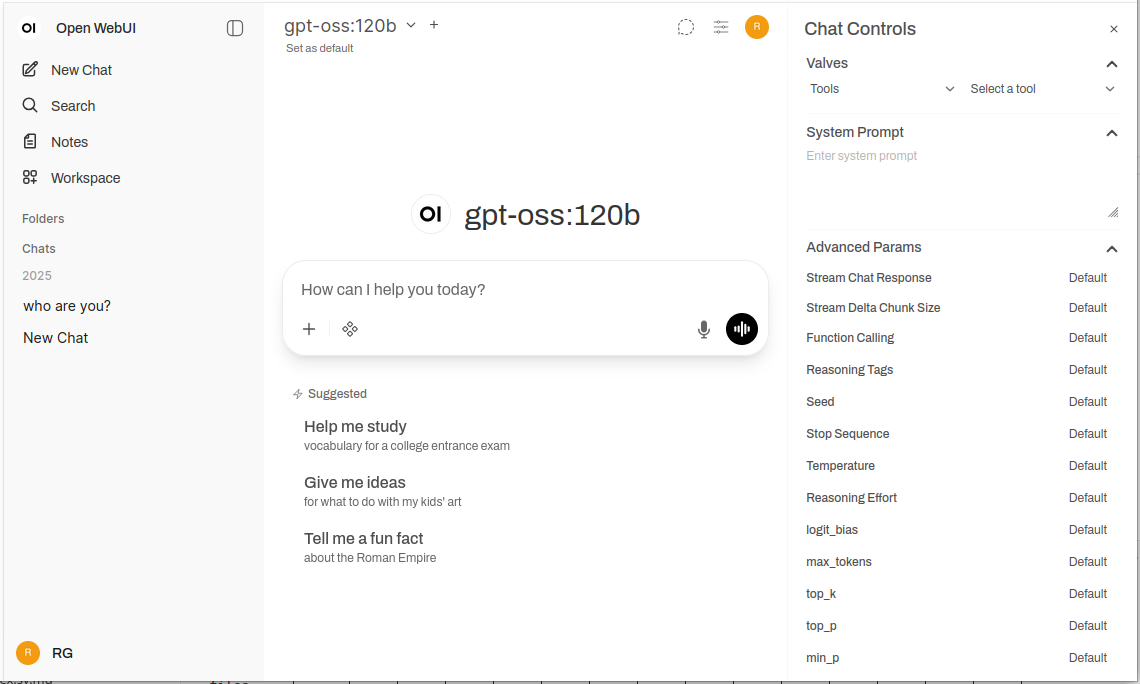
What is Open WebUI?
Open WebUI is an open-source, self-hosted web application that provides a modern chat interface for interacting with large language models. Unlike cloud-based AI services, Open WebUI runs entirely on your infrastructure, giving you complete control over your data, conversations, and model selection.
While Open WebUI is commonly used with Ollama (and is sometimes informally called an “Ollama WebUI”), it’s actually a backend-agnostic platform. It can connect to Ollama’s API for local model execution, but it also supports any OpenAI-compatible endpoint—including vLLM, LocalAI, LM Studio, Text Generation WebUI, and even cloud providers. This flexibility makes Open WebUI a comprehensive solution supporting multiple backends, RAG (Retrieval-Augmented Generation) for document chat, multi-user authentication, voice capabilities, and extensive customization options. Whether you’re running models on a laptop, a home server, or a Kubernetes cluster, Open WebUI scales to meet your needs.
Why Choose Open WebUI?
Privacy First: All data stays on your infrastructure—no conversations, documents, or prompts leave your network unless you explicitly configure external APIs.
Offline Capable: Perfect for air-gapped environments, restricted networks, or situations where internet access is unreliable or prohibited. When paired with locally running models via Ollama or vLLM, you achieve complete independence from cloud services.
Feature-Rich: Despite being self-hosted, Open WebUI rivals commercial offerings with document upload and RAG, conversation history with semantic search, prompt templates and sharing, model management, voice input/output, mobile-responsive design, and dark/light themes.
Multi-User Support: Built-in authentication system with role-based access control (admin, user, pending), user management dashboard, conversation isolation, and shared prompts and models across teams.
Quick Installation Guide
The fastest way to get started with Open WebUI is using Docker. This section covers the most common deployment scenarios.
Basic Installation (Connecting to Existing Ollama)
If you already have Ollama running on your system, use this command:
docker run -d \
  -p 3000:8080 \
  -v open-webui:/app/backend/data \
  --name open-webui \
  --restart always \
  ghcr.io/open-webui/open-webui:main
This runs Open WebUI on port 3000, persisting data in a Docker volume. Access it at http://localhost:3000.
Bundled Installation (Open WebUI + Ollama)
For a complete all-in-one setup with Ollama included:
docker run -d \
  -p 3000:8080 \
  --gpus all \
  -v ollama:/root/.ollama \
  -v open-webui:/app/backend/data \
  --name open-webui \
  --restart always \
  ghcr.io/open-webui/open-webui:ollama
The --gpus all flag enables GPU access for faster inference. Omit it if you’re running CPU-only.
Docker Compose Setup
For production deployments, Docker Compose provides better maintainability:
version: '3.8'

services:
  ollama:
    image: ollama/ollama:latest
    ports:
      - "11434:11434"
    volumes:
      - ollama:/root/.ollama
    deploy:
      resources:
        reservations:
          devices:
            - driver: nvidia
              count: all
              capabilities: [gpu]

  open-webui:
    image: ghcr.io/open-webui/open-webui:main
    ports:
      - "3000:8080"
    environment:
      - OLLAMA_BASE_URL=http://ollama:11434
    volumes:
      - open-webui:/app/backend/data
    depends_on:
      - ollama
    restart: always

volumes:
  ollama:
  open-webui:
Deploy with docker-compose up -d.
Kubernetes Deployment
For enterprise deployments, Open WebUI provides Helm charts:
helm repo add open-webui https://helm.openwebui.com/
helm repo update
helm install open-webui open-webui/open-webui \
  --set ollama.enabled=true \
  --set ingress.enabled=true \
  --set ingress.host=chat.yourdomain.com
This creates a production-ready deployment with persistent storage, health checks, and optional ingress configuration.
Core Features Deep Dive
RAG and Document Chat
Open WebUI’s RAG implementation allows you to upload documents and have the model reference them in conversations. The system automatically chunks documents, generates embeddings, stores them in a vector database, and retrieves relevant context when you ask questions.
Supported formats: PDF, DOCX, TXT, Markdown, CSV, and more through built-in parsers.
Usage: Click the ‘+’ button in a chat, select ‘Upload Files’, choose your documents, and start asking questions. The model will cite relevant passages and page numbers in its responses.
Configuration: You can adjust chunk size, overlap, embedding model, and retrieval parameters in the admin settings for optimal performance with your document types.
Multi-User Authentication and Management
Open WebUI includes a complete authentication system suitable for team and organizational use:
- Local authentication: Username/password with secure password hashing
- OAuth/OIDC integration: Connect to existing identity providers (Google, GitHub, Keycloak, etc.)
- LDAP/Active Directory: Enterprise directory integration
- Role-based access: Admin (full control), User (standard access), Pending (requires approval)
Admins can manage users, monitor usage, configure model access per user/group, and set conversation retention policies.
Voice Input and Output
Built-in support for voice interaction makes Open WebUI accessible and convenient:
- Speech-to-text: Uses Web Speech API or configured external STT services
- Text-to-speech: Multiple TTS engines supported (browser-based, Coqui TTS, ElevenLabs, etc.)
- Language support: Works with multiple languages depending on your TTS/STT configuration
Prompt Engineering Tools
Open WebUI provides robust tools for prompt management:
- Prompt library: Save frequently used prompts as templates
- Variables and placeholders: Create reusable prompts with dynamic content
- Prompt sharing: Share effective prompts with your team
- Prompt versioning: Track changes and improvements over time
Model Management
Easy model switching and management through the UI:
- Model catalog: Browse and pull models directly from Ollama’s library
- Custom models: Upload and configure custom GGUF models
- Model parameters: Adjust temperature, top-p, context length, and other sampling parameters per conversation
- Model metadata: View model details, size, quantization, and capabilities
Configuration and Customization
Environment Variables
Key configuration options via environment variables:
# Backend URL (Ollama or other OpenAI-compatible API)
OLLAMA_BASE_URL=http://localhost:11434

# Enable authentication
WEBUI_AUTH=true

# Default user role (user, admin, pending)
DEFAULT_USER_ROLE=pending

# Enable user signup
ENABLE_SIGNUP=true

# Admin email (auto-create admin account)
WEBUI_ADMIN_EMAIL=admin@example.com

# Database (default SQLite, or PostgreSQL for production)
DATABASE_URL=postgresql://user:pass@host:5432/openwebui

# Enable RAG
ENABLE_RAG=true

# Embedding model for RAG
RAG_EMBEDDING_MODEL=sentence-transformers/all-MiniLM-L6-v2
Connecting to Alternative Backends
Open WebUI works with any OpenAI-compatible API. Configure the base URL in Settings → Connections:
- vLLM:
http://localhost:8000/v1 - LocalAI:
http://localhost:8080 - LM Studio:
http://localhost:1234/v1 - Text Generation WebUI:
http://localhost:5000/v1 - OpenAI:
https://api.openai.com/v1(requires API key) - Azure OpenAI: Custom endpoint URL
Reverse Proxy Configuration
For production deployments, run Open WebUI behind a reverse proxy:
Nginx example:
server {
    listen 443 ssl http2;
    server_name chat.yourdomain.com;

    ssl_certificate /path/to/cert.pem;
    ssl_certificate_key /path/to/key.pem;

    location / {
        proxy_pass http://localhost:3000;
        proxy_set_header Host $host;
        proxy_set_header X-Real-IP $remote_addr;
        proxy_set_header X-Forwarded-For $proxy_add_x_forwarded_for;
        proxy_set_header X-Forwarded-Proto $scheme;

        # WebSocket support
        proxy_http_version 1.1;
        proxy_set_header Upgrade $http_upgrade;
        proxy_set_header Connection "upgrade";
    }
}
Traefik example (Docker labels):
labels:
  - "traefik.enable=true"
  - "traefik.http.routers.openwebui.rule=Host(`chat.yourdomain.com`)"
  - "traefik.http.routers.openwebui.entrypoints=websecure"
  - "traefik.http.routers.openwebui.tls.certresolver=letsencrypt"
  - "traefik.http.services.openwebui.loadbalancer.server.port=8080"
Performance Optimization
Database Tuning
For multi-user deployments, switch from SQLite to PostgreSQL:
# Install dependencies
pip install psycopg2-binary

# Configure database URL
DATABASE_URL=postgresql://openwebui:password@postgres:5432/openwebui
PostgreSQL handles concurrent users better and provides improved query performance for conversation search and RAG operations.
Embedding Model Selection
RAG performance depends heavily on your embedding model choice:
- Fast/Resource-constrained:
all-MiniLM-L6-v2(384 dimensions, ~80MB) - Balanced:
all-mpnet-base-v2(768 dimensions, ~420MB) - Best quality:
bge-large-en-v1.5(1024 dimensions, ~1.3GB)
Configure in Settings → RAG → Embedding Model.
Caching Strategies
Enable conversation caching to reduce repeated API calls:
- Model caching: Ollama automatically caches loaded models in memory
- Response caching: Open WebUI can cache identical prompts (configurable)
- Embedding cache: Reuse embeddings for previously processed documents
Security Best Practices
When deploying Open WebUI in production, follow these security guidelines:
- Enable authentication: Never run Open WebUI without authentication on public networks
- Use HTTPS: Always deploy behind a reverse proxy with TLS/SSL
- Regular updates: Keep Open WebUI and Ollama updated for security patches
- Restrict access: Use firewall rules to limit access to trusted networks
- Secure API keys: If connecting to external APIs, use environment variables, never hardcode keys
- Audit logs: Enable and monitor access logs for suspicious activity
- Backup data: Regularly backup the
/app/backend/datavolume - Database encryption: Enable encryption at rest for PostgreSQL in production
- Rate limiting: Configure rate limits to prevent abuse
- Content filtering: Implement content policies appropriate for your organization
Use Cases and Real-World Applications
Personal Knowledge Assistant
Combine Open WebUI with local models and RAG to create a private knowledge base. Upload your notes, research papers, project documentation, and personal documents. Query them conversationally without sending data to cloud services—perfect for researchers, students, and knowledge workers who value privacy.
Development Team Collaboration
Deploy Open WebUI for your development team with shared access to technical documentation, API specs, and codebase knowledge. The RAG feature lets developers quickly find relevant information across thousands of pages of docs, while conversation history helps track architectural decisions and technical discussions.
Enterprise Internal Chatbot
Organizations can deploy Open WebUI behind their firewall with SSO integration, providing employees with an AI assistant that has access to internal wikis, policies, and procedures. Role-based access ensures sensitive information remains properly segmented, while admin controls maintain governance and compliance.
Education and Training
Educational institutions use Open WebUI to provide students and faculty with AI assistance without privacy concerns. Upload course materials, textbooks, and lecture notes for contextual Q&A. The multi-user system allows tracking of usage while keeping student data private.
Healthcare and Legal Applications
In regulated industries where data privacy is critical, Open WebUI enables AI-assisted workflows while maintaining HIPAA or GDPR compliance. Medical professionals can query drug databases and treatment protocols, while legal teams can search case law and contracts—all without data leaving controlled infrastructure.
Air-Gapped and Offline Environments
Government agencies, research facilities, and secure operations centers use Open WebUI in air-gapped networks. The complete offline capability ensures AI assistance remains available even without internet connectivity, critical for classified environments or remote locations.
Troubleshooting Common Issues
Connection Problems
Issue: Open WebUI can’t connect to Ollama
Solution: Verify Ollama is running (curl http://localhost:11434), check the OLLAMA_BASE_URL environment variable, and ensure firewall rules allow the connection. For Docker deployments, use service names (http://ollama:11434) instead of localhost.
Issue: Models not appearing in the UI
Solution: Confirm models are installed (ollama list), refresh the model list in Open WebUI settings, and check browser console for API errors.
RAG and Document Upload Issues
Issue: Document upload fails
Solution: Check file size limits in settings, verify supported file format, ensure adequate disk space in the data volume, and review container logs for parsing errors.
Issue: RAG responses don’t reference uploaded documents
Solution: Verify the embedding model is downloaded and running, check chunk size settings (try smaller chunks for better granularity), increase the number of retrieved chunks in RAG settings, and ensure the query is relevant to document content.
Performance Problems
Issue: Slow response times
Solution: Enable GPU acceleration if available, reduce model size or use quantized versions, increase OLLAMA_NUM_PARALLEL for concurrent requests, and allocate more RAM to Docker containers.
Issue: Out of memory errors
Solution: Use smaller models (7B instead of 13B parameters), reduce context length in model parameters, limit concurrent users, or add more RAM/swap space to your system.
Authentication and Access
Issue: Can’t log in or create admin account
Solution: Set WEBUI_AUTH=true, configure WEBUI_ADMIN_EMAIL to auto-create admin, clear browser cookies and cache, and check container logs for database errors.
Issue: Users can’t sign up
Solution: Verify ENABLE_SIGNUP=true, check DEFAULT_USER_ROLE setting (use user for auto-approval or pending for manual approval), and ensure the database is writable.
Open WebUI Alternatives
While Open WebUI excels at providing a self-hosted interface with strong Ollama integration, several alternatives offer different approaches to the same problem space. Your choice depends on whether you need multi-provider flexibility, specialized document handling, extreme simplicity, or enterprise features.
LibreChat stands out as the most provider-agnostic solution, offering native support for OpenAI, Anthropic, Azure OpenAI, Google Vertex AI, AWS Bedrock, and Ollama in a single interface. Its plugin architecture and enterprise features like multi-tenancy, detailed access controls, and usage quotas make it ideal for organizations that need to support multiple AI providers or require sophisticated audit trails. The trade-off is complexity—LibreChat requires more setup effort and heavier resources than Open WebUI, and its Ollama support feels secondary to cloud providers. If your team uses Claude for writing, GPT-4 for coding, and local models for privacy-sensitive work, LibreChat’s unified interface shines.
For document-heavy workflows, AnythingLLM takes a knowledge-base-first approach that goes beyond basic RAG. Its workspace model organizes documents and conversations into isolated environments, while advanced retrieval features include hybrid search, reranking, and citation tracking. Data connectors pull content from GitHub, Confluence, and Google Drive, and agent capabilities enable multi-step reasoning and workflow automation. This makes AnythingLLM excellent for consulting firms managing multiple client knowledge bases or support teams working with extensive documentation. The chat interface is less polished than Open WebUI, but if querying large document collections is your primary need, the sophisticated retrieval capabilities justify the steeper learning curve.
LobeChat prioritizes user experience over feature depth, offering a sleek, mobile-friendly interface with progressive web app capabilities. Its modern design, smooth animations, and strong voice/multimodal support make it popular with designers and non-technical users who want an AI assistant that works seamlessly across devices. The PWA implementation provides an app-like mobile experience that Open WebUI doesn’t match. However, enterprise features are limited, the plugin ecosystem is smaller, and RAG capabilities lag behind both Open WebUI and AnythingLLM.
For users who prefer desktop applications, Jan.ai provides cross-platform installers (Windows, macOS, Linux) with zero-configuration local model management. There’s no need to install Ollama separately or deal with Docker—Jan bundles everything into a native app with system tray support and one-click model downloads. This “it just works” philosophy makes Jan ideal for giving local LLMs to family members or colleagues who aren’t comfortable with command-line tools. The trade-offs are no multi-user support, fewer advanced features, and no remote access capability.
Chatbox occupies the lightweight niche—a minimal cross-platform client supporting OpenAI, Claude, Gemini, and local APIs with very low resource overhead. It’s perfect for developers who need to quickly test different API providers or users with resource-constrained hardware. The setup friction is minimal, but some features are subscription-gated, it’s not fully open-source, and RAG support is limited.
Several Ollama-specific minimal UIs exist for users who want “just enough” interface: Hollama manages multiple Ollama servers across different machines, Ollama UI provides basic chat and PDF upload with extremely easy deployment, and Oterm offers a surprisingly capable terminal-based interface for SSH sessions and tmux workflows. These sacrifice features for simplicity and speed.
For organizations requiring vendor support, commercial options like TypingMind Team, BionicGPT, and Dust.tt offer self-hosting with professional backing, compliance certifications, and SLAs. They trade open-source freedom for guaranteed uptime, security audits, and accountability—appropriate when your organization needs enterprise-grade support contracts.
Choosing wisely: Open WebUI hits the sweet spot for most self-hosted Ollama deployments, balancing comprehensive features with manageable complexity. Choose LibreChat when provider flexibility is paramount, AnythingLLM for sophisticated document workflows, LobeChat for mobile-first or design-conscious users, Jan for non-technical desktop users, or commercial options when you need vendor support. For the majority of technical users running local models, Open WebUI’s active development, strong community, and excellent RAG implementation make it the recommended starting point.
Future Developments and Roadmap
Open WebUI continues rapid development with several exciting features on the roadmap:
Improved multimodal support: Better handling of images, vision models, and multi-modal conversations with models like LLaVA and Bakllava.
Enhanced agent capabilities: Function calling, tool use, and multi-step reasoning workflows similar to AutoGPT patterns.
Better mobile apps: Native iOS and Android applications beyond the current PWA implementation for improved mobile experience.
Advanced RAG features: Graph-based RAG, semantic chunking, multi-query retrieval, and parent-document retrieval for better context.
Collaborative features: Shared conversations, team workspaces, and real-time collaboration on prompts and documents.
Enterprise integrations: Deeper SSO support, SCIM provisioning, advanced audit logs, and compliance reporting for regulated industries.
The project maintains backward compatibility and semantic versioning, making upgrades straightforward. The active GitHub repository sees daily commits and responsive issue management.
Conclusion
Open WebUI has evolved from a simple Ollama frontend into a comprehensive platform for self-hosted AI interactions. Its combination of privacy, features, and ease of deployment makes it an excellent choice for individuals, teams, and organizations wanting to leverage local LLMs without sacrificing capabilities.
Whether you’re a developer testing models, an organization building internal AI tools, or an individual prioritizing privacy, Open WebUI provides the foundation for powerful, self-hosted AI workflows. The active community, regular updates, and extensible architecture ensure it will remain a leading option in the self-hosted AI space.
Start with the basic Docker installation, experiment with RAG by uploading a few documents, try different models from Ollama’s library, and gradually explore advanced features as your needs grow. The learning curve is gentle, but the ceiling is high—Open WebUI scales from personal laptop to enterprise Kubernetes cluster.
For those comparing alternatives, Open WebUI’s Ollama-first design, balanced feature set, and active development make it the recommended starting point for most self-hosted LLM deployments. You can always migrate to more specialized solutions if specific needs emerge, but many users find Open WebUI’s capabilities sufficient for their entire journey from experimentation to production. To see how Open WebUI’s typical backends (Ollama, vLLM, etc.) fit with Docker Model Runner, LocalAI and cloud providers, check our LLM Hosting: Local, Self-Hosted & Cloud Infrastructure Compared guide.
Useful links
When setting up your Open WebUI environment, you’ll benefit from understanding the broader ecosystem of local LLM hosting and deployment options. The comprehensive guide Local LLM Hosting: Complete 2025 Guide - Ollama, vLLM, LocalAI, Jan, LM Studio & More compares 12+ local LLM tools including Ollama, vLLM, LocalAI, and others, helping you choose the optimal backend for your Open WebUI deployment based on API maturity, tool calling capabilities, and performance benchmarks.
For high-performance production deployments where throughput and latency are critical, explore the vLLM Quickstart: High-Performance LLM Serving guide, which covers vLLM setup with Docker, OpenAI API compatibility, and PagedAttention optimization. This is particularly valuable if Open WebUI is serving multiple concurrent users and Ollama’s performance becomes a bottleneck.
If you prefer a multimodal backend that handles chat, embeddings, image generation, and audio through a single OpenAI-compatible server, the LocalAI QuickStart covers Docker installation, model gallery setup, and API configuration — all connectable to Open WebUI via the http://localhost:8080 base URL.
Understanding how your backend handles concurrent requests is crucial for capacity planning. The article How Ollama Handles Parallel Requests explains Ollama’s request queuing, GPU memory management, and concurrent execution model, helping you configure appropriate limits and expectations for your Open WebUI deployment’s multi-user scenarios.
External Resources
For official documentation and community support, refer to these external resources:
